


Participant
January 31, 2019
Question

Triggering different forward and backwards cycles between substitutions?

  • January 31, 2019
  • 5 replies
  • 299 views

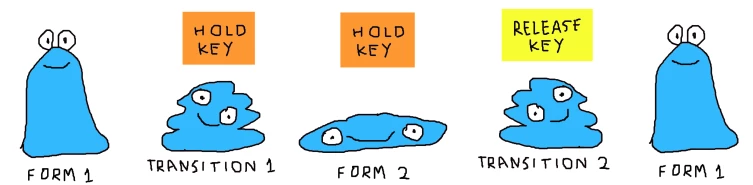
Taking the very simple puppet from my previous thread as an example, I was wondering if it would be possible to make the transition (layer cycles) between the two different states different when going forward and backwards, like this?
    This topic is closed to new replies. Start a new post to keep the conversation going.

    5 replies

    robinh49469832
    Inspiring
    February 1, 2019

    Sorry, now I understand. But maybe this could help: Two cyles. One for melting, that stays on the last frame and one for de-melting. So the melted state can stay as long as you need it and then you press another key to start the reverse cycle. Could that work or would there be problems, because the first cycle is still on?

    alank99101739
    Legend
    January 31, 2019

    There was a feature to pause at particular cycle layers until an additional trigger occurred. Maybe try one longer cycle layer sequence with several pause points? Not sure how well it would work...

    alank99101739
    Legend
    January 31, 2019

    I think the question was to have different sequences for forwards and backwards. I am not sure how you are doing the transitions - could you expand on that more? E.g. maybe have 3 states (initial state, different state, 2nd copy of initial state so you can make A different transition to it)

    Participant
    January 31, 2019

    Yeah, having a different sequence in place of the reverse cycle is exactly what I meant, but making a copy of the initial state wouldn't work when the second state gets triggered by holding a key. Also, any further changes to the initial state would have to be done twice... or three times if I add a third state, etc.

    The transition is just a very simple layer cycle triggered by holding a key, which is currently using "Forward and Reverse" and "Hold on last layer", nothing special.

    The ideal/cleanest way to do it would be:

    -State 1

    -Holding key, triggers Transition 1.

    -Transition 1 end, triggers State 2.

    -Releasing key, triggers Transition 2.

    -Transition 2 end, triggers State 1.

    But that's not possible to do, isn't it?

    robinh49469832
    Inspiring
    January 31, 2019

    When making the cyle layers animation you can check the box for I think it's called "Reverse Cycle Layers" or something like that (i'm using the german version). By checking this it is played forward when pressing and played backwards when releasing the key.