


Participant
April 13, 2023
Question

Unwanted Gray Top & Bottom Border appearing after export via Media Encoder

  • April 13, 2023
  • 2 replies
  • 409 views

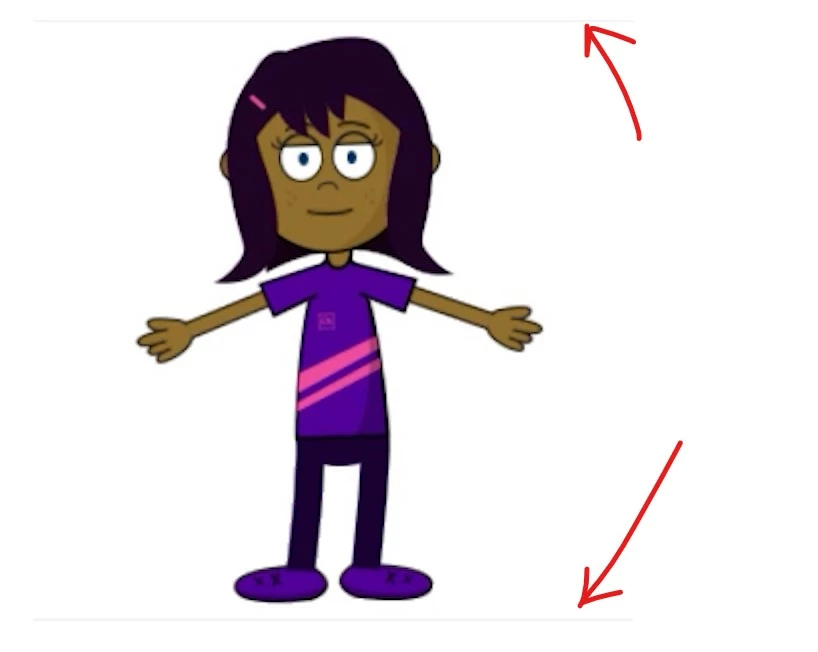
Hello community. Hoping for a miracle. When I export my scene from Character Animator through Media Encoder, it's adding a faint gray top & bottom border to my mp4 file. I'm using the H.264 format and the "Match Source - Adaptive High Bitrate" preset. The lines are only really visable if i drop the video on a white background, which is exactly what I need to do. I can't figure out how to get rids of these lines no matter what I try. Has anyone else had this problem? 

Here's what they look like: 
This topic has been closed for replies.

2 replies

Known Participant
May 2, 2024

I am having the same exact issue and like you, I am trying to place the videos on a white background to make them appear seamless so it's a big problem. Here's a screenshot of a 360x420 video dropped in a 1080p Premiere Pro sequence (just to make it easy to see the issue, the video will actually be imported into an Articulate Storyline project on a white background there).


The issue happens both if exporting via quick export and AME export. 


Would love to get an answer from Adobe on how to avoid this issue, or at least a workaround to prevent it!!!  

Inspiring
May 5, 2023

What is the height of your comp? Is it an odd number? If so, try making it an even number. Alternatively, you could export as ProRes 4444 to export your character with an alpha channel (transparency) so you can move it wherever you want and put it on any background color without having to re-render.

hopegunsAuthor
Participant
May 7, 2023
Thank you for the suggestions. My comp is already an even number in both
height and width. And unfortunately I can't export with ProRes 4444 because
Capitvate won't accept it. I need to export an MP4. Any other ideas?
Inspiring
May 7, 2023

Ah, gotcha. Are you able to crop the video in Captivate? It's been many years since I've used it and can't remember. 

Also, what's your Character Animator comp resolution? If on the lower side it might be worth increasing the quality, exporting a high quality file like ProRes 422 (really ProRes LT or even Proxy would be perfectly fine for this type of file) and then converting it to H.264 after.