Participant
March 19, 2020
Answered

Updating Original file wipes all my behaviors, triggers, and anchors.
  • March 19, 2020
  • 6 replies
  • 2270 views


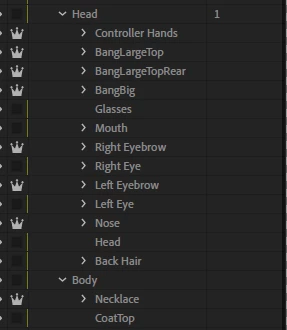
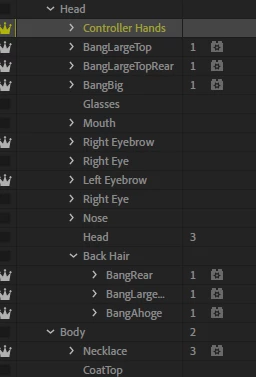
The first image is what my character project looked like before I made some edits (to the +Controller Hands layer, specifically. Character Animator was closed during these edits and when I reload Character Animator, it updates to incorporate my changes to the layers and then just wholesale wipes all my rigging. Nothing changed. No layers were moved or deleted, just edited, but everything is wiped and I have to start all over again because I cannot rollback to an "earlier" original. The PSD is saved as is, so every time I try to do anything, it reverts to the "new" PSD and erases all my past work.


I have to be missing something here? What did I goof on? Can I not edit anything without Character Animator open to make sure it doesn't go crazy and wipe my changes when I load back in?

This topic has been closed for replies.
Correct answer aurashinhye

Just replying to this (long after the fact) to note that the issue was because some layers were created/edited in Clip Studio Paint, which apparently causes some ID errors in the PSD file, causing Ch to break settings and "reset" as shown in the screenshots above. If this is also happening to you, stick to editing/painting in Photoshop and if you must use CSP, paint in there, copy the layer info to your clipboard, and paste it into a new layer that you created in Photoshop. Should be fine! I was told by the Ch team that they're reaching out to Celsys to hopefully resolve this issue on their end.

6 replies

Duggs1
Participant
October 20, 2023

ADOBE! It's nuts that this flaw is still live - if I've got a puppet and I want to keep using it, expanding and adding other things like gesture swap sets, then I have to re-rig the whole thing every time? 

katland401
Participant
October 20, 2023

Just started using Character Animator last night. Added + signs to a few layers because they were behaving weirdly (even though I already had the crown icon turned on for those layers, I thought I would try making them "independant" in Photoshop as well.) Now all the rigging for those layers is gone. They also appeared in disjointed positions in my Rigger view afte saving in Photoshop, despite not moving them at all in Photoshop. 

Participant
July 11, 2022

I am having a similar issue with two puppets. I have only used Photoshop and Character Animator, and am only saving onto my internal hard drive. I have not changed the folder structure or labels of any of the layers in Photoshop. This is a huge setback. Any further insight or advice appreciated.

Inspiring
April 29, 2020

thank you so much..now my productivity is going to go up so much as I was forever having to redo everything..life saver!

aurashinhyeAuthorCorrect answer
Participant
April 23, 2020

Just replying to this (long after the fact) to note that the issue was because some layers were created/edited in Clip Studio Paint, which apparently causes some ID errors in the PSD file, causing Ch to break settings and "reset" as shown in the screenshots above. If this is also happening to you, stick to editing/painting in Photoshop and if you must use CSP, paint in there, copy the layer info to your clipboard, and paste it into a new layer that you created in Photoshop. Should be fine! I was told by the Ch team that they're reaching out to Celsys to hopefully resolve this issue on their end.

blanchettez
Participant
April 28, 2020

I am adding to this thread because I just last night had a puppet suddenly lose all its rigging and I haven't a clue why. I have spent hours (as do we all) getting the rigging set and editing the original art in illustrator. (No 3rd party in the process.) Went fine for a couple of iterations over a couple of days, starting and stopping ch. All of a sudden, no rigging, no sticks, no handles, no pins, no behaviors. As if it's a new puppet (which my time spent says it is not!). The replays are still there, the controls, the triggers. When I try to use them of course nothing happens. The replays still have their timings and show progress bars when I run them, if I try recording triggers, they record to the timeline, but show names like "Handle ([unknown])", and nothing happens with the puppet. It just stands there staring at me, inscrutably.


I can restore from yesterday's back up, so I have only lost a day (although that's when I did most of the rigging fine-tuning and recorded the replays and triggers). I am counting to 10 (a lot of repetitions!) to just relax and get back to rerigging the whole thing, but since I don't know what action caused the puppet's guts to go POOF I am trepidatious about it happening again, echoing aurashinhye's concern.


I am going with the assumption that the rig is unrecoverable but If anyone has a suggestion on a file or log to look at or for, I'd be happy to try restoring a version or whatever.

Participant
April 28, 2020

When this happened to me, the new, broken rig was a new "version" of my puppet in Ch that I could browse through but I never found a way to like, go back to an old version. It was there and I could look at it but never say, like, revert to it.


If that's not the case though, it's possible it's just gone for good. I had the Adobe people tell me that another issue that might cause problems like this is having your files saved to a cloud service like Dropbox. The file synching process can potentially screw with the Ch files and cause those breaks and I was told to save locally as a result, which I do now. I backup to an external drive instead of Dropbox instead now.

Inspiring
March 19, 2020

Hi. Sorry you're running into this. Some edits we can incorporate without issue(e.g., adding layers, changing the color of layers) and others we can't(usually structural differences). 

Based on this comment, "Now that I didn't touch any of the layers besides editing their contents", it sounds like you might. be running into something else. 

If you still have the project, I'd love to take a look at it. It's important that it is the original project, not a Save As because we'd need the entire history. If you're willing to share, please contact me directly at dramirez|adobe|.com and I'll take a look. 
Thanks,

Dan Ramirez

CH QA Engineer


Participant
March 19, 2020

I should add that this is not the first time it's happened, it's happened maybe 5-6 times in the same project file but that was early in me rigging and I always attributed it to me adding layers and changing folder structure. Now that I didn't touch any of the layers besides editing their contents, I'm at a total loss as to why it happened and how I can prevent it from happening in the future. Ch makes it completely unclear why it's happening.