
Participant
March 16, 2019
Answered

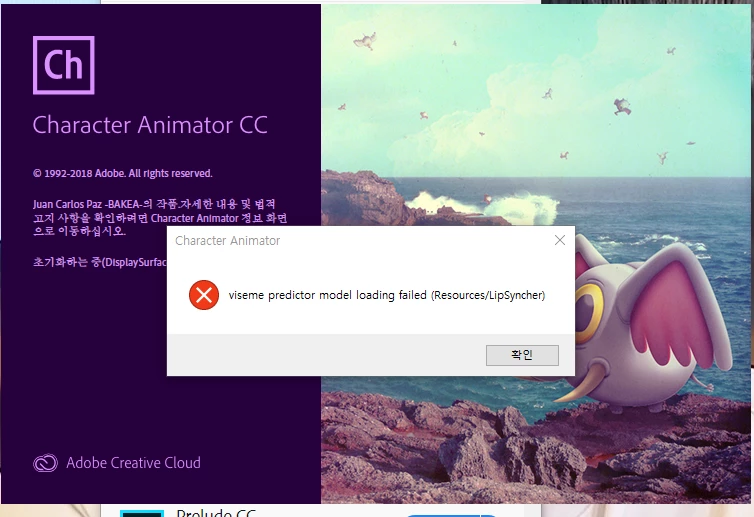
Visume Predictor model loading failed?

  • March 16, 2019
  • 2 replies
  • 1699 views

After connect my headphone (Steel Arctis 5), continually this error pops up, and program freezes.

reinstall does not help. searching internet does not help neither

It disappeared when I disabled audio input, but than I cannot recording of course.

cannot use my headphone for this program or something?

plz help
This topic has been closed for replies.
Correct answer DanTull

Weird. Could you post the path to where Ch is installed? Also, what are the contents of the Contents/LipSyncher folder at that path?

I'm not sure off hand how the headphones are triggering this, but it sounds like the files in that directory are somehow missing or inaccessible. Sounds like you've already tried a re-install so maybe inspecting the files/folder will help spot the issue.

DT

2 replies

DanTull
Adobe Employee
DanTullCorrect answer
Adobe Employee
March 20, 2019

Weird. Could you post the path to where Ch is installed? Also, what are the contents of the Contents/LipSyncher folder at that path?

I'm not sure off hand how the headphones are triggering this, but it sounds like the files in that directory are somehow missing or inaccessible. Sounds like you've already tried a re-install so maybe inspecting the files/folder will help spot the issue.

DT

Shinaan91Author
Participant
March 22, 2019

Sorry for too late reply.

Actually I tested with some other headphones and mics during this weekday, but that was not effective.

BUT re-Install in another SSD DRIVER (where my windowOS & other Adobe programs installed)

is completely worked!

Plus I compared LipSyncher folders after reinstall, but I cannot find the difference anyway. Both were same.

(CA CC 2019 >> Supporte Files >> LipSyncher)

Thank you very much!

DanTull
Adobe Employee
Adobe Employee
March 22, 2019

My best guess is that either the file size difference means one of the files was incomplete and that was causing the error or something about the path (too long or multi-byte issue) was tripping up the code that reads those resources. I may look into the latter case to see if anything is amiss in the way that code reads resources.

In any case, glad you got it sorted out and thanks for reporting back!

DT

Inspiring
March 16, 2019

Have you tried using an alternate headset? if you have and it still continues with this error try updating your "Steel Arctis 5" ​drivers.