


Participant
February 26, 2018
Answered

Weird UI language bug

  • February 26, 2018
  • 1 reply
  • 431 views

Hi!

I'm in serious troubles on CA, I've just installed it and there is a issue on the language displayed.
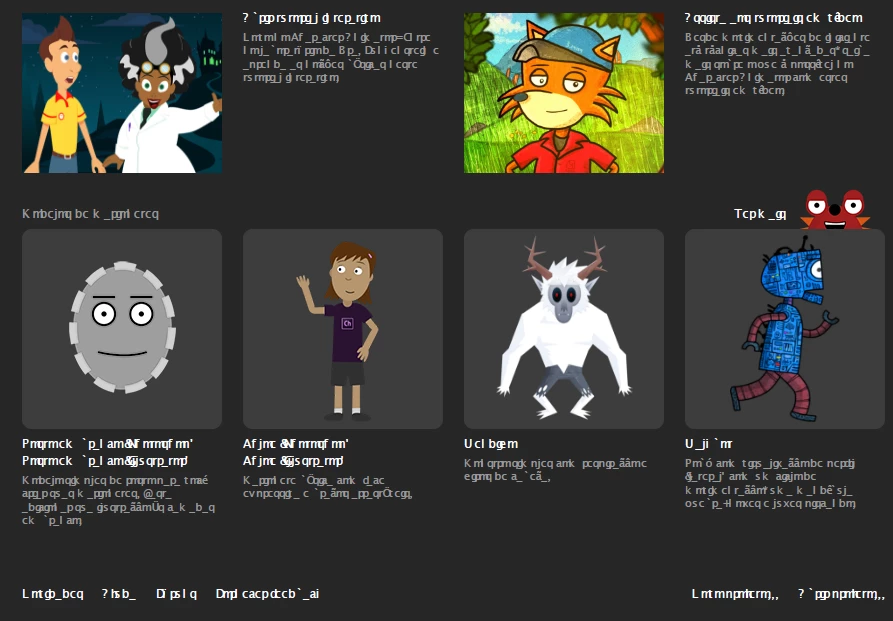
I've tried to change language putting an "ca_force_english.txt" in my User's Documents directory. Also I've changed the language on Creative Cloud app and reinstalled CA several times, but nothing seems to work. (ideas taken from here​). I've used the creative cloud suite (AFTER EFFECTS, PHOTOSHOP, ILLUSTRATOR, PREMIERE, MEDIA ENCODER, BRIDGE) everyday without that kind of situation.

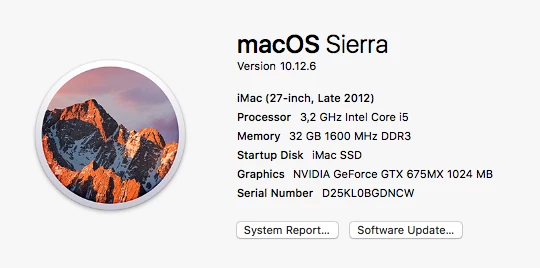
I'm on  a OS Sierra
v

I need to clear this issue to be able to use the software. This "alien language"doesn't work for me.

Any ideas?

This topic is closed to new replies. Start a new post to keep the conversation going.
Correct answer alvarotista

I´ve did it!

It seems there was a trouble on my system himself, I´ve cleared font Caches & Font Databases on the terminal usisng instructions below and finally the weird font has gone away.

http://osxdaily.com/2015/01/08/clear-font-caches-databases-mac-os-x/

Have a nice animation!

1 reply

alvarotistaAuthorCorrect answer
Participant
February 27, 2018

I´ve did it!

It seems there was a trouble on my system himself, I´ve cleared font Caches & Font Databases on the terminal usisng instructions below and finally the weird font has gone away.

http://osxdaily.com/2015/01/08/clear-font-caches-databases-mac-os-x/

Have a nice animation!