


cuckets
Participating Frequently
December 19, 2018
Question

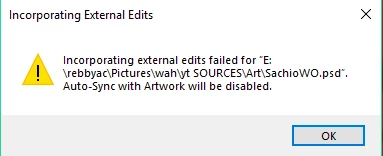
Why does this happen? Incorporating External Edits Error
  • December 19, 2018
  • 2 replies
  • 662 views

this has happened to multiple projects and it is SO frustrating because this is the error I get when I try to enable auto-sync with artwork.

and so far the only way to fix it is completely reimporting the puppet...but there goes hours of rigging and trigger binds and cycle layers.

Is there ANY way around this? Am I doing something wrong?

    This topic is closed to new replies. Start a new post to keep the conversation going.

    2 replies

    DanTull
    Adobe Employee
    Adobe Employee
    December 21, 2018

    One place I've seen this happen is if the PSD scratch system runs out of disk space (it can need a surprising amount of space) while trying to render, but I wouldn't expect a re-import to resolve that.

    There's an option to expose more detailed console logging of the error that occurred. I can send you some instructions for how to enable that. Maybe it'll provide some clues.


    DT

    DanTull
    Adobe Employee
    Adobe Employee
    January 4, 2019

    Forgot to follow-up on this post. Based on some additional info gathered, this definitely seemed to have been an out of disk space error due to Photoshop being hungry for scratch disk space.


    In particular, for others who might happen across this post, the way to recognize that is that you'll also probably see this error: Photoshop File error -25010  (also, yes, that error message should be more obvious, I'll file that internally)

    DT