


Participant
November 6, 2016
Answered

Why is Ch position my head/arms randomly after I made changes in Ai?

  • November 6, 2016
  • 1 reply
  • 1522 views

Hi, my apologies if other had brought this up already but since I couldn't find it in the Forum, I figured I'll start this Thread and see if anyone can help.

Sometime when I made changes in the main Illustrator File (say I add a new arms), when i switched to Character Animator, it just position some of my layers weird in some random position.

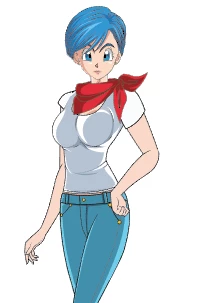
Here's a screen shot of the file in Illustrator
Here's what it looked like in Character Animator
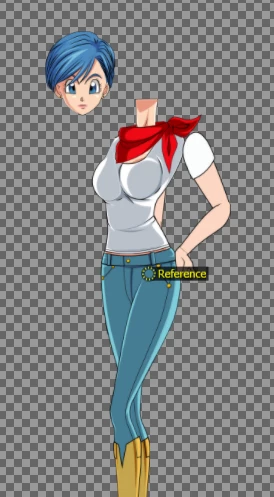
Now I know you can fix it by dragging all the different parts of the body back to the correct position but I want to know if there's a way to prevent this from happening in the first place. I should also mention that this only  happened to independence layers that had the symbol in the layer name.

I had this problem whenever I add some new layers to the hand/head or the body in Ch Preview 3, 4 and CC 2017 (Beta).

If anyone had any idea on how to prevent this from happening, I'll greatly appreciate it.

Thank you.

This topic has been closed for replies.
Correct answer oksamurai

Yeah this is a bug. Basically what is happening is that when you add substantial artwork like arms or something, you're essentially changing the origin points of stuff like the Head or Body because you're changing its dimensions to make it a little wider or lower or whatever. For some reason sometimes CH doesn't always figure it out and does this instead. Reimporting, unfortunately, is usually your best bet. Thanks for your input - we'll hopefully fix this soon.

1 reply

oksamurai
oksamuraiCorrect answer
Legend
November 7, 2016

Yeah this is a bug. Basically what is happening is that when you add substantial artwork like arms or something, you're essentially changing the origin points of stuff like the Head or Body because you're changing its dimensions to make it a little wider or lower or whatever. For some reason sometimes CH doesn't always figure it out and does this instead. Reimporting, unfortunately, is usually your best bet. Thanks for your input - we'll hopefully fix this soon.

Participant
November 7, 2016

Ah that explains it. Thank you for clearing it up Dave. Hopefully it's fix on future update.