
Participant
December 21, 2021
Question

Why is my files always missing on Character Animator

  • December 21, 2021
  • 2 replies
  • 194 views

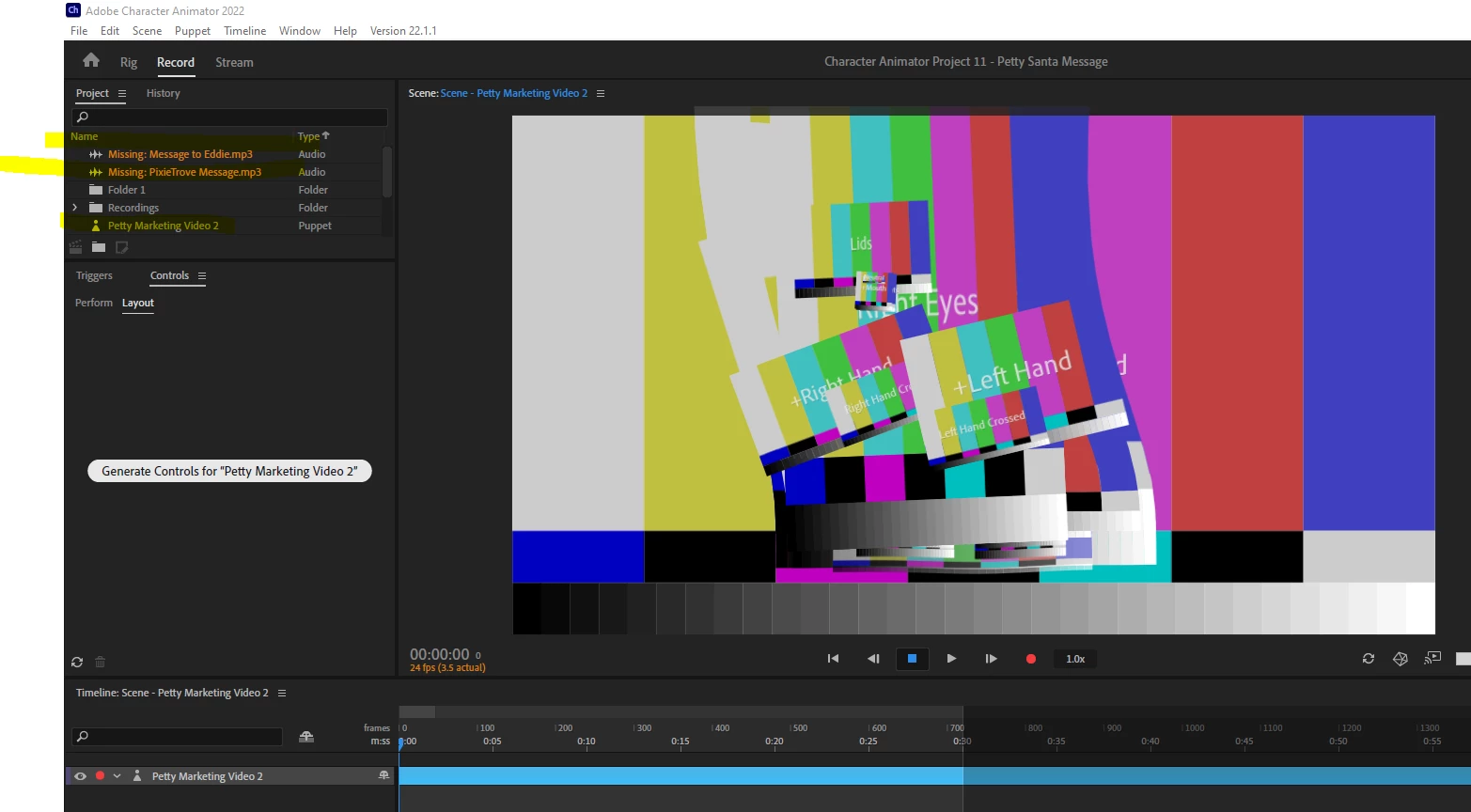
Hey team, wish you can help. I dont know why all my saved character animator scene will have this issue after a while. I did not change my PSD puppet folder file location but after a while, it will states as missing files on my character animator. This is not the first time and when it happens, it corrupts my completed scenes on after effect as well. This means I have to re-import the same puppet file again and re-rig everything. Can someone tell me what am I doing wrong or is there a way I should be saving my files?


This topic has been closed for replies.

2 replies

oksamurai
Legend
December 21, 2021

This video explains it: https://youtu.be/7pgm_u4VkQk?t=311


If you see this it means CH doesn't know where the original PSD or AI file is. This could be from moving it, renaming a folder, a cloud-synced folder issue, etc. Linking back to the file should work. If this keeps happening I would try saving your PSD/AI files in a different location to see if that helps.

alank99101739
Legend
December 21, 2021

If it lost the artwork file, you can reattach the artwork to your rigging without redoing everything. Single click on puppet in project panel, then look at "Path" property in the properties panel. Is it pointing to the file correctly? If not, fix that (click on it and pick the correct location of the file)