House of Sugars
Inspiring
Oct 20, 2017 8:48 PM UTC
Answered

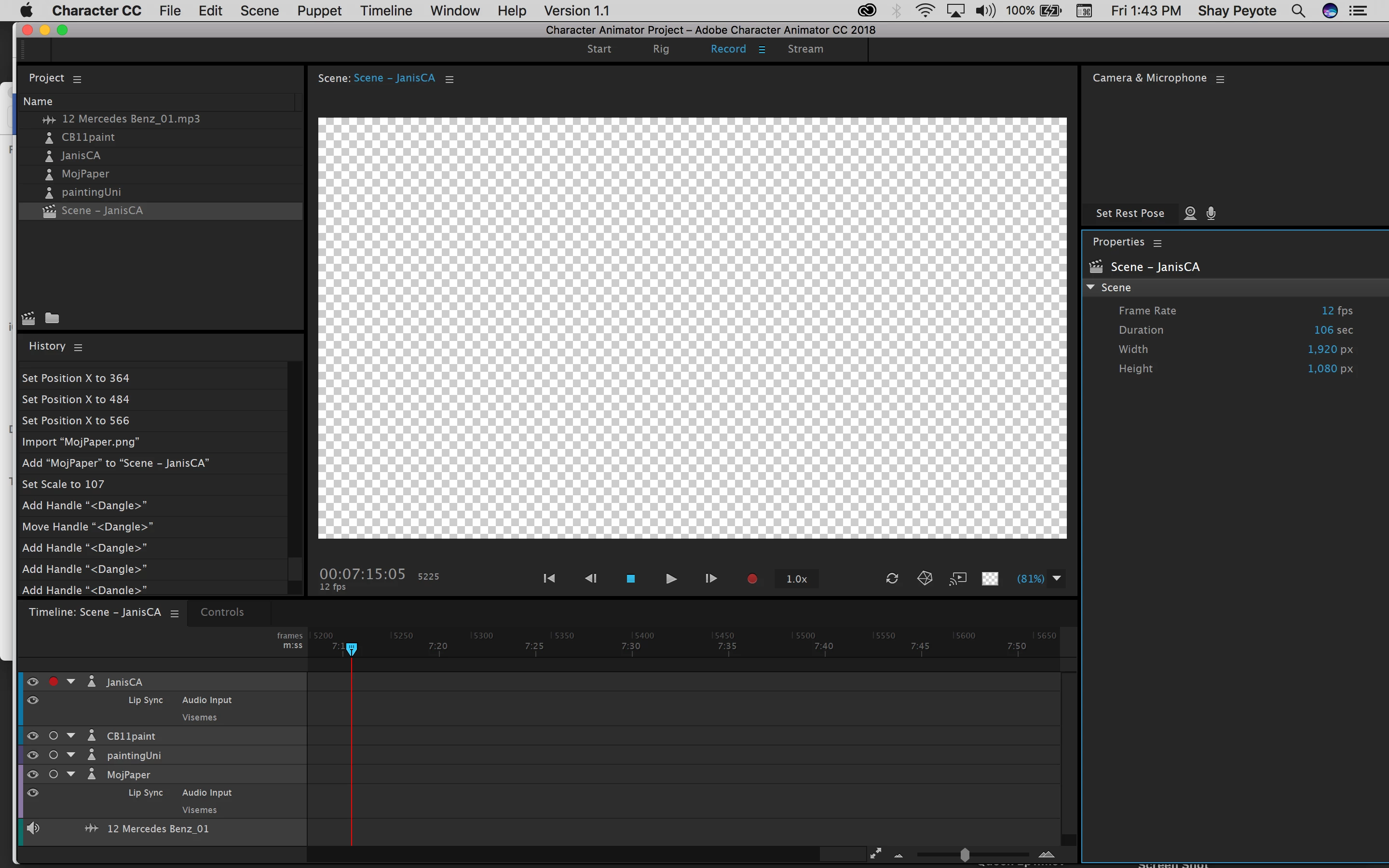
Why is nothing showing up in record mode?

Hi! Just upgraded to the new full-fledged version, and although I can see my puppet in 'rig' mode, I'm suddenly getting a blank screen in 'record' mode

    This topic is closed to new replies. Start a new post to keep the conversation going.
    Inventsable
    InventsableCorrect answer
    Legend
    Oct 21, 2017 1:15 AM UTC

    Hmm and now pins and eye gaze aren't working at all? Is this a bug from the upgrade or am I doing something wrong? JanisCA.puppet - Google Drive


    70 replies

    House of Sugars
    Inspiring
    Jan 22, 2018 10:53 PM UTC

    That's so strange I could have SWORN I checked that!!! It's working now, Thank you

    Translate
    House of Sugars
    Inspiring
    Jan 20, 2018 9:42 PM UTC
    House of Sugars
    Inspiring
    Jan 20, 2018 12:00 AM UTC

    I rigged it so the triggers are A S D F G to turn the head and that worked beautifully, but when I added the cycle layers nothing shows up in record mode? When you get a moment, please take a look thanks so much Queen Ep1v4Jan19.chproj - Google Drive

    Translate
    Jeff Almasol
    Adobe Employee
    Adobe Employee
    Jan 22, 2018 9:48 PM UTC

    Where are you placing he Cycle Layers in the puppet structure? Can you show a screenshot of where it's placed in the Puppet panel?

    How are you wanting to use Cycle Layers with head turns?

    Thanks.

    P.S. The .chproj file is actually just an empty file. A Character Animator project is the actual folder that it exists in. We provide the .chproj file so that there's something for you to double-click or easily select in the Open project dialog box.

    Translate
    House of Sugars
    Inspiring
    Jan 22, 2018 10:20 PM UTC

    QueenCAEp1Guitar2Jan22.puppet - Google Drive
    It's almost there, just a couple of places where it's not working?"P.S. The .chproj file is actually just an empty file. A Character Animator project is the actual folder that it exists in. We provide the .chproj file so that there's something for you to double-click or easily select in the Open project dialog box."-I can't make heads or tails of that. No idea what it means?

    Translate
    House of Sugars
    Inspiring
    Jan 18, 2018 11:16 PM UTC

    OK I found a cycle layer and took it off, now she's in the record screen again, but I'm trying to figure out how to do head turns using triggers and cycle layers

    Translate
    House of Sugars
    Inspiring
    Jan 18, 2018 11:33 PM UTC

    I think the problem is how it's set up in the .ai file?

    Translate
    House of Sugars
    Inspiring
    Jan 18, 2018 11:15 PM UTC

    Refreshing didn't help!! I took all the triggers and cycle layers off

    Translate
    House of Sugars
    Inspiring
    Jan 18, 2018 10:49 PM UTC

    And now, even though I've deleted it, I'm only getting a black screen in record mode.

    Translate
    Kevin J. Monahan Jr.
    Legend
    Jan 18, 2018 10:51 PM UTC

    Hi,

    Can you tell us a little about your computer? What are the specs? RAM? OS? GPU?

    Thanks,
    Kevin

    Translate
    Kevin Monahan - Sr. Community and Engagement Strategist – Adobe Pro Video and Audio
    Jeff Almasol
    Adobe Employee
    Adobe Employee
    Jan 18, 2018 10:58 PM UTC

    Does refreshing the scene (click the Refresh button in the lower-right corner of the Scene panel) make a difference?

    If not, does holding down the Option key while clickng Refresh help?

    Also, where in the puppet hierarchy were you applying the Cycle Layers behavior and what were its settings? Screenshot of that puppet group and the Properties panel showing the settings would be helpful.

    Thanks.

    Translate
    House of Sugars
    Inspiring
    Jan 18, 2018 10:41 PM UTC

    Every time I try to add cycle layers, the character disappears?

    Translate
    Jeff Almasol
    Adobe Employee
    Adobe Employee
    Oct 20, 2017 10:03 PM UTC

    Looks like you're scrolled later in time? Click the Go to Start button (where the transport controls are at the bottom of the Scene panel) to go back to the beginning of time to see if the puppet track is showing up there.

    Translate
    House of Sugars
    Inspiring
    Oct 20, 2017 11:14 PM UTC

    I actually started all over and it's working now but that's good to know for my future screw-ups . Now I'm trying to get 'breath' to work....

    Translate
    House of Sugars
    Inspiring
    Oct 20, 2017 11:32 PM UTC

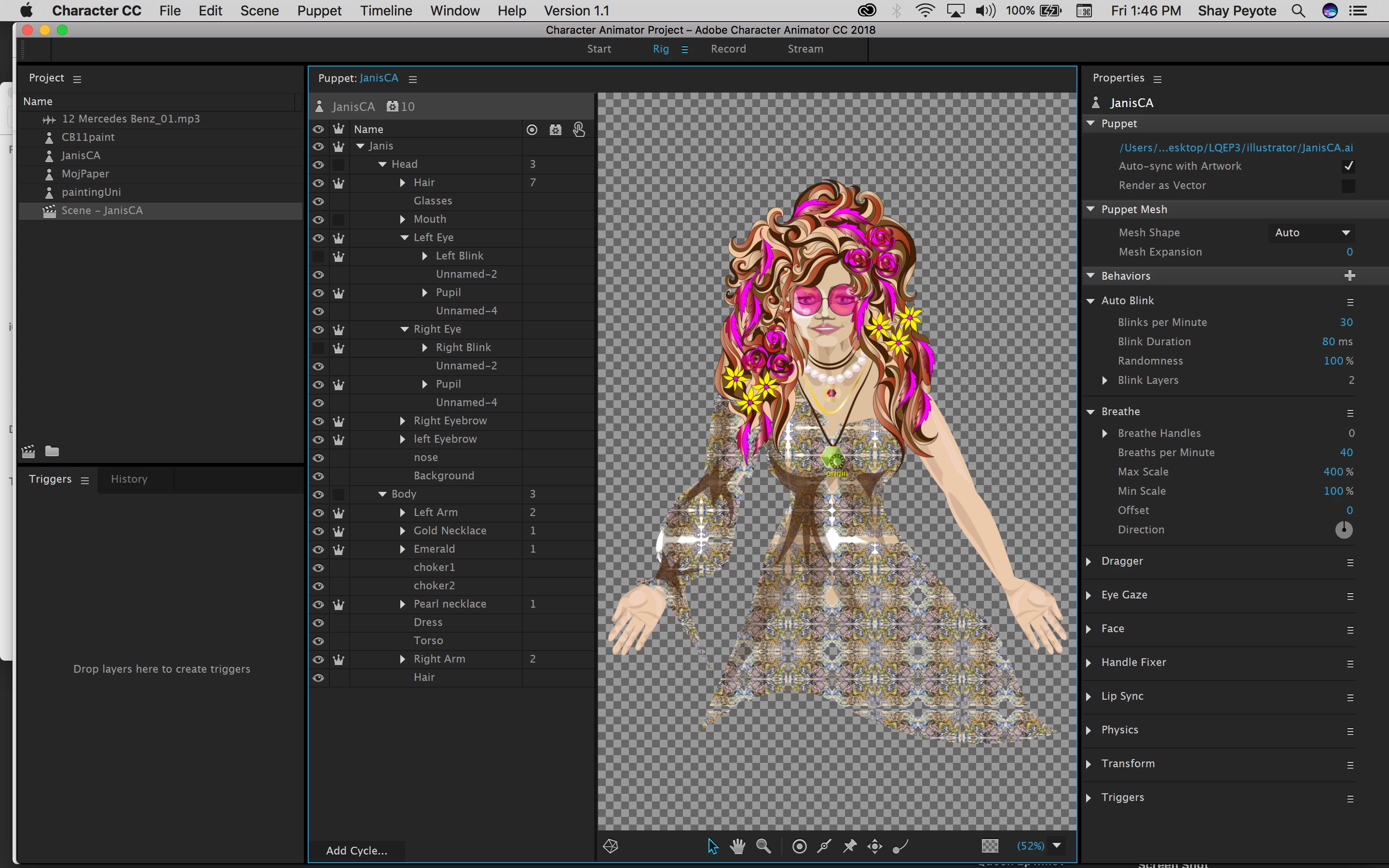
    Why is it saying I have no 'breathe' handles?

    Translate