martinflash
Participating Frequently
May 30, 2022
Answered

Why my puppet does not want to stand on the ground?

  • May 30, 2022
  • 1 reply
  • 380 views

Why my puppet does not want to stand on the ground?
Where is the issue? I have already spent all day and can not figure out.
https://youtu.be/36oZSSCkamQ

This topic has been closed for replies.
Correct answer k_oshiro

Translated from Japanese to English with translation software.


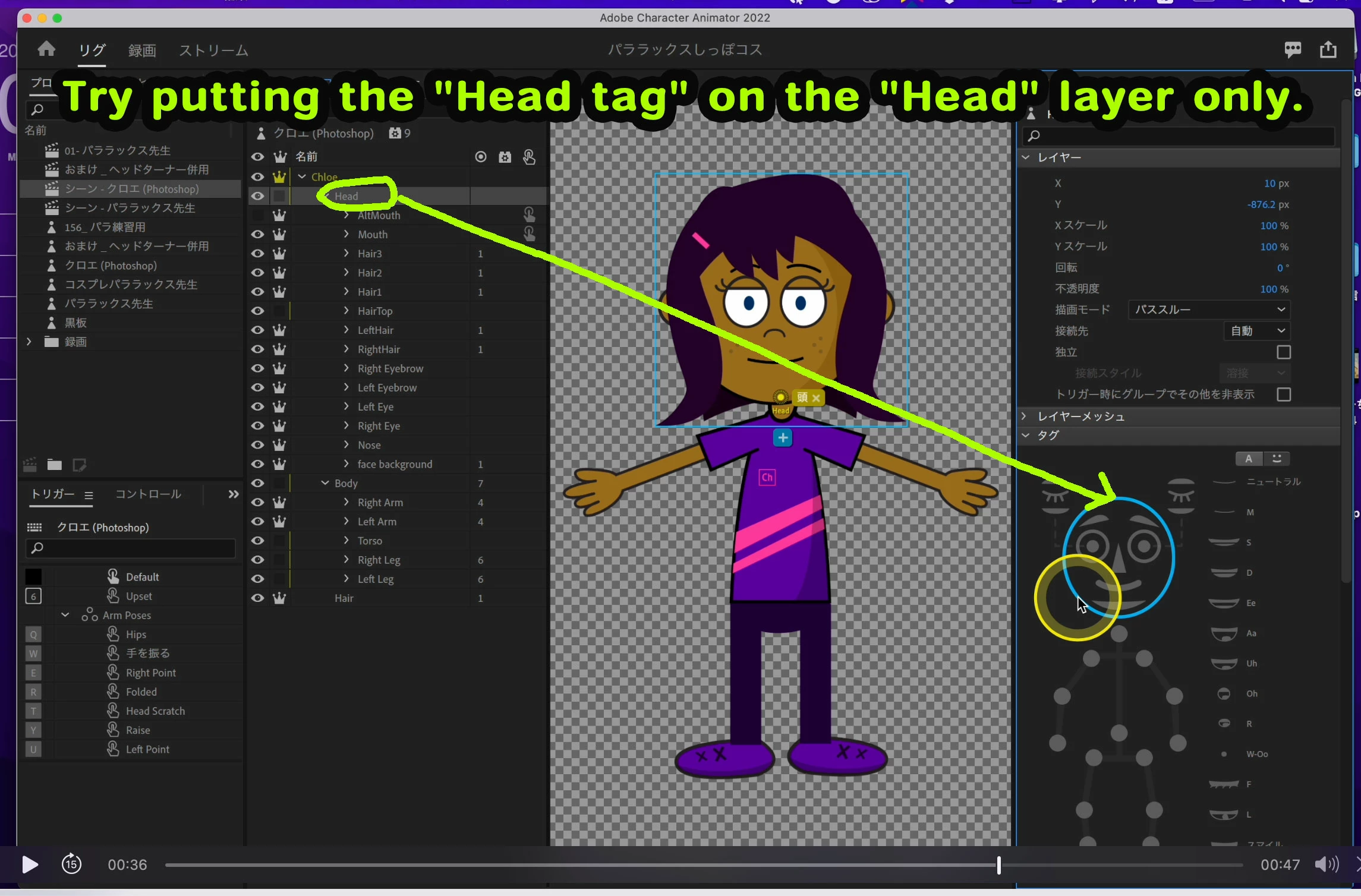
Perhaps you have a 'Head tag' attached to the entire layer of the puppet. Therefore, even if you pin the body, the entire body will move.


Please try putting the "Head tag" on the "Head" layer only.
 

Thanks.


https://youtu.be/sFXyrHkp9zU

1 reply

k_oshiro
Community Expert
k_oshiroCommunity ExpertCorrect answer
Community Expert
May 30, 2022

Translated from Japanese to English with translation software.


Perhaps you have a 'Head tag' attached to the entire layer of the puppet. Therefore, even if you pin the body, the entire body will move.


Please try putting the "Head tag" on the "Head" layer only.


Thanks.


https://youtu.be/sFXyrHkp9zU

k_oshiro(AdobeCommunityExpert)
alank99101739
Legend
May 30, 2022

I would also recommend looking at Head. The blue warnings panel for example said your Head layer was tagged but not being used. That indicates a parent layer might have a Head tag on it as well... or at least something funny is going on in that area.


Another thing you can do is look for the Face behavior, expand the Handles and Views sections and see if you can see what layer the head in there has bound to. The Face behavior is what takes the webcam and moves the body. If it bound to the wrong layer, this would explain a lot of things.