



johns45317965
Known Participant
October 2, 2015
Question

Simple PHP - fill in ('localhost' , 'username , 'password' , 'database_name')

  • October 2, 2015
  • 2 replies
  • 3564 views

First, thanks goes out to both Nancy O. & osgood_ in helping me figure out how PHP's and MySQLi work but I still have a long way to go. As of now I'm working on a simple PHP script I attainted through Nancy O. at http://stackoverflow.com/questions/24397969/simple-but-secure-user-registration-with-php-and-mysqli
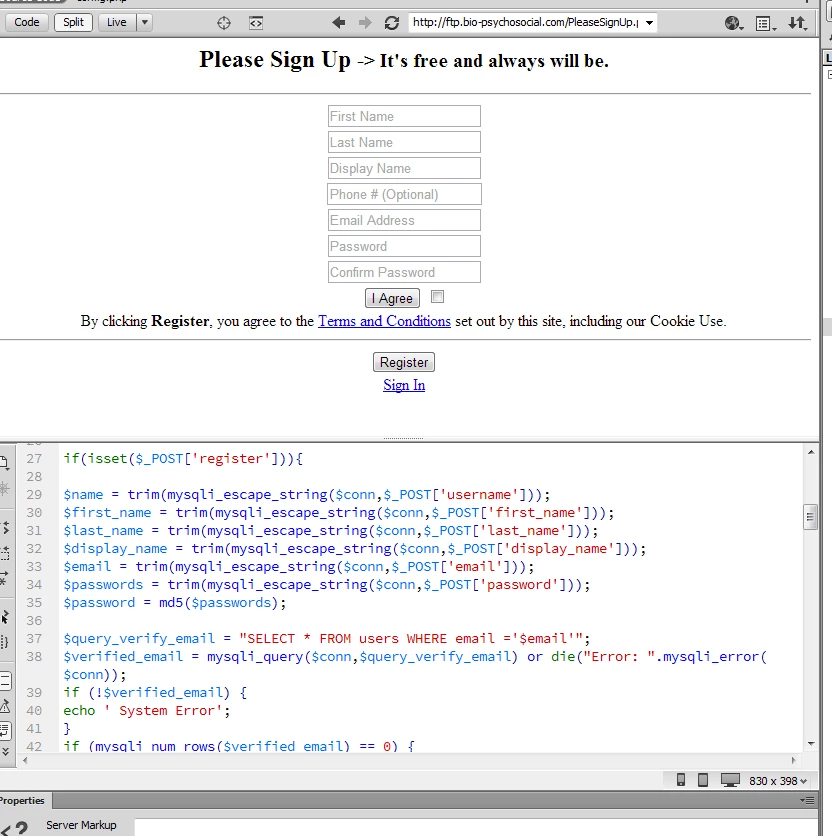
So far it is working well and I made a few changes to give it the type of look I want....


However, one little problem arises: WHERE exactly do I insert my ('localhost' , 'username , 'password' , 'database_name') at? I tried to find a "$con = mysqli_connect" followed by but couldn't find exactly that anywhere. Well below I put a copy of the beginning of the script where I assume it will go and if anyone know where I should put that I would love to know. Thanks.

<html>
<head>
<meta charset="utf-8">
<title>Login & Registration System Page</title>
</head>


<?php
include('config.php');  // Database connection and settings

error_reporting(E_ALL);
ini_set('display_errors', 1);


if(isset($_POST['register'])){

$name = trim(mysqli_escape_string($conn,$_POST['username']));                                                                   <-here?
$first_name = trim(mysqli_escape_string($conn,$_POST['first_name']));                                                           <-here?
$last_name = trim(mysqli_escape_string($conn,$_POST['last_name']));                                                            <-here?
$display_name = trim(mysqli_escape_string($conn,$_POST['display_name']));                                                 <-here?
$email = trim(mysqli_escape_string($conn,$_POST['email']));                                                                            <-here?  
$passwords = trim(mysqli_escape_string($conn,$_POST['password']));                                                             <-here?
$password = md5($passwords);

$query_verify_email = "SELECT * FROM users WHERE email ='$email'";
$verified_email = mysqli_query($conn,$query_verify_email) or die("Error: ".mysqli_error($conn));                   <-here?
if (!$verified_email) {
echo ' System Error';
}
if (mysqli_num_rows($verified_email) == 0) {                                                                                                         <-here?
// Generate a unique code:
$hash = md5(uniqid(rand(), true));
$query_create_user = "INSERT INTO users (username, email, password, hash,first_name,last_name,display_name,pic,gender,isactive)
VALUES ( '$name', '$email', '$password', '$hash','$first_name','$last_name','$display_name','','',0)";                    <-here
$created_user = mysqli_query($conn,$query_create_user) or die("Error: ".mysqli_error($conn));                          <-here
if (!$created_user) {
echo 'Query Failed ';
}

if (mysqli_affected_rows($conn) == 1) { //If the Insert Query was successfull.

$subject = 'Activate Your Email';

$headers = "From: admin@infotuts.com \r\n";
$headers .= "MIME-Version: 1.0\r\n";
$headers .= "Content-Type: text/html; charset=ISO-8859-1\r\n";
$url= 'verify.php?email=' . urlencode($email) . "&key=$hash";

$message ='<p>To activate your account please click on Activate buttton</p>';
$message.='<table cellspacing="0" cellpadding="0"> <tr>';
$message .= '<td align="center" width="300" height="40" bgcolor="#000091" style="-webkit-border-radius: 5px; -moz-border-radius: 5px; border-radius: 5px;

color: #ffffff; display: block;">';

$message .= '<a href="'.$url.'" style="color: #ffffff; font-size:16px; font-weight: bold; font-family: Helvetica, Arial, sans-serif; text-decoration: none;

line-height:40px; width:100%; display:inline-block">Click to Activate</a>';
$message .= '</td> </tr> </table>';

mail($email, $subject, $message, $headers);

echo '<div class="alert alert-success">A confirmation email
has been sent to <b>'. $email.' </b> Please click on the Activate Button to Activate your account </div>';
} else { // If it did not run OK.
echo '<div class="alert alert-info">You could not be registered due to a system
error. We apologize for any
inconvenience.</div>';
die(mysqli_error($conn));
}
}
else{
echo '<div class="alert alert-danger">Email already registered</div>';}
}
?>

(the rest of the script would be below and if anyone wants to see the rest of it feel free to let me know)

This topic has been closed for replies.

2 replies

johns45317965
Known Participant
October 14, 2015

Hi Nancy O.


I'm not 100% sure what you're referring to in reference to a local testing server database but the database I've created is through my host, FatCow's MySQL (see pictures). I have no reason to do any testing and didn't know DW had that...but it's interesting lol. Below are the pics. of the database I made through FatCow:


I'm simply trying to make php web pages for regular traffic and/or web "members" to have the option to create an  account/login/logout/hello & goodbye pages. That's why I created a database along with a separate folder with a generic name to store the data as you suggested for privacy...although nothing is on it yet because the site is not hasn't been promoted yet.

As for the .htaccess privacy....is this all I need, at the bottom and OUTSIDE of the PHP scripts: 


obscurely_named_folder


config.php (here being my db connect folder you told me to make with oblivious name)


.htaccess


Apache directives inside your .htaccess file: 


order deny,allow
deny from all


I'd be surprised because with the reading I did I thought my own IP address was needed to allow just me to have access to the data...but my "research" source could be outdated of course.


Nancy OShea
Community Expert
Community Expert
October 14, 2015

I don't add my IP address to my .htaccess files.  I see no need for it.  In fact, adding an IP might make you more vulnerable to IP copycats.

Nancy O.

Nancy O'Shea— Product User & Community Expert
johns45317965
Known Participant
October 27, 2015

Hi Nancy,

Ok obviously you can see I haven't been working on the site 24-7 but I'm looking to start working on it more it lol

OK here are the login/open account pages I created with the general script "plan" you provided for me. I like them a lot and if you want to see any of the actual codes I'd be more then happy to share with you (or anybody else who's interested). In order it's:

Create account page ---->  Login & Registration System Page

Basic Sign in page ------->  Login Page

Password Wrong Page --> Login Page - Another Attept

Previous Use Page -------> Login & Registration System Page Again because of Email or Name Repeat

So now that the pages are made and look ok for me, is the next step connecting the incoming data to the MySQL account I made (pictured above in previous message) at my host? I "assume" 1.) folders will need to be opened for the MySQL account I made at my host and 2.)  some more adjustments are going to have to be made to my the PHP pages to "link" the two of them together (?). I know I could be wrong though and I may have trouble doing both so if you know where videos are showing/explaining how I'm all eyes and ears   

October 2, 2015

The first line of your php script has the following. As the comment for that line implies, config.php is most likely where you'd enter the database connection and settings.

include('config.php');  // Database connection and settings

best,

Shocker

Nancy OShea
Community Expert
Community Expert
October 2, 2015

What the_shocker said.

config.php is a separate file that connects to your MySQL database.

For security reasons, I like to put my db connection files inside an obscurely named folder that has .htaccess protection from would-be hackers with Deny from all

Nancy O.

Nancy O'Shea— Product User & Community Expert
johns45317965
Known Participant
October 13, 2015

Hi Nancy O.

I did create an "obscurely named folder" for all the information that will be collected but can you link me to exactly how to apply .htaccess protection from would-be hackers along with how to "Deny from all"? I completely understand how that will be very, very important due to the information that will be collected through  the site.

I understand it's a great way to allow just me (i.e. just my IP address) to access all the data collected but want to figure out exactly where and how it is applied to the script in order to protect it.

Thanks,

John