
Inspiring
September 14, 2020
Answered

Basic JSON question

  • September 14, 2020
  • 2 replies
  • 1008 views

I am relatively new to working with JSON. I've had success with a few projects reusing the same code. On this particular one, the JSON data is returned differently and I could use some assistance on my deserialize code. This what I've been using:

<cfset requestBody = toString( getHttpRequestData().content ) />
<cfset results = deserializeJSON( requestBody )>

This is what I get back when I dump the reply:
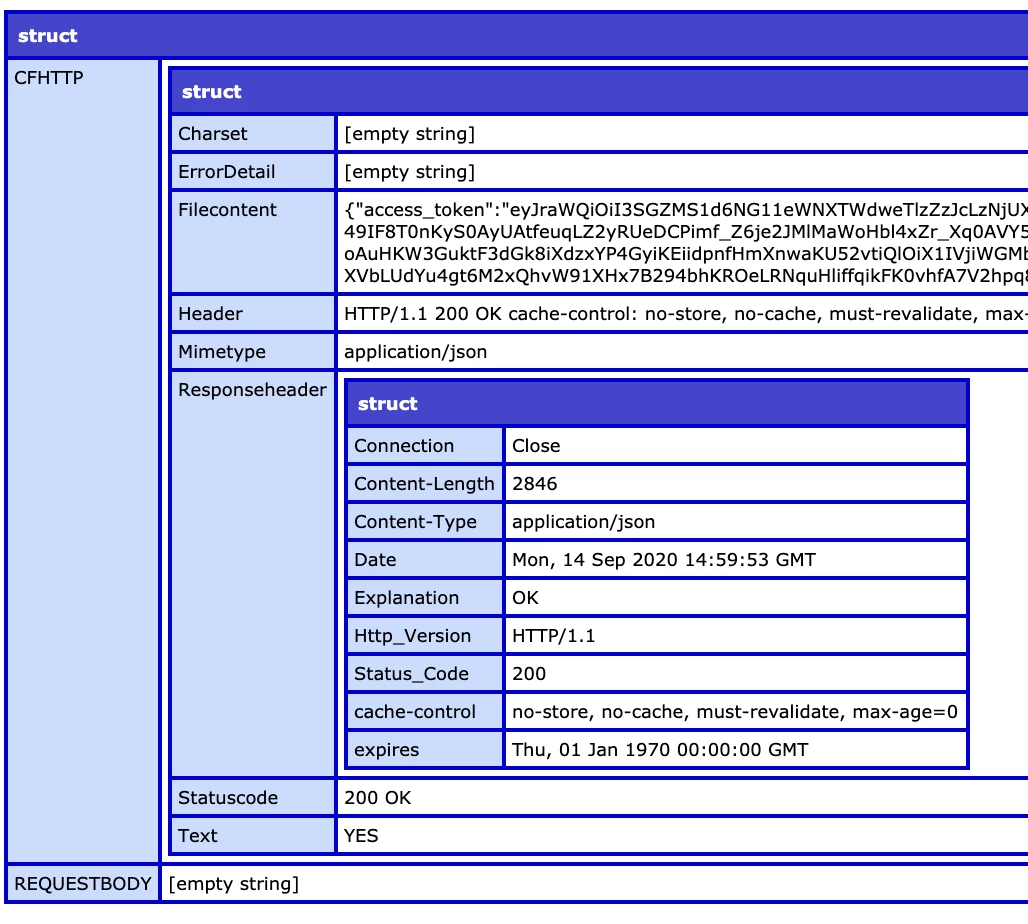
 

I assume my toString is looking at the wrong location for the response since the requestBody is empty.

Appreciate any help!

Thanks,

Gary

    This topic has been closed for replies.
    Correct answer BKBK

    Yes, that's the one: cfhttp.filecontent. An alternative way is to use the attribute result="httpResult" in the cfhttp tag, then proceed as before with

    <cfset results = deserializeJSON(httpResult.filecontent)>

     Incidentally, as you're processing cfhttp, it means you have made an HHTP request to a server. You are therefore a client. The function you originally used, getHttpRequestData(), is server code. For example, if you use cfhttp and cfhttpparam to post a form to the server, getHttpRequestData() will enable the server to get the request data.

    2 replies

    WolfShade
    Legend
    September 14, 2020

    AFAIK, the method you're using for getting the JSON is what I've used.  And it should be in the REQUESTBODY.  Which is why I think it's the way it's being SENT is the issue.  Perhaps this SO thread could provide some solution.


    HTH,


    ^ _ ^

    ghanna1Author
    Inspiring
    September 14, 2020

    Thanks for the link. I poked around SO and found this thread. I needed to change to this:

    <cfset results = deserializeJSON( cfhttp.filecontent )>

     Appreciate the help!


    Gary

    BKBK
    Community Expert
    BKBKCommunity ExpertCorrect answer
    Community Expert
    September 14, 2020

    Yes, that's the one: cfhttp.filecontent. An alternative way is to use the attribute result="httpResult" in the cfhttp tag, then proceed as before with

    <cfset results = deserializeJSON(httpResult.filecontent)>

     Incidentally, as you're processing cfhttp, it means you have made an HHTP request to a server. You are therefore a client. The function you originally used, getHttpRequestData(), is server code. For example, if you use cfhttp and cfhttpparam to post a form to the server, getHttpRequestData() will enable the server to get the request data.

    WolfShade
    Legend
    September 14, 2020

    Hello, ghanna1,


    I haven't worked much with JSON, but it seems to me that the issue isn't in how the JSON is received, but rather how it's sent.  If the requestbody is empty, then whatever is sending the JSON would have an issue.  At least, that's how I perceive it.  Check whatever is sending the JSON.


    V/r,


    ^ _ ^

    ghanna1Author
    Inspiring
    September 14, 2020

    I probably should have mentioned the response I am expecting is shown in the Filecontent of the cfdump image I attached. That's why I assumed my toString command was looking for the response in the wrong place.


    Gary