
Participating Frequently
February 9, 2021
Question

CFHTTP issues on CF2018 Update 7

  • February 9, 2021
  • 2 replies
  • 747 views

Hello,


We have recently update our ColdFusion 2016 install to 2018 on two load balanced RHEL 7.9 servers. Both servers are currently running CF2018 Update 7 with Java version 11.0.10 and we are having issues with making cfhttp calls to various HTTPS sites like Google and Facebook.


These cfhttp calls work fine when CF is restarted but we eventually see errors like "I/O Exception: Could not generate secret" , "I/O Exception: Peer not authenticated", and "I/O Exception: Couldn't kickstart handshaking". After updating to Update 7, here's the more prominent error we've seen:
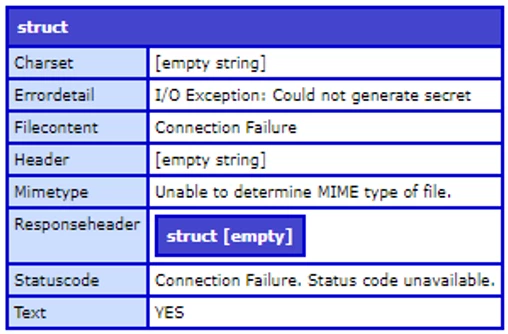


Here are my JVM arguments:

-server --add-opens=java.rmi/sun.rmi.transport=ALL-UNNAMED --add-opens=java.base/java.nio=ALL-UNNAMED --add-opens=java.base/java.lang=ALL-UNNAMED --add-opens=java.base/sun.util.cldr=ALL-UNNAMED --add-opens=java.base/sun.util.locale.provider=ALL-UNNAMED -XX:MaxMetaspaceSize=1024m -XX:+UseParallelGC -Xbatch -Djdk.attach.allowAttachSelf=true -Dcoldfusion.home={application.home} -Djava.security.egd=/dev/urandom -Duser.language=en -Dcoldfusion.rootDir={application.home} -Dcom.sun.xml.bind.v2.bytecode.ClassTailor.noOptimize=true -Dcoldfusion.libPath={application.home}/lib -Dorg.apache.coyote.USE_CUSTOM_STATUS_MSG_IN_HEADER=true -Dcoldfusion.jsafe.defaultalgo=FIPS186Random -Dorg.eclipse.jetty.util.log.class=org.eclipse.jetty.util.log.JavaUtilLog -Djava.util.logging.config.file={application.home}/lib/logging.properties -Djava.locale.providers=COMPAT,SPI -Dsun.font.layoutengine=icu -javaagent:/opt/fusionreactor/instance/cfusion.cf2018/fusionreactor.jar=name=cfusion.cf2018,address=8088 -agentpath:/opt/fusionreactor/instance/cfusion.cf2018/libfrjvmti_x64.so -Duser.timezone=US/Central -Dcoldfusion.http.usepooling=false


The -Dcoldfusion.http.usepooling=false argument was something that CF Support suggested but hasn't worked.

Any help is greatly appreciated.


Thank you!

    This topic has been closed for replies.

    2 replies

    Charlie Arehart
    Community Expert
    Community Expert
    February 10, 2021

    Erik, your problem really sounds like you have NOT update the JVM. I realize you say you updated to Java 11.0.10, but could you confirm for us that your CF really is using that? (I've seen people install a new JVM on the box and mistakenly presume that CF would "just use it".)


    If you go to the "settings summary" pge in the CF Admin (the link right next to the "java and jvm" link), that has two sections at the top, and the second is the JVM info, and it reports the version CF is using. (You showed your CF's java args, but that doesn't confirm this for us.)


    If it's not showing 11.0.10, then the problem is that the JVM CF is using is NOT updated.  You will see on that page also that java.home which is how CF points to the JVM it uses. If you do have Java 11.0.10 installed, you can point CF to that. Do be careful, as if you make a mistake CF won't start. I have a blog post of many common problems that can happen in changing the JVM, and how to fix them.


    Along the same lines, if one ever DOES need to import certs, it is also then critical to import them to the lib/security/cacerts of the jvm CF is using, whereas many resources blithely say to update the one within [coldfusion]\jre folder. Again, if CF has been changed to point to a different JVM, then importing certs there will be pointless.


    All that said, you may not neeed to bother importing certs at all. Often just updating the JVM will solve problems of cfhttp calls to ssl urls. I have a blog post on that also. (And yes, even just updates with Java 11 can solve such problems. I help people do it about weekly.)

    /Charlie (troubleshooter, carehart. org)
    Participating Frequently
    February 10, 2021

    Hello Charlie,

    I know we had a brief call where I confirmed the JVM version but wanted to update this conversation for historical reasons and in case it helps someone else.


    The Settings Summary page on both servers show the Java Version is 11.0.10 and Java Home is /opt/coldfusion2018/jre, which is where we imported the intermediate certs (/opt/coldfusion2018/jre/lib/security/cacerts).


    Thank you

    BKBK
    Community Expert
    Community Expert
    February 11, 2021

    You could experiment with one or two of ColdFusion's Java properties. If only to rule out the probable causes.


    You could for example experiment with the following settings jvm.config:


    -Dhttps.protocols=TLSv1,TLSv1.1,TLSv1.2 -Dcoldfusion.disablejsafe=true

    Community Expert
    February 9, 2021

    This is kind of a wild guess, but I think you may have updated one of your keystores on one server but not on the other. I've usually seen this "MIME type" error when I don't have all of the certificate chain in the keystore (root CA plus intermediate CAs - you don't actually need the server certificate because that's provided as part of the TLS transaction). That would explain why it works when you initially restart the servers but doesn't work later - the initial CFHTTP calls are being made by the server with the updated keystore, the later ones aren't.


    Like I said, kind of a wild guess. Good luck!


    Dave Watts, Eidolon LLC

    Dave Watts, Eidolon LLC
    Participating Frequently
    February 9, 2021

    Hi Dave,

    I did try importing the root CAs for a couple sites we have problems with but that didn't fix the issue. We setup test cfhttp pages that we can hit on each server individually so we know that once we restart CF on the server, it works fine.

    It seems to just build over time and eventually starts to throw the errors I mentioned.


    Also, one other odd thing to mention. When the issue is happening, I will get the following error if I check updates via CFAdmin > Server Update.

    Not able to connect to Update Site: Connection Failure: Status code unavailable


    Thank you!

    Participating Frequently
    February 9, 2021

    Correction on this, apparently it was only the root CA that was imported. We imported google.com and facebook.com's intermidiate CA certs during a call with CF Support and will be monitoring for issues.