
Inspiring
July 18, 2011
Answered

cfspreadsheet action="write" sophisticates values

  • July 18, 2011
  • 1 reply
  • 1365 views

Hi,

I have a problem writing data to an excel file using cfspreadsheet.

My query result contains for example values like '41D', but in the excelfile it is ''41'.

Here is my example code:

<cfquery  name="select_test" datasource="test">
select '41D' test from dual
</cfquery>

<cfdump  var="#select_test#">

<cfset sObj=SpreadsheetNew()>

<cfset SpreadsheetAddRows(sObj, select_test)>

<cfspreadsheet action="write" name="sObj" filename="testfile.xls" overwrite="true" >

<cfspreadsheet action="read"  src="testfile.xls" query="queryvar">
<cfdump  var="#queryvar#">
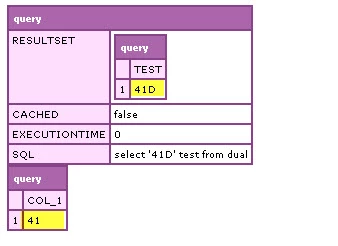
I already tried to format the column to text, but it doesn't help.

Environment: ColdFusion 9 Standard, Database Oracle 11g, Microsoft Office 2003

What's wrong with my code?

Regards Claudia

    This topic has been closed for replies.
    Correct answer Owainnorth

    I've never used the Spreadsheet functions, so thought I'd have a play. It seems the issue is that doing a SetRowFormat() or similar does as it says, but to the row sequentially after the one being worked on. Therefore chances are you're not formatting the cells you think you are.

    If you specifically format a cell, then set its value to be that from the database, it works:

    <cfset spreadsheetFormatCell(sObj, sFormat, 3, 1) />

    <cfset spreadsheetSetCellValue(sObj,select_test.test[1],3,1) />

    And displays 41D as it should. I haven't really looked into the formatting functions that much, but I suspect that's the issue - you're not formatting the cells you think you are.

    I reserve the right to be completely wrong and pointing you down some kind of blind alley

    1 reply

    Owainnorth
    OwainnorthCorrect answer
    Inspiring
    July 18, 2011

    I've never used the Spreadsheet functions, so thought I'd have a play. It seems the issue is that doing a SetRowFormat() or similar does as it says, but to the row sequentially after the one being worked on. Therefore chances are you're not formatting the cells you think you are.

    If you specifically format a cell, then set its value to be that from the database, it works:

    <cfset spreadsheetFormatCell(sObj, sFormat, 3, 1) />

    <cfset spreadsheetSetCellValue(sObj,select_test.test[1],3,1) />

    And displays 41D as it should. I haven't really looked into the formatting functions that much, but I suspect that's the issue - you're not formatting the cells you think you are.

    I reserve the right to be completely wrong and pointing you down some kind of blind alley

    Owainnorth
    Inspiring
    July 18, 2011

    Sorry, should have included this line also:

    <cfset sFormat = {dataformat="text"} />