
Participant
March 21, 2024
Question

Coldfusion 2023 SOAP API, name of parameters on wsdl change to generic one

  • March 21, 2024
  • 2 replies
  • 1216 views

I have a legacy SOAP API built in Coldfusion. This API is well established and works most times, until it doesn't but just for some third parties integrating with it. The issue I am facing is quite odd, I have checked the logs but not able to pinpoint why it occurs or when.

This is what the API Method in question looks like when I access the wsdl directly from browser:
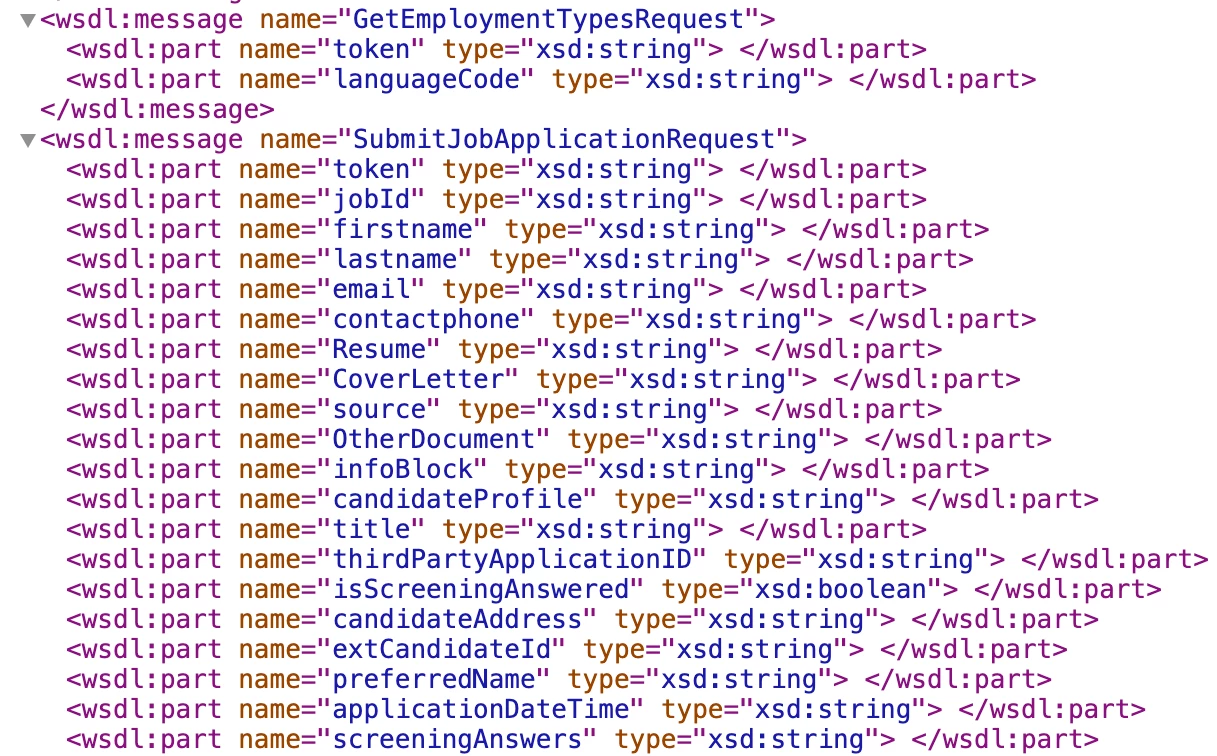
 

As you can see the parameters names for function SubmitJobApplocationRequest are defined and listed as expected; however quite regularly, after the API gets used for sometime (once again, I am not able to find out when it occurs unfortunately nor why it does), the parameter names change to the following:
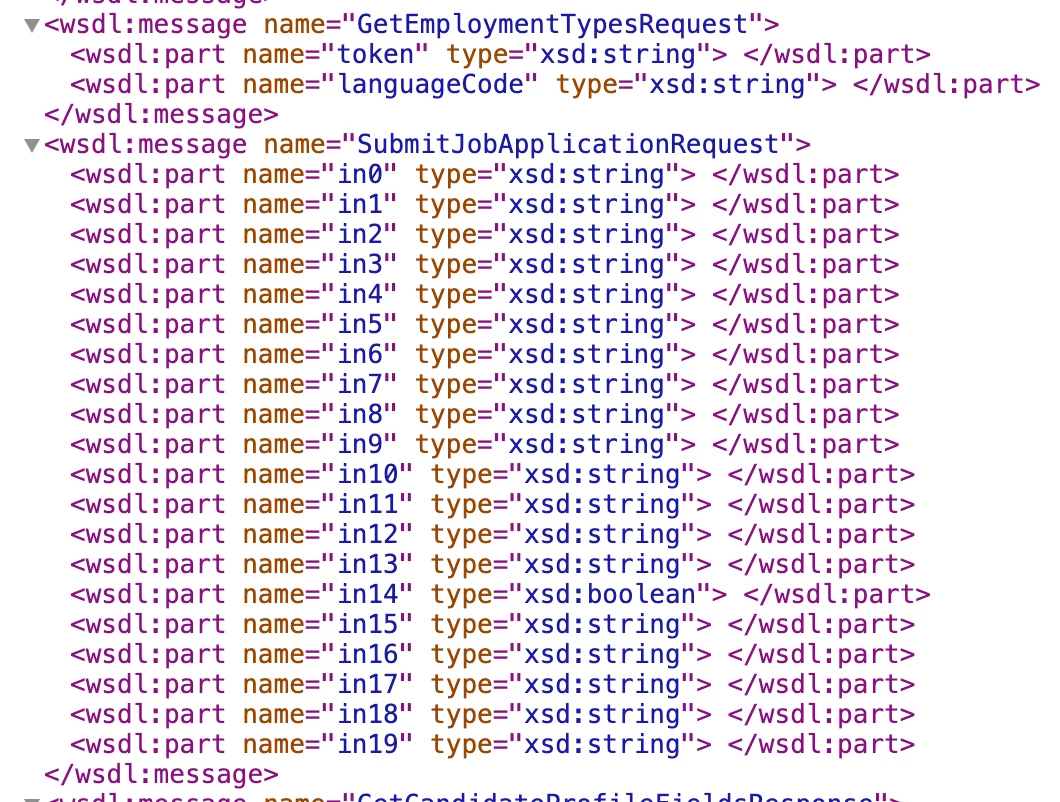
At this stage, some of the third party software's integrating with this API get the following error message back from Coldfusion:


coldfusion.xml.rpc.CFCInvocationException: [coldfusion.runtime.MissingArgumentException : The TOKEN parameter to the SubmitJobApplication function is required but was not passed in.]


I originally believed that the issue could be caused by the parameters not being passed in the exact same order as what Coldfusion expects them to be, however the code snippets I have been provided by the developers from one of these third party softwares show the parameters being passed in the correct order.


The simplest solution I have found to fix the issue (until it occurs again) is to save the CFC template again by adding/removing a space anywhere within the template; it seems to be refreshing the wsdl perhaps?


Another thing to note is that we are using Coldfusion 2023 and we have recently upgraded from 2018 (and before then 2016) however we were already experiencing it, so it doesn't seem to relate to this upgrade process.


The server on which this API is hosted is not load balanced and there is only the 1 CF template in the folder.


Has anyone experienced the same issue with Coldfusion with the name of the parameters changing? Or anyone could suggest what I could look at to find out why it is happening?

    This topic has been closed for replies.

    2 replies

    BKBK
    Community Expert
    Community Expert
    March 21, 2024

    So there is a function in a web-service CFC. Its arguments are token, jobId, firstname, and so on.


    As the error message suggests, that function is actually SubmitJobApplication, not SubmitJobApplicationRequest. SubmitJobApplicationRequest is not created by the developer. It is an internal object that the WSDL engine creates to represent request-data. So it is up to the WSDL engine how it represents the data within the SubmitJobApplicationRequest  object.


    That said, it appears as if the order of the arguments may change from one web-service invocation to the next. That would be one reason why the engine would switch to generically named variables in0, in1, in2, and so on. Something else strengthens this hypothesis. Namely, the engine's use of the <wsdl:message> element to hold the arguments.


    I would expect to see something like


    <xs:element name="submitJobApplication">
    	<xs:complexType>
    		<xs:sequence>
    			<xs:element name="token" />
    			<xs:element name="jobId" "/>
    		</xs:sequence>
    	</xs:complexType>
    </xs:element>


    instead of


    <wsdl:message name="submitJobApplicationRequest" >
    	<wsdl:part name="token" ></wsdl:part>
    	<wsdl:part name="jobId" ></wsdl:part>
    </wsdl:message>


    Suggestion: ensure that

    1. each of the arguments of the function SubmitJobApplication is of simple-type.
    2.  every invocation of the function is on the basis of single arguments, rather than by means of a complex-type or argumentCollection.


    MC-1Author
    Participant
    March 22, 2024

    Hi @BKBK 


    Thanks for your response. I have just tried what you have mentioned in regards to passing the arguments in the incorrect order and that seems to be what is triggering the issue!

    Unless there is a workaround in Coldfusion to either not accept requests where the order of the arguments is incorrect, or somehow to stop Coldfusion from behaving this way in that case?!, then my only option is to try and find out which third party integration sends through requests with the arguments/parameters in the incorrect order and ask them to fix it.


    In regards to the the suggestions you have provided, for what I can see, all the arguments of the function SubmitJobApplication are of simple-type (see here below) so that should already be covered

    BKBK
    Community Expert
    Community Expert
    March 22, 2024

    Strange. I did a test, but was unable to reproduce your WSDL elements. Details of the test follow.


    Having checked on the web-service page in the ColdFusion Administrator that the version is 2, I created the following web-service CFC:


    <!--- Path under root: /workspace/CF_Project/wsdl_test/JobApplication.cfc --->
    <cfcomponent wsversion="2" >
    	<cffunction name="SubmitJobApplication" access="remote" returntype="String" output="no">
    		<cfargument name="jobId" type="string" required="yes">	
    		<cfargument name="token" type="string" required="yes">	
    		<cfargument name="firstname" type="string" required="yes">	
    		<cfargument name="resume" type="string" required="no">
    		<cfargument name="isScreeningAnswered" type="boolean" required="no" default="false">	
    		
    		<cfset var wsResult="Job with ID " & arguments.jobId & " and Token " & arguments.token & ". " & 
    		                     "Candidate's First Name: "  & arguments.firstname & ". " &
    		                     "Candidate's resume:" & arguments.resume & ". " &
    		                     "Is screening answered: " & arguments.isScreeningAnswered & "." >
    		                      	
    		<cfreturn wsResult>
    		
    	</cffunction>
    </cfcomponent>


    When I launch http://localhost:8500/workspace/CF_Project/wsdl_test/JobApplication.cfc?wsdl I get the following WSDL:


    <wsdl:definitions xmlns:wsdl="http://schemas.xmlsoap.org/wsdl/" xmlns:ax213="http://rpc.xml.coldfusion/xsd" xmlns:ns="http://wsdl_test.cf_project" xmlns:wsaw="http://www.w3.org/2006/05/addressing/wsdl" xmlns:mime="http://schemas.xmlsoap.org/wsdl/mime/" xmlns:http="http://schemas.xmlsoap.org/wsdl/http/" xmlns:xs="http://www.w3.org/2001/XMLSchema" xmlns:soap12="http://schemas.xmlsoap.org/wsdl/soap12/" xmlns:ns1="http://org.apache.axis2/xsd" xmlns:soap="http://schemas.xmlsoap.org/wsdl/soap/" targetNamespace="http://wsdl_test.cf_project">
    <wsdl:types>
    <xs:schema xmlns:ax214="http://rpc.xml.coldfusion/xsd" attributeFormDefault="qualified" elementFormDefault="qualified" targetNamespace="http://wsdl_test.cf_project">
    <xs:import namespace="http://rpc.xml.coldfusion/xsd"/>
    <xs:element name="workspace.CF_Project.wsdl_test.JobApplication.cfcCFCInvocationException">
    <xs:complexType>
    <xs:sequence>
    <xs:element minOccurs="0" name="CFCInvocationException" nillable="true" type="ax214:CFCInvocationException"/>
    </xs:sequence>
    </xs:complexType>
    </xs:element>
    <xs:element name="SubmitJobApplication">
    <xs:complexType>
    <xs:sequence>
    <xs:element minOccurs="0" name="jobId" nillable="true" type="xs:string"/>
    <xs:element minOccurs="0" name="token" nillable="true" type="xs:string"/>
    <xs:element minOccurs="0" name="firstname" nillable="true" type="xs:string"/>
    <xs:element minOccurs="0" name="resume" nillable="true" type="xs:string"/>
    <xs:element minOccurs="0" name="isScreeningAnswered" type="xs:boolean"/>
    </xs:sequence>
    </xs:complexType>
    </xs:element>
    <xs:element name="SubmitJobApplicationResponse">
    <xs:complexType>
    <xs:sequence>
    <xs:element minOccurs="0" name="return" nillable="true" type="xs:string"/>
    </xs:sequence>
    </xs:complexType>
    </xs:element>
    <xs:complexType name="document">
    <xs:sequence>
    <xs:any/>
    </xs:sequence>
    </xs:complexType>
    </xs:schema>
    <xs:schema attributeFormDefault="qualified" elementFormDefault="qualified" targetNamespace="http://rpc.xml.coldfusion/xsd">
    <xs:complexType name="CFCInvocationException">
    <xs:sequence/>
    </xs:complexType>
    <xs:complexType name="StructDelegate">
    <xs:sequence>
    <xs:element maxOccurs="unbounded" minOccurs="0" name="entries" nillable="true" type="ax213:EntryDelegate"/>
    </xs:sequence>
    </xs:complexType>
    <xs:complexType name="EntryDelegate">
    <xs:sequence>
    <xs:element minOccurs="0" name="key" nillable="true" type="xs:anyType"/>
    <xs:element minOccurs="0" name="value" nillable="true" type="xs:anyType"/>
    </xs:sequence>
    </xs:complexType>
    <xs:complexType name="QueryBean">
    <xs:sequence>
    <xs:element maxOccurs="unbounded" minOccurs="0" name="columnList" nillable="true" type="xs:string"/>
    <xs:element maxOccurs="unbounded" minOccurs="0" name="data" nillable="true" type="ax213:ArrayOfObject"/>
    </xs:sequence>
    </xs:complexType>
    <xs:complexType name="ArrayOfObject">
    <xs:sequence>
    <xs:element maxOccurs="unbounded" minOccurs="0" name="array" nillable="true" type="xs:anyType"/>
    </xs:sequence>
    </xs:complexType>
    <xs:complexType name="DocumentDelegate">
    <xs:sequence>
    <xs:element minOccurs="0" name="document" nillable="true" type="ns:document"/>
    </xs:sequence>
    </xs:complexType>
    <xs:complexType name="ArrayDelegate">
    <xs:sequence>
    <xs:element maxOccurs="unbounded" minOccurs="0" name="array" nillable="true" type="xs:anyType"/>
    </xs:sequence>
    </xs:complexType>
    </xs:schema>
    </wsdl:types>
    <wsdl:message name="SubmitJobApplicationRequest">
    <wsdl:part name="parameters" element="ns:SubmitJobApplication"/>
    </wsdl:message>
    <wsdl:message name="SubmitJobApplicationResponse">
    <wsdl:part name="parameters" element="ns:SubmitJobApplicationResponse"/>
    </wsdl:message>
    <wsdl:message name="workspace.CF_Project.wsdl_test.JobApplication.cfcCFCInvocationException">
    <wsdl:part name="parameters" element="ns:workspace.CF_Project.wsdl_test.JobApplication.cfcCFCInvocationException"/>
    </wsdl:message>
    <wsdl:portType name="workspace.CF_Project.wsdl_test.JobApplication.cfcPortType">
    <wsdl:operation name="SubmitJobApplication">
    <wsdl:input message="ns:SubmitJobApplicationRequest" wsaw:Action="urn:SubmitJobApplication"/>
    <wsdl:output message="ns:SubmitJobApplicationResponse" wsaw:Action="urn:SubmitJobApplicationResponse"/>
    <wsdl:fault message="ns:workspace.CF_Project.wsdl_test.JobApplication.cfcCFCInvocationException" name="workspace.CF_Project.wsdl_test.JobApplication.cfcCFCInvocationException" wsaw:Action="urn:SubmitJobApplicationworkspace.CF_Project.wsdl_test.JobApplication.cfcCFCInvocationException"/>
    </wsdl:operation>
    </wsdl:portType>
    <wsdl:binding name="workspace.CF_Project.wsdl_test.JobApplication.cfcSoap11Binding" type="ns:workspace.CF_Project.wsdl_test.JobApplication.cfcPortType">
    <soap:binding transport="http://schemas.xmlsoap.org/soap/http" style="document"/>
    <wsdl:operation name="SubmitJobApplication">
    <soap:operation soapAction="urn:SubmitJobApplication" style="document"/>
    <wsdl:input>
    <soap:body use="literal"/>
    </wsdl:input>
    <wsdl:output>
    <soap:body use="literal"/>
    </wsdl:output>
    <wsdl:fault name="workspace.CF_Project.wsdl_test.JobApplication.cfcCFCInvocationException">
    <soap:fault use="literal" name="workspace.CF_Project.wsdl_test.JobApplication.cfcCFCInvocationException"/>
    </wsdl:fault>
    </wsdl:operation>
    </wsdl:binding>
    <wsdl:binding name="workspace.CF_Project.wsdl_test.JobApplication.cfcSoap12Binding" type="ns:workspace.CF_Project.wsdl_test.JobApplication.cfcPortType">
    <soap12:binding transport="http://schemas.xmlsoap.org/soap/http" style="document"/>
    <wsdl:operation name="SubmitJobApplication">
    <soap12:operation soapAction="urn:SubmitJobApplication" style="document"/>
    <wsdl:input>
    <soap12:body use="literal"/>
    </wsdl:input>
    <wsdl:output>
    <soap12:body use="literal"/>
    </wsdl:output>
    <wsdl:fault name="workspace.CF_Project.wsdl_test.JobApplication.cfcCFCInvocationException">
    <soap12:fault use="literal" name="workspace.CF_Project.wsdl_test.JobApplication.cfcCFCInvocationException"/>
    </wsdl:fault>
    </wsdl:operation>
    </wsdl:binding>
    <wsdl:service name="workspace.CF_Project.wsdl_test.JobApplication.cfc">
    <wsdl:port name="workspace.CF_Project.wsdl_test.JobApplication.cfcHttpSoap11Endpoint" binding="ns:workspace.CF_Project.wsdl_test.JobApplication.cfcSoap11Binding">
    <soap:address location="http://localhost:8500/workspace/CF_Project/wsdl_test/JobApplication.cfc"/>
    </wsdl:port>
    <wsdl:port name="workspace.CF_Project.wsdl_test.JobApplication.cfcHttpSoap12Endpoint" binding="ns:workspace.CF_Project.wsdl_test.JobApplication.cfcSoap12Binding">
    <soap12:address location="http://localhost:8500/workspace/CF_Project/wsdl_test/JobApplication.cfc"/>
    </wsdl:port>
    </wsdl:service>
    </wsdl:definitions>


    The section containing the arguments looks different from yours:

    I am therefore curious what WSDL you will get if you run my CFC. To do so, save the code as JobApplication.cfc. Then launch http://path/to/JobApplication.cfc?wsdl in a browser.


    Charlie Arehart
    Community Expert
    Community Expert
    March 21, 2024

    I've not heard of that issue before, no. I'll say that since editing the file seems to fix things, that's about refreshing the template cache (versus refreshing the wsdl, which is related to how CF as a client calls upon a soap web service).


    You could automate the process, in that there's a cf admin api method (in its runtime.cfc) called cleartrustedcache, which optionally takes an argument of a path to a filename whose template cache entry is to be flushed. A Google search will find details on doing that.


    And until you find and resolve the root cause problem, you could also automate checking for the situation with a scheduled task that detects when it's happening (by creating an instance of the web service and assessing its results).


    If you might assert that the problem is that some customers get the problem and not others--such that the scheduled task might not detect when it's happening, that's certainly a very challenging situation. In either case, I hope someone else might have a better idea for you. 

    /Charlie (troubleshooter, carehart. org)
    MC-1Author
    Participant
    March 21, 2024

    Thank you Charlie for your response. 

    I have tried with a template that checks the response of the SOAP API and checks the first agument/parameter name. if not what expected, I can then clear the trusted cache for that template and seems to be working fine; I might set up a scheduled task for that and keep it monitored. However, there might still be instances in which the issue occurs between each scheduled task call.

    Eg, if the schedule is running every 5 minutes to  check and reset the cache, if a SOAP request comes through within that timeframe and the WSDL object returns generic names for the parameters, the issue will still occur