Bonjour,
C'est exactement ce que je cherchais ! MERCI
Par contre, il faut que je trouve un moyen pour déterminer automatiquement le début et la fin du chapitre.
J'ai pensé demander au client de mettre par exemple $deb$ et $fin$ pour le déterminer si je ne trouve pas autre chose.
PDF mette-t-il un signe particulier en début et fin de chapitre ?
Merci par avance.
Cordialement
Hello,
This is exactly what I was looking for ! THANK YOU
On the other hand, I have to find a way to automatically determine the beginning and the end of the chapter.
I thought I'd ask the client to put for example $start$ and $end$ to determine if I can't find something else.
Does PDF put a special mark at the beginning and end of the chapter?
Thanks in advance.
cordially
Hi @ZNB ,
Your expectation is quite reasonable. I also expected ColdFusion would by now offer a way to extract the chapter metadata of a PDF. Especially because ColdFusion is, like PDF, within the Adobe family.
Perhaps, there is such a way. If there is, then I am unaware of it and shall be glad to hear about it.
It may indeed be a good idea to ask the client to put $XstartX$ and $XendX$, respectively, at the start and end of a chapter. Here, X is the chapter number. Using chapter numbers will make the code simpler.
In any case, it is possible to get information about PDF chapters automatically. You could do so by using the iText PDF library integrated in ColdFusion to extract the PDF bookmark.
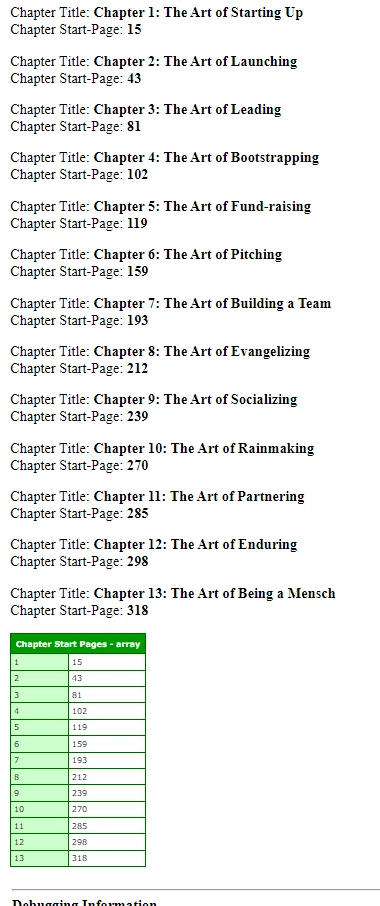
In the example below, I extract the bookmark of the Guy Kawasaki PDF ebook. From it, I could construct an array of chapter-start-pages, as defined in my previous code. What remains is for you to find a way to define the chapter-end-pages.
<cfset reader = CreateObject("java", "com.lowagie.text.pdf.PdfReader").init("C:\Users\bkbk\Desktop\kawasaki\The Art of the Start 2.0 - Guy Kawasaki.pdf")>
<cfset simpleBookmark = createObject("java","com.lowagie.text.pdf.SimpleBookmark")>
<cfset bookmarks = simpleBookmark.getBookmark(reader)>

<cfif isNull(bookmarks)>
	 No bookmarks.
	<cfabort>
</cfif>

<cfset chapterStartPages = arrayNew(1)>

<cfset iterator = bookmarks.listIterator()>


<cfloop condition="iterator.hasNext()">

	<!--- A HashMap --->
	<cfset bookmark = iterator.next()>

	<!--- Debugging code.
	Shows you an object containing chapter titles and page numbers,
	if there are any.
	ColdFusion will tell you that this object is a struct.
	But it is not; it is a HashMap.
	--->
	<!---<cfdump var="#bookmark#">--->

	<cfoutput>
			<cfif not isNull(bookmark.get('Kids'))>
				<cfloop from="1" to="#arrayLen(bookmark.get('Kids'))#" index="i">
					<cfif bookmark.get('Kids')[i]['Title'] contains "chapter">

						<cfset title = trim(bookmark.get('Kids')[i]['Title'])>
						<cfset pageNumber = listGetAt(trim(bookmark.get('Kids')[i]['Page']),1," ")>

						<p>
							Chapter Title: <strong>#title#</strong> <br>
							Chapter Start-Page: <strong>#pageNumber#</strong>
						</p>

						<cfset arrayAppend(chapterStartPages,pageNumber)>
					</cfif>
				</cfloop>
			</cfif>
	</cfoutput>
</cfloop>

<cfdump var="#chapterStartPages#" label="Chapter Start Pages">
The output is:



 AdChoices