
Participant
January 27, 2022
Answered

Encode Json Object to Base64

  • January 27, 2022
  • 2 replies
  • 897 views

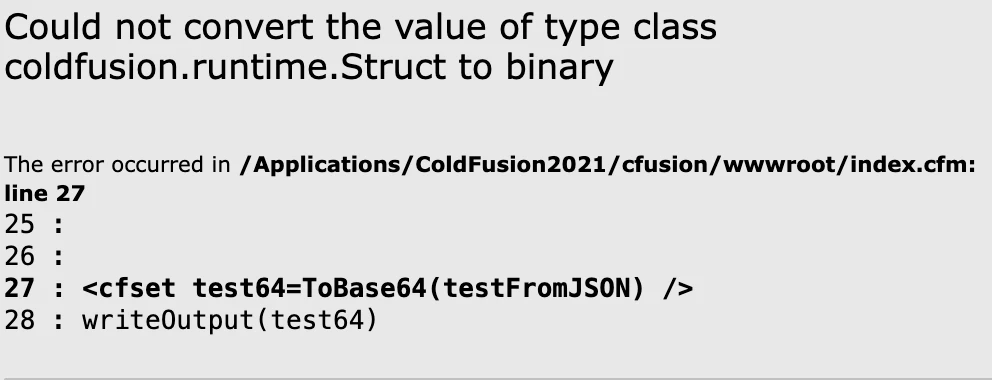
In an api that I add to my application (payment platform), I have to convert a Json object to Base64. When I use the ToBase64 function. I have this error message. Can anybody help me. Thanks in advance. Cordially,

<cfset card_firstname = "Jeremy">

<cfset dataDirectory = getDirectoryFromPath(
getCurrentTemplatePath()
) />

<!--- Create a basic ColdFusion object. --->
<cfset test = {
"billing":{
"firstName":"#card_firstname#", "lastName":"Grimm", "addressLine1":"3 rue de l'église", "city":"Ostheim", "postalCode":"68150", "country":"FR"
}, "shipping":{
"firstName":"Jérémy", "lastName":"Grimm", "addressLine1":"3 rue de l'église", "city":"Ostheim", "postalCode":"68150", "country":"FR", "email":"jerem68@hotmail.com", "phone":"+33-612345678", "shipIndicator":"billing_address", "deliveryTimeframe":"two_day", "firstUseDate":"2017-01-25", "matchBillingAddress":true
}, "client":{
"email":"jerem68@hotmail.com", "phone":"+33-612345678", "birthCity":"Colmar", "birthPostalCode":"68000", "birthCountry":"FR", "birthdate":"1987-03-27"
} } />

<cfset fileWrite(
"#dataDirectory#data.json",
serializeJSON( test )
) />

<cfset testFromJSON = deserializeJSON(
fileRead( "#dataDirectory#data.json" )
) />


<cfset test64=ToBase64(testFromJSON) />
writeOutput(test64)
 

    This topic has been closed for replies.
    Correct answer EddieLotter

    Why are you deserializing your file read? Don't do that and your code will succeed.

    2 replies

    BKBK
    Community Expert
    Community Expert
    January 27, 2022

    EddieLotter has answered your question. I wish to point out something else.


    Perhaps the name testFromJSON led to the confusion. That is not a JSON, but a struct.


    If you did actually need a Base64 string for whatever reason, as hinted by your title, then you could have proceeded as follows:


    <!--- Get the JSON string from the test struct --->
    <cfset testJSON = serializeJSON( test ) />
    
    <!--- Write the JSON string to file --->
    <cfset fileWrite( "#dataDirectory#data.json", testJSON) />
    
    <!--- 
    You may read from the file. 
    But it seems unnecessary: you already have the JSON. 
    It also carries a risk, as I'll show in a moment.
    --->
    <cfset testJSONFromFile = fileRead( "#dataDirectory#data.json" ) />
    <cfset testFromJSON = deserializeJSON( testJSONFromFile ) />
    
    <!--- Get the Base64 representation of the JSON string --->
    <cfset test64 = ToBase64( testJSON ) />


    BKBK
    Community Expert
    Community Expert
    January 27, 2022


    <!--- Write to file --->
    <cfset fileWrite( "#dataDirectory#data.json", testJSON) />
    
    <!--- Read from the file --->
    <cfset testJSONFromFile = fileRead( "#dataDirectory#data.json" ) />


    This kind of code - a write immediately followed by a read - can be a problem. While one process is writing the file, a second process might attempt to read it. Or vice versa.


    A common way to prevent such race conditions is to use a lock. For example:


    <!--- Write to file --->
    <cflock timeout="10" name="JSONFileLock789">
        <cfset fileWrite( "#dataDirectory#data.json", testJSON) />
    </cflock>
    
    <!--- Read from the file --->
    <cflock timeout="10" name="JSONFileLock789">
        <cfset testJSONFromFile = fileRead( "#dataDirectory#data.json" ) />
    </cflock>


    EddieLotter
    EddieLotterCorrect answer
    Inspiring
    January 27, 2022

    Why are you deserializing your file read? Don't do that and your code will succeed.