
Issue in the order of display of Arabic texts in PDF file generated using ColdFusion
I have a query result set as given below.
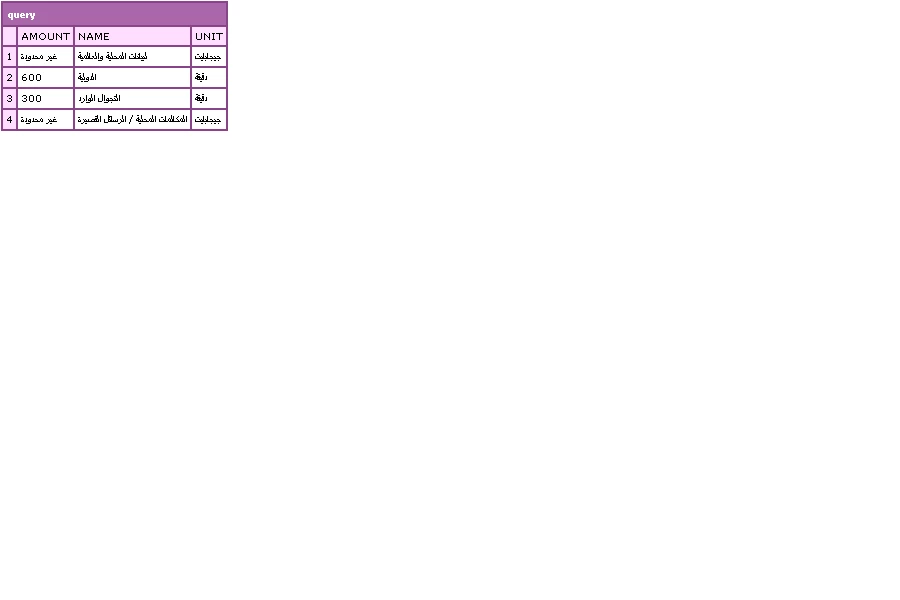
I want to display details from this query in a pattern of name1 amount1 unit1,name2 amount2 unit2,name3 amount3 unit3,name4 amount4 unit 4 and that too in RTL (Right To Left) direction since data from the query is Arabic.
For example : please see the screen shot of pdf file.
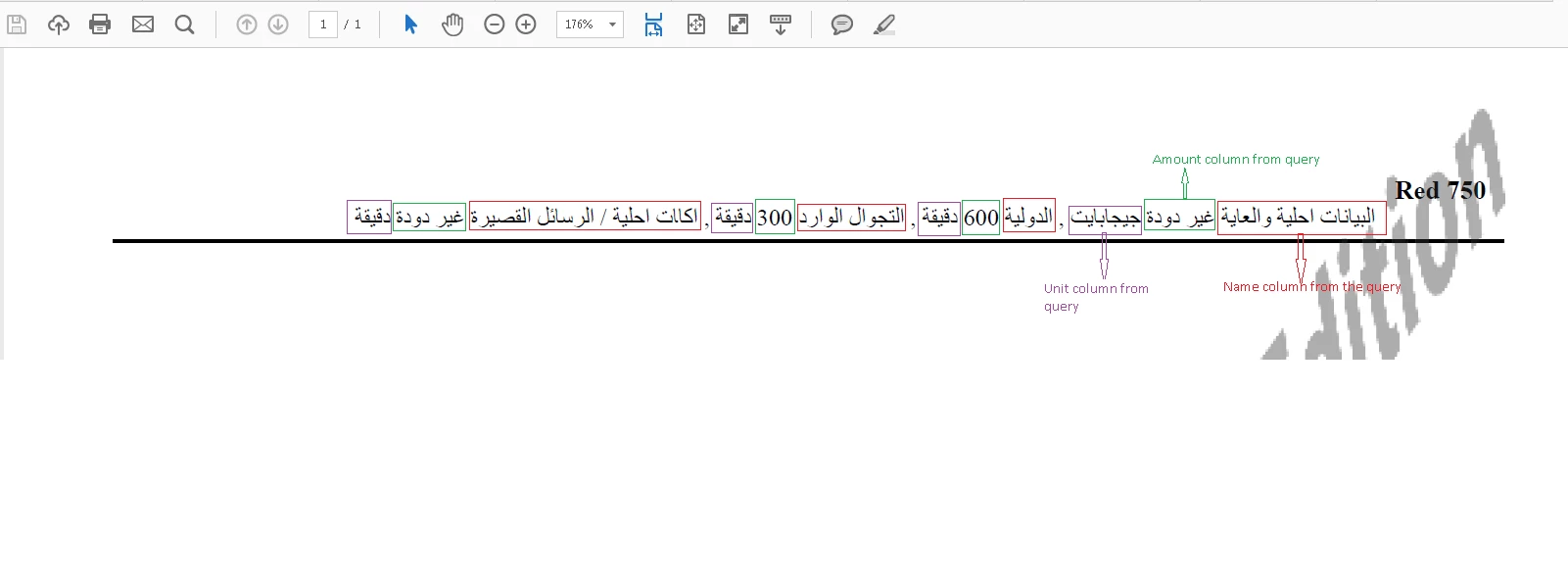
Issue:Order of Arabic text is not correct as expected as given in the above screenshot. Below is the code snippet I used to generate pdf but order of display is wrong.
<cfset local.qBuckets = QueryNew("amount,name,unit","varchar,varchar,varchar") />
<cfset Queryaddrow(local.qBuckets,4)>
<cfset x=1>
<cfset Querysetcell(local.qBuckets,'amount','غير محدودة',x)>
<cfset Querysetcell(local.qBuckets,'name','لبيانات المحلية والعالمية',x)>
<cfset Querysetcell(local.qBuckets,'unit','جيجابايت',x)>
<cfset y=2>
<cfset Querysetcell(local.qBuckets,'amount','600',y)>
<cfset Querysetcell(local.qBuckets,'name','الدولية',y)>
<cfset Querysetcell(local.qBuckets,'unit','دقيقة',y)>
<cfset z=3>
<cfset Querysetcell(local.qBuckets,'amount','300',z)>
<cfset Querysetcell(local.qBuckets,'name','التجوال الوارد',z)>
<cfset Querysetcell(local.qBuckets,'unit','دقيقة',z)>
<cfset p=4>
<cfset Querysetcell(local.qBuckets,'amount','غير محدودة',p)>
<cfset Querysetcell(local.qBuckets,'name','المكالمات المحلية / الرسائل القصيرة',p)>
<cfset Querysetcell(local.qBuckets,'unit','جيجابايت',p)>
<cfoutput>
<cfdocument filename="c:\arr-bill.pdf" format="pdf" overwrite="true">
<table border="0" cellspacing="0" cellpadding="5" align="center" style="width:190mm;direction: rtl;">
<tr>
<td style="border-bottom:1pt solid ##000000;">
<span style="font-size:10pt; font-weight:bold;">Red 750</span>
<BR />
<span style="font-size:9pt;">
<cfset attributes.bucketSep = "">
<cfloop query="local.qBuckets">
#attributes.bucketSep# <span style="font-weight: bold;color:black;">#name#</span>
#amount# #unit#
<cfset attributes.bucketSep = ",">
</cfloop>
</span>
</td>
</tr>
</table>
</cfdocument>
</cfoutput>
Notes: Order of Arabic text is correct in HTML output (in browser). Also , the order is correct in pdf file but only when I remove the span used around the name.
PDF generating code where order is correct
<cfdocument filename="c:\arr-bill.pdf" format="pdf" overwrite="true">
<table border="0" cellspacing="0" cellpadding="5" align="center" style="width:190mm;direction: rtl;">
<tr>
<td style="border-bottom:1pt solid ##000000;">
<span style="font-size:10pt; font-weight:bold;">Red 750</span>
<BR />
<span style="font-size:9pt;">
<cfset attributes.bucketSep = "">
<cfloop query="local.qBuckets">
#attributes.bucketSep# #name#
#amount# #unit#
<cfset attributes.bucketSep = ",">
</cfloop>
</span>
</td>
</tr>
</table>
</cfdocument>


 AdChoices