
Participant
May 10, 2022
Question

Output data in a gridlike format

  • May 10, 2022
  • 1 reply
  • 252 views

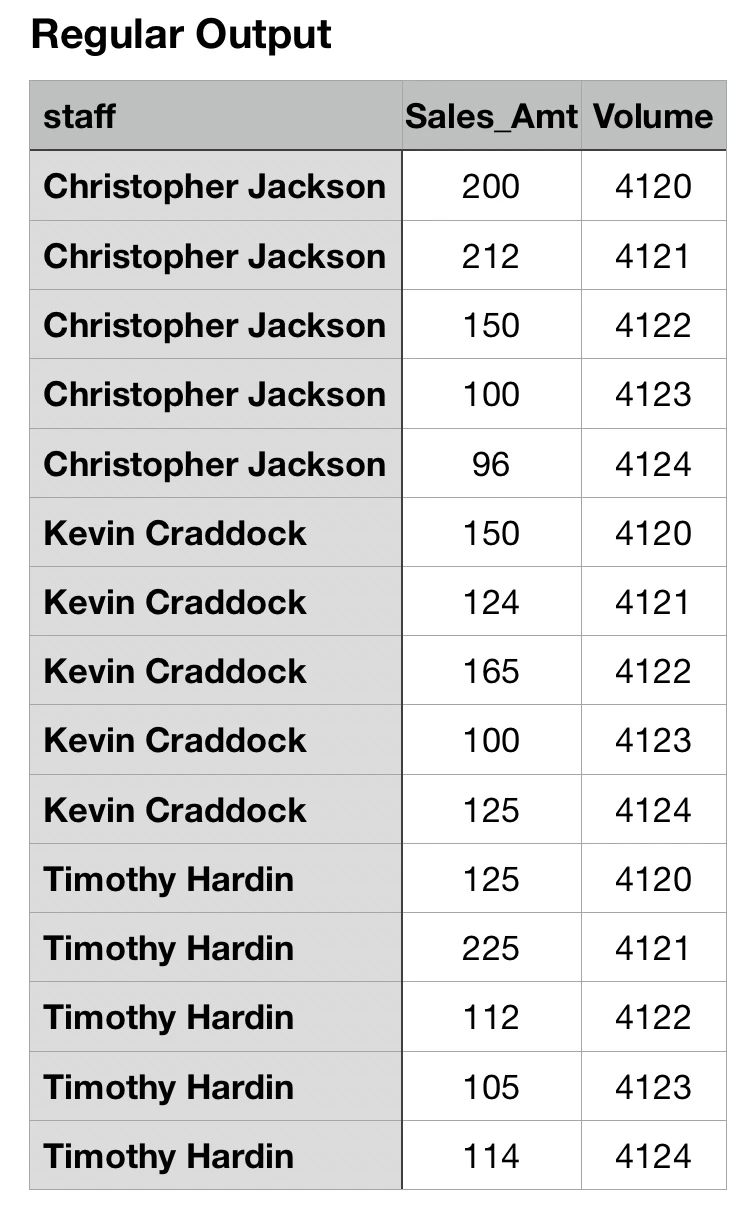
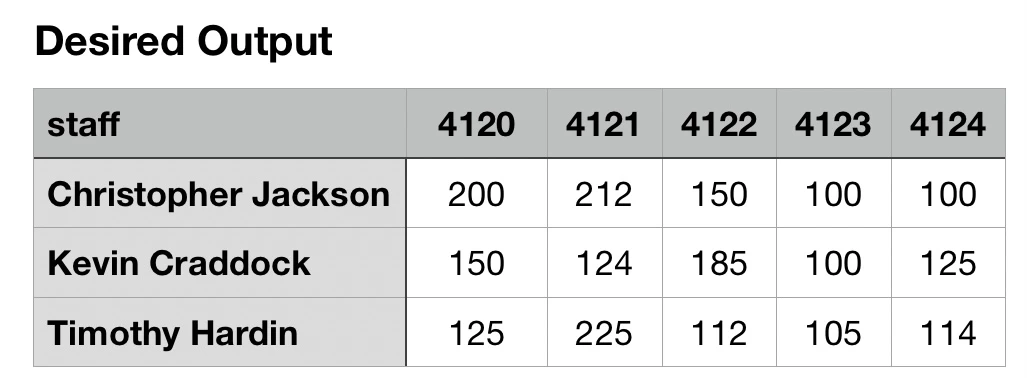
 I’m trying to output data in the form of a grid pattern using coldfusion or MySQL . When I execute the code below, it outputs it in the regular drill down format. I Want to see if there’s a ColdFusion method and or a MySQL method that will allow my data to be out in a grid-like format With each row having a different person and each column having the results for that particular person in the row over a period of time. Please see the attached code and please also see the attached desired output. I am trying to see how I can get the desired results to look like the second image. Is it an array function in ColdFusion that I would need to do that in?


Attached code:
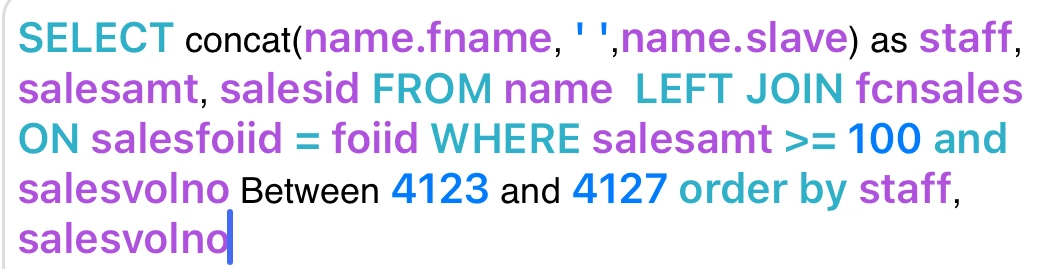


Regular output
 desired output
This topic has been closed for replies.

1 reply

BKBK
Community Expert
Community Expert
May 11, 2022

SQL Server has an operator that would do that for you, namely, pivot. However, I don't think there is a MySQL equivalent.


However, you could use ColdFusion's query-of-a-query to generate the desired output. Then display the result using CSS or an HTML table. An example follows, that uses an HTML table.


Let's say your query is called salesQuery. Then you could do something like:

<!--- Query of a query to obtain distinct volumes in ascending order --->
<cfquery dbtype="query" name="vols">
	select distinct(volume) as vol 
	from salesQuery
	order by vol 
</cfquery>

<!--- Query of a query to obtain distinct staff in ascending order --->
<cfquery dbtype="query" name="staffMembers">
	select distinct(staff) as staffMember
	from salesQuery
	order by staffMember
</cfquery>

<cfoutput>
<table border="1">
	<!--- Generate volume title and header--->
	<tr>
		<th>&nbsp;</th>	
		<th colspan="#vols.recordcount#">Volumes</th>
	</tr>
	<tr>
		<th>&nbsp;</th>
		<cfloop query="vols">
			<th>#vols.vol#</th>
		</cfloop>
	</tr>
	
	<cfloop query="staffMembers">
		<tr>
			<td>#staffMembers.staffMember#</td>
			<cfloop query="vols">
				<!--- Sales for given staff for given volume --->
				<td>#getStaffSalesAmountByVolume(staffMembers.staffMember,vols.vol)#</td>
			</cfloop>
		<tr>
	</cfloop>
	
</table>
</cfoutput>

<!--- Function to return the sales amount for given staff for given volume --->
<cffunction name="getStaffSalesAmountByVolume" returntype="numeric" output="no">
	<cfargument name="staffMember" type="string" required="yes">
	<cfargument name="vol" type="numeric" required="yes">
	
	<cfset var sales=queryNew("")>
	
	<!--- Query of a query to get sales amount for given staff and volume --->
	<cfquery dbtype="query" name="sales">
		select sales_amt
		from salesQuery
		where staff='#arguments.staffMember#' and volume=#arguments.vol#
	</cfquery>
	
	<cfreturn sales.sales_amt>
</cffunction>


HumbleCFAuthor
Participant
May 11, 2022

Thank you man, I'm really grateful for your reply. I'm going to play with my coding in accordance to what you just put on just see if it works for me. Thanks again for your help

BKBK
Community Expert
Community Expert
May 16, 2022

Problem solved?


Testing above code with the following query:

<cfscript>
salesQuery = queryNew("staff,sales_amt,volume", "varchar,integer,integer");
queryAddRow(salesQuery);
querySetCell(salesQuery, "staff", "Christopher Jackson");
querySetCell(salesQuery, "sales_amt", "200");
querySetCell(salesQuery, "volume", "4120");
queryAddRow(salesQuery);
querySetCell(salesQuery, "staff", "Christopher Jackson");
querySetCell(salesQuery, "sales_amt", "212");
querySetCell(salesQuery, "volume", "4121");
queryAddRow(salesQuery);
querySetCell(salesQuery, "staff", "Christopher Jackson");
querySetCell(salesQuery, "sales_amt", "150");
querySetCell(salesQuery, "volume", "4122");
queryAddRow(salesQuery);
querySetCell(salesQuery, "staff", "Christopher Jackson");
querySetCell(salesQuery, "sales_amt", "100");
querySetCell(salesQuery, "volume", "4123");
queryAddRow(salesQuery);
querySetCell(salesQuery, "staff", "Christopher Jackson");
querySetCell(salesQuery, "sales_amt", "96");
querySetCell(salesQuery, "volume", "4124");
queryAddRow(salesQuery);
querySetCell(salesQuery, "staff", "Kevin Craddock");
querySetCell(salesQuery, "sales_amt", "150");
querySetCell(salesQuery, "volume", "4120");
queryAddRow(salesQuery);
querySetCell(salesQuery, "staff", "Kevin Craddock");
querySetCell(salesQuery, "sales_amt", "124");
querySetCell(salesQuery, "volume", "4121");
queryAddRow(salesQuery);
querySetCell(salesQuery, "staff", "Kevin Craddock");
querySetCell(salesQuery, "sales_amt", "165");
querySetCell(salesQuery, "volume", "4122");
queryAddRow(salesQuery);
querySetCell(salesQuery, "staff", "Kevin Craddock");
querySetCell(salesQuery, "sales_amt", "100");
querySetCell(salesQuery, "volume", "4123");
queryAddRow(salesQuery);
querySetCell(salesQuery, "staff", "Kevin Craddock");
querySetCell(salesQuery, "sales_amt", "125");
querySetCell(salesQuery, "volume", "4124");
queryAddRow(salesQuery);
querySetCell(salesQuery, "staff", "Timothy Hardin");
querySetCell(salesQuery, "sales_amt", "125");
querySetCell(salesQuery, "volume", "4120");
queryAddRow(salesQuery);
querySetCell(salesQuery, "staff", "Timothy Hardin");
querySetCell(salesQuery, "sales_amt", "225");
querySetCell(salesQuery, "volume", "4121");
queryAddRow(salesQuery);
querySetCell(salesQuery, "staff", "Timothy Hardin");
querySetCell(salesQuery, "sales_amt", "112");
querySetCell(salesQuery, "volume", "4122");
queryAddRow(salesQuery);
querySetCell(salesQuery, "staff", "Timothy Hardin");
querySetCell(salesQuery, "sales_amt", "105");
querySetCell(salesQuery, "volume", "4123");
queryAddRow(salesQuery);
querySetCell(salesQuery, "staff", "Timothy Hardin");
querySetCell(salesQuery, "sales_amt", "114");
querySetCell(salesQuery, "volume", "4124");
//writeDump(salesQuery);	
</cfscript>


I get the result: