Known Participant
October 29, 2021
Answered

Reporting staff grouped by columns

  • October 29, 2021
  • 1 reply
  • 419 views

Hi all,

As a reminder, I am not a programmer, far from it.  Please forgive the poor design.  This is for a small intranet, so I am not looking to improve what we're working with.

I have an employees table.  In that table I have these columns that I am interested in working with:

  • First_Name
  • Last_name
  • Sup (more on that in a minute)
  • Job Title

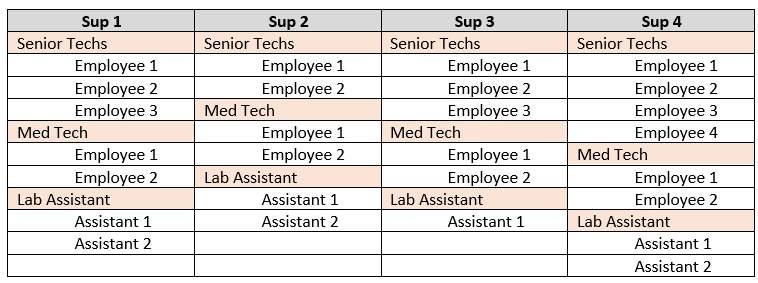
I want to display the Supervisors in a column with their staff, by group, under them.  The number of Sups will vary over time.  Today it's four, in a few months it will be three...

This is what I am looking for:
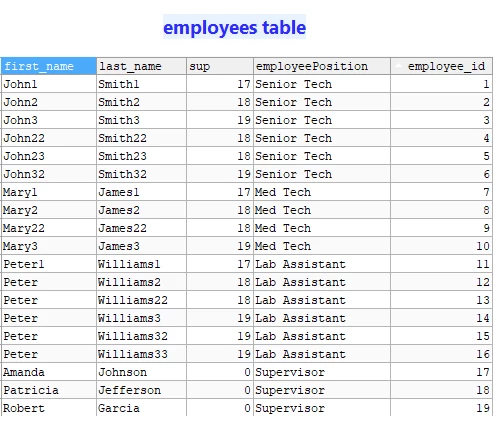
OK, so the Sup column form the database.

If the employee is a Supervisor, they have a 0 in the Sup column.

Reporting staff then have the Supervisor's employee number in their Sup column establishing who reports to whom.

I have been able to get the column display for the Supervisors but cannot figure out how to get the staff listed (in groups) under them.

Here is what I am using:

<cfquery name="Sups" DataSource="#APPLICATION.DSN#">
SELECT
      First_Name + ' ' + last_name AS SupName
FROM
      Employees
Where
      Sup = 0
Order By
      Last_name
</cfquery>


<table width="100%">
<caption>Supervisors</caption>
  <cfloop list="#Sups.columnList#" index="col">
  <thead>
    <tr>
      <cfloop query="Sups">
        <th><cfoutput>#SupName#</cfoutput></th>
      </cfloop>
    </tr>
    </thead>
  </cfloop>
</table>

That displays this for me:

Any tips on how to add the staff query / output?

If I add a column to the Sups query, it duplicates the rows in the output.

I found the partial solution above here https://stackoverflow.com/questions/28238242/coldfusion-can-cfoutput-list-all-columns-in-the-table-without-explicitly-listi


Thank you for any help pointing me in the right direction.
    This topic has been closed for replies.
    Correct answer BKBK

    Use:

    • Query of a query.
      Make just 1 trip to the database, with an employees query.
      It should collect all the employee information you will need.
      Then perform a query of query on employees to obtain the different subcategories of information.
      This will all become clear in a moment.
    • A design that will enable you to easily display the information.
      I would go for a design based on the Supervisor: select each Supervisor, then find his or her subordinates.
    • An HTML table embedded within an HTML table. For exmple, a table within the td of another table.
      The table you have posted suggests this. 


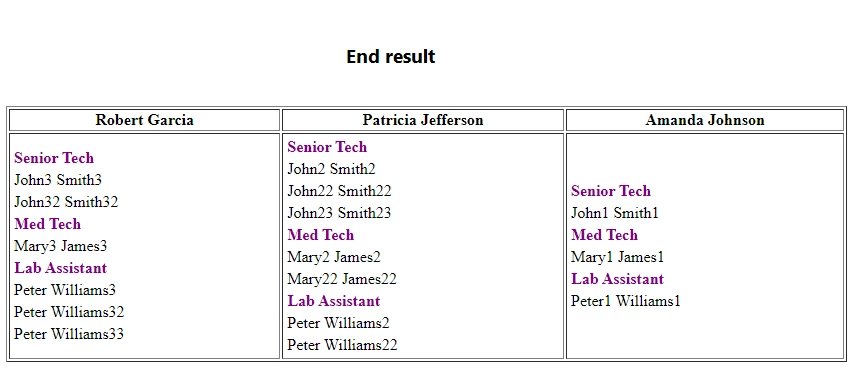
    You will now get asolution, based on the following table:


    <!--- General employees query --->
    <cfquery datasource="cfmx_db" name="employees">
    	select *
    	from employees
    </cfquery>
    
    <!--- Supervisors --->
    <cfquery name="Sups" dbtype="query">
    SELECT
          employee_id, First_Name + ' ' + last_name AS SupName
    FROM
          Employees
    WHERE
          Sup = 0
    ORDER BY
          Last_name, first_name
    </cfquery>
    
    <!--- Supervisors and their subordinates --->
    <cfoutput>
    	<table width="100%" border="1">
    	 
    	    <thead>
    	    <tr>
    	      <cfloop query="Sups">
    	        <th>#SupName#</th>
    	      </cfloop>
    	    </tr>
    	    </thead>
    	    <tr>
    	      <cfloop query="Sups">
    	        <td>#getSubordinatesTable(employee_id)#</td>	        
    	      </cfloop>
    	    </tr>
    	   
    	</table>
    </cfoutput>
    
    <!--- Function to get the Subordinates of each Supervisor --->
    <cffunction name="getSubordinatesTable" returntype="string" >
    	<!--- Employee ID of the Supervisor --->
    	<cfargument name="employeeId" required="true" type="numeric" >
    	
    	<cfset var SeniorTechsQ = "">
    	<cfset var MedTechsQ = "">
    	<cfset var LabAssistantsQ = "">
    	<cfset var subordinatesTable = "">
    	
    	<!--- Get the Supervisor's Senior Techs --->
    	<cfquery name="SeniorTechsQ" dbtype="query">
    		SELECT
    		        First_Name + ' ' + last_name AS SeniorTechName
    		FROM
    		      Employees
    		WHERE
    		      employeePosition = 'Senior Tech' and sup=#arguments.employeeId#
    		ORDER BY
    		      first_name, Last_name
    	</cfquery>
    	
    	<!--- Get the Supervisor's Med Techs --->
    	<cfquery name="MedTechsQ" dbtype="query">
    		SELECT
    		       First_Name + ' ' + last_name AS MedTechName
    		FROM
    		      Employees
    		WHERE
    		      employeePosition = 'Med Tech' and sup=#arguments.employeeId#
    		ORDER BY
    		      first_name, Last_name
    	</cfquery>
    	
    	<!--- Get the Supervisor's Lab Assistants --->
    	<cfquery name="LabAssistantsQ" dbtype="query">
    		SELECT
    		       First_Name + ' ' + last_name AS LabAssistantName
    		FROM
    		      Employees
    		WHERE
    		      employeePosition = 'Lab Assistant' and sup=#arguments.employeeId#
    		ORDER BY
    		      first_name, Last_name
    	</cfquery>
    	
    	<!--- Display the Supervisor's subodinates in a table, according to role --->
    	<cfsavecontent variable="subordinatesTable">
    		<cfoutput>
    			<table>
    	        <tr><td><span style="color:purple"><strong>Senior Tech</strong></span> </td></tr>
    	        <cfloop query="SeniorTechsQ">
    	        	<tr><td>#SeniorTechName#</td></tr>
    	        </cfloop>
    	 		<tr><td><span style="color:purple"><strong>Med Tech</strong></span> </td> </tr>
    	 		<cfloop query="MedTechsQ">
    	        	<tr><td>#MedTechName#</td></tr>
    	        </cfloop>
    	 		<tr><td><span style="color:purple"><strong>Lab Assistant</strong></span> </td></tr>
    	 		<cfloop query="LabAssistantsQ">
    	        	<tr><td>#LabAssistantName#</td></tr>
    	        </cfloop>
    	 		</table>
            </cfoutput>
    	</cfsavecontent>
    	
    	<cfreturn subordinatesTable>
    	
    </cffunction>


    1 reply

    BKBK
    Community Expert
    BKBKCommunity ExpertCorrect answer
    Community Expert
    November 7, 2021

    Use:

    • Query of a query.
      Make just 1 trip to the database, with an employees query.
      It should collect all the employee information you will need.
      Then perform a query of query on employees to obtain the different subcategories of information.
      This will all become clear in a moment.
    • A design that will enable you to easily display the information.
      I would go for a design based on the Supervisor: select each Supervisor, then find his or her subordinates.
    • An HTML table embedded within an HTML table. For exmple, a table within the td of another table.
      The table you have posted suggests this. 


    You will now get asolution, based on the following table:


    <!--- General employees query --->
    <cfquery datasource="cfmx_db" name="employees">
    	select *
    	from employees
    </cfquery>
    
    <!--- Supervisors --->
    <cfquery name="Sups" dbtype="query">
    SELECT
          employee_id, First_Name + ' ' + last_name AS SupName
    FROM
          Employees
    WHERE
          Sup = 0
    ORDER BY
          Last_name, first_name
    </cfquery>
    
    <!--- Supervisors and their subordinates --->
    <cfoutput>
    	<table width="100%" border="1">
    	 
    	    <thead>
    	    <tr>
    	      <cfloop query="Sups">
    	        <th>#SupName#</th>
    	      </cfloop>
    	    </tr>
    	    </thead>
    	    <tr>
    	      <cfloop query="Sups">
    	        <td>#getSubordinatesTable(employee_id)#</td>	        
    	      </cfloop>
    	    </tr>
    	   
    	</table>
    </cfoutput>
    
    <!--- Function to get the Subordinates of each Supervisor --->
    <cffunction name="getSubordinatesTable" returntype="string" >
    	<!--- Employee ID of the Supervisor --->
    	<cfargument name="employeeId" required="true" type="numeric" >
    	
    	<cfset var SeniorTechsQ = "">
    	<cfset var MedTechsQ = "">
    	<cfset var LabAssistantsQ = "">
    	<cfset var subordinatesTable = "">
    	
    	<!--- Get the Supervisor's Senior Techs --->
    	<cfquery name="SeniorTechsQ" dbtype="query">
    		SELECT
    		        First_Name + ' ' + last_name AS SeniorTechName
    		FROM
    		      Employees
    		WHERE
    		      employeePosition = 'Senior Tech' and sup=#arguments.employeeId#
    		ORDER BY
    		      first_name, Last_name
    	</cfquery>
    	
    	<!--- Get the Supervisor's Med Techs --->
    	<cfquery name="MedTechsQ" dbtype="query">
    		SELECT
    		       First_Name + ' ' + last_name AS MedTechName
    		FROM
    		      Employees
    		WHERE
    		      employeePosition = 'Med Tech' and sup=#arguments.employeeId#
    		ORDER BY
    		      first_name, Last_name
    	</cfquery>
    	
    	<!--- Get the Supervisor's Lab Assistants --->
    	<cfquery name="LabAssistantsQ" dbtype="query">
    		SELECT
    		       First_Name + ' ' + last_name AS LabAssistantName
    		FROM
    		      Employees
    		WHERE
    		      employeePosition = 'Lab Assistant' and sup=#arguments.employeeId#
    		ORDER BY
    		      first_name, Last_name
    	</cfquery>
    	
    	<!--- Display the Supervisor's subodinates in a table, according to role --->
    	<cfsavecontent variable="subordinatesTable">
    		<cfoutput>
    			<table>
    	        <tr><td><span style="color:purple"><strong>Senior Tech</strong></span> </td></tr>
    	        <cfloop query="SeniorTechsQ">
    	        	<tr><td>#SeniorTechName#</td></tr>
    	        </cfloop>
    	 		<tr><td><span style="color:purple"><strong>Med Tech</strong></span> </td> </tr>
    	 		<cfloop query="MedTechsQ">
    	        	<tr><td>#MedTechName#</td></tr>
    	        </cfloop>
    	 		<tr><td><span style="color:purple"><strong>Lab Assistant</strong></span> </td></tr>
    	 		<cfloop query="LabAssistantsQ">
    	        	<tr><td>#LabAssistantName#</td></tr>
    	        </cfloop>
    	 		</table>
            </cfoutput>
    	</cfsavecontent>
    	
    	<cfreturn subordinatesTable>
    	
    </cffunction>


    Known Participant
    November 8, 2021

    This is great!  I never would have figured that out.

    I suspect I complicated it a bit, perhaps I can do without the grouping of the staff.

    It partially works, it's not listing the individual staff.


    Known Participant
    November 8, 2021

    Ugh, never mind!

    I was using an incorrect value, emp_id instead of emp_pk

    It works!!!