Inspiring
April 27, 2024
Answered

Setting up ColdFusion Server website with another user login web.config

  • April 27, 2024
  • 1 reply
  • 697 views

Hi,

I have a ColdFusion 2021 webserver with IIS.  


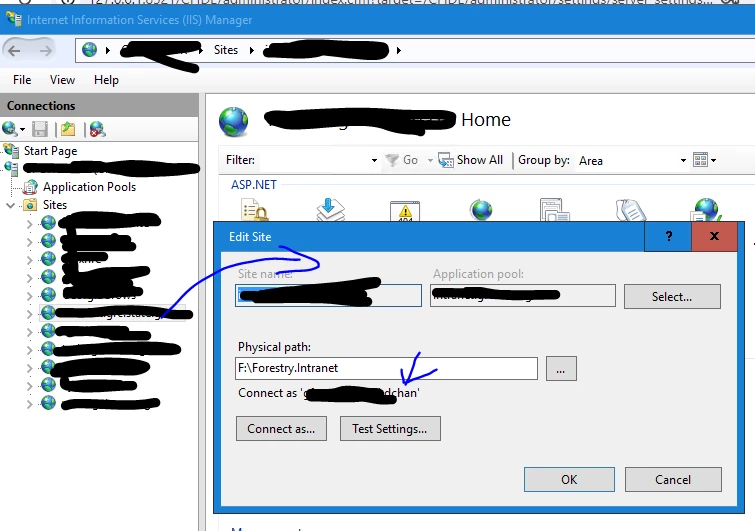
The above setting will work.  But, since it uses my personal login and we have a policy to change personal passwords every so often, that means I will need to come here to change my password. 


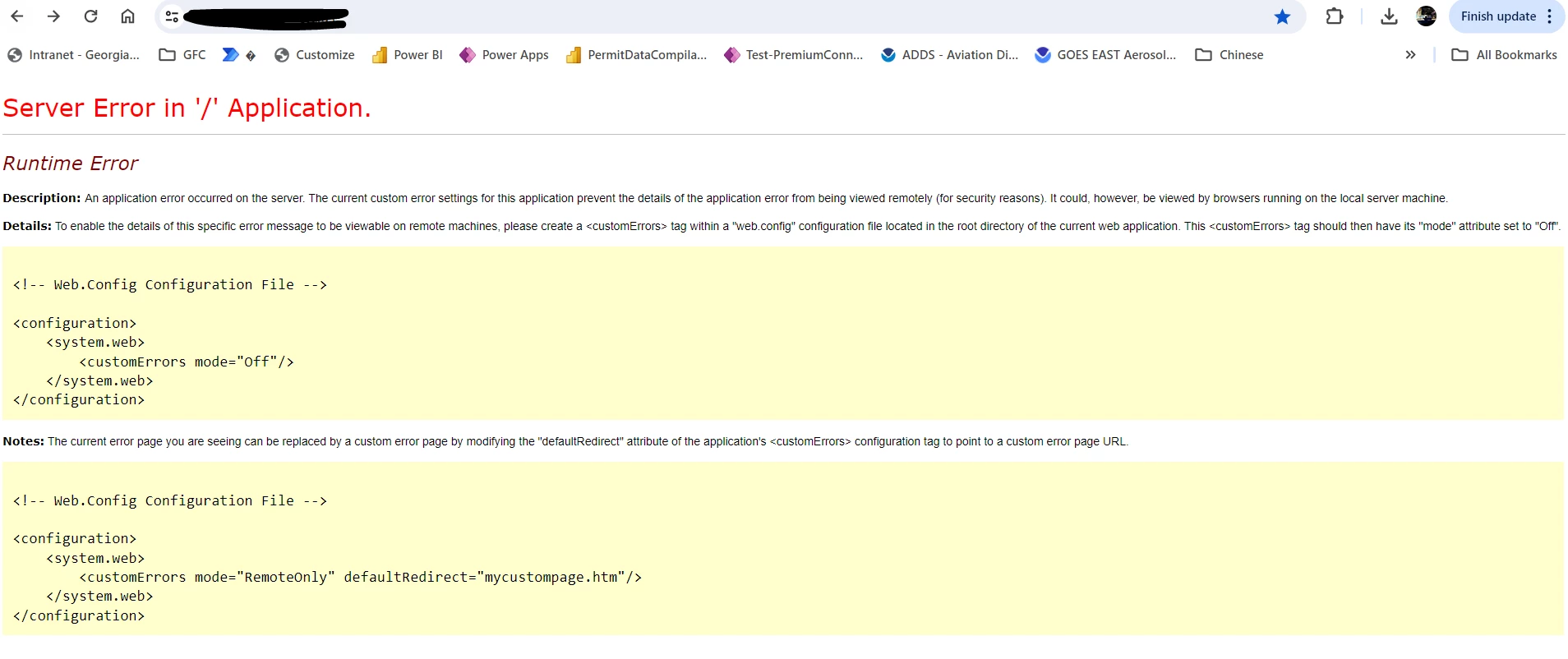
I tried to change this to an administrative account that does not require periodic password change,  but then, I got this error. 


How should I go about fixing this?  I could not identify the location of web.config.  I wonder if making the suggested change will work either. 


Comments/Suggestions? 


Thanks.


dchan

This topic has been closed for replies.
Correct answer Charlie Arehart

You would place that web.config file in that website folder whose name you show. And if one is there already, you'd instead carefully fold these changes into that.


Or you could instead use the iis ui. At this web site level, find the "error pages" feature, open that, then use the "edit feature settings" on the right, and change the value to "detailed". (Google for more details if needed.)  Now refresh the page.


Either way, you should now see the actual error that is happening because of your password change.


Finally, you should NOT need to be using a personal username and password for accessing the folder in question. Your iis site runs by default under a special windows user account that incorporates the name of the app pool used by the site, and you should be able to grant that user permission to the folder in question. This, too, is something you should be able to learn more about in any of many online resources.


Indeed, as it's not at all a question specific to cf, you don't need to give regard to cf at all in looking into it. That should widen your search results.


Let us know if you solve things, or if you fail to find help. Of course, others here may offer an expansion on what I've offered, or they may well offer an entirely different answer (even one which entirely ignores what I've said, as can happen here sometimes). 

1 reply

Charlie Arehart
Community Expert
Charlie ArehartCommunity ExpertCorrect answer
Community Expert
April 27, 2024

You would place that web.config file in that website folder whose name you show. And if one is there already, you'd instead carefully fold these changes into that.


Or you could instead use the iis ui. At this web site level, find the "error pages" feature, open that, then use the "edit feature settings" on the right, and change the value to "detailed". (Google for more details if needed.)  Now refresh the page.


Either way, you should now see the actual error that is happening because of your password change.


Finally, you should NOT need to be using a personal username and password for accessing the folder in question. Your iis site runs by default under a special windows user account that incorporates the name of the app pool used by the site, and you should be able to grant that user permission to the folder in question. This, too, is something you should be able to learn more about in any of many online resources.


Indeed, as it's not at all a question specific to cf, you don't need to give regard to cf at all in looking into it. That should widen your search results.


Let us know if you solve things, or if you fail to find help. Of course, others here may offer an expansion on what I've offered, or they may well offer an entirely different answer (even one which entirely ignores what I've said, as can happen here sometimes). 
/Charlie (troubleshooter, carehart. org)
Inspiring
April 27, 2024

Hi @Charlie Arehart ,


Thanks for the reply.  

I found the web.config file.  I can make edit to it and the changes DID take effect.

However, the error screen I posted was simply saying that something is wrong without specifying the details.  

Where may I see the details?  


It is probably not best practice to use personal username/password to make the website works, but it works.  I am trying to migrate away from it, but run into this issue.  


Thanks. 


dchan

Charlie Arehart
Community Expert
Community Expert
April 27, 2024

You will see the details on the page as rendered. If it's still showing the same thing as before, then your attempt to solve that by editing the file has failed to work. 


Please skip that and user the other approach I'd offered. 

/Charlie (troubleshooter, carehart. org)