
Inspiring
October 3, 2017
Answered

SpreadsheetSetCellFormula with the function Hyperlink has a strange behavior

  • October 3, 2017
  • 2 replies
  • 1340 views

Hello everybody

I don't know if you can help me but:

I create an excel document using the instructions "spreadsheet" for ColdFusion 10.

There is, among the data to be added, a "hyperlink" formula that will contain the URL of a website

I therefore use the instruction "SpreadsheetSetCellFormula"

See the code:

<cfset SpreadsheetSetCellFormula(s, 'HYPERLINK("#Query.Field1#", "#qQuery.Field1#")', curRow, curCol)>

Explanation of different variables:

s                   : object representing the excel sheet

Query.Field1 : it is the data containing the URL (in a Query)

curRow          : row number where the data will be write

curCol           : Column number

The problem:

When I execute the code on my computer and I open the file: the display is correct
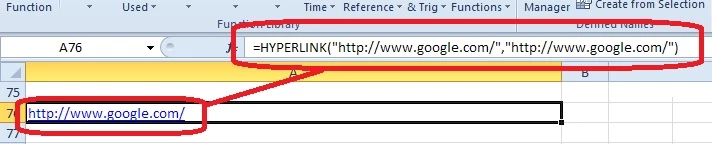
When my colleague tries to create the file with the same code, he receives, not the internet link, but the number "0" is displayed in blue colour but and no formulas.
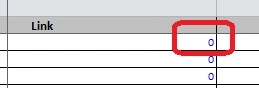
any ideas ?

I don't understand.

Thank you for you help

Best regards

Andre

This topic has been closed for replies.
Correct answer andrél93139241

Hello,

I would like to thank you for your help.

About the name (query and Query), it is false name just for example.

The problem is (If I understood correctly) when it opens the document, it has not clicked on the "enable content" button.


This morning everything seems to work fine.

So thank you

2 replies

Participant
February 8, 2022

SAME ISSUE:  CF server 2021 Release.

VERY IMPORTANT:  This code ran flawlessly on CF v10 (same excel file "xlsx")

MUST Find solution. 

My Master excel is "xlsx".   Going back to "xls" is NOT option as we're using advanced features not backward compatible.


To simulate workflow I used Excel to create a blank "xls" and "xlsx" both with "sheet1" renamed to "interview".

The following code sets the cells correctly... BUT "xls" will autocalc when opened, "xlsx" WILL NOT.  User must hit "cntrl-alt-F9" which then updates.

Please try yourself, you will see same results.


 (simply switch lines 1/2 to use different "master" in your simulation.

<cfset excelFileToUse = "d:\oldExcel.xls">
<cfset excelFileToUse = "d:\testMaster.xlsx">


<cfset dummyNumber = randrange(12345,99999)>

<cfset fileExt = listLast(excelFileToUse,".")>


<cfset CompanyLink = "HYPERLINK(""http://localhost/customers/customer.cfm?customerID=156"",""My Company"")">
<cfset contactLink = "HYPERLINK(""http://localhost//customers/customer.cfm?customerID=156"",""Johnny Walker"")">
<cfset quoteLink = "HYPERLINK(""http://localhost/quotes/oldquote.cfm?quoteID=15263"",""15626"")">


<!--- Read QUOTE Sheet --->

<cfset SpreadsheetObj = SpreadSheetRead(excelFileToUse)>

<cfset SpreadsheetSetActiveSheet(SpreadsheetObj, "interview")>


<!--- hard coded param rather than CF variable, NO DIFFERENCE in outcome --->

<cfset SpreadsheetSetCellFormula(SpreadsheetObj, 'HYPERLINK("http://localhost/customers/customer.cfm?customerID=156","My Company")', 1,2)>
<cfset SpreadsheetSetCellFormula(SpreadsheetObj, contactLink, 2,2)>
<cfset SpreadsheetSetCellFormula(SpreadsheetObj, quoteLink, 3,2)>


<!--- Basic math test --->

<cfset SpreadsheetSetCellFormula(SpreadsheetObj, '134+442', 1,3)>
<cfset SpreadsheetSetCellFormula(SpreadsheetObj, "154*342", 2,3)>
<cfset SpreadsheetSetCellFormula(SpreadsheetObj, "14/62", 3,3)>

<cfset SpreadsheetSetColumnWidth(SpreadsheetObj, 2, 24)>
<cfset SpreadsheetSetColumnWidth(SpreadsheetObj, 3, 24)>


<!--- set active sheet again in effort to troubleshoot, no difference if this line is in code or not --->

<cfset SpreadsheetSetActiveSheet(SpreadsheetObj, "interview")>


<cfset spreadsheetwrite(SpreadsheetObj, "d:\temp\#dummyNumber #.#fileExt#")>


SOMEBODY PLEASE HELP... THIS IS FRUSTATION TO THE 38TH POWER!!!!!

Participating Frequently
February 8, 2022

How is this?

<cfset SpreadsheetSetActiveSheet(SpreadsheetObj, "interview")>

<cfset obj=SpreadsheetObj.getWorkBook()>
<cfset obj.getCreationHelper().createFormulaEvaluator().evaluateAll()>

<cfset spreadsheetwrite(SpreadsheetObj, "d:\temp\#dummyNumber #.#fileExt#")>


BKBK
Community Expert
Community Expert
October 4, 2017

You call the query Query, then qQuery. That is confusing. I would suggest the following test for your colleague:

<cfset SpreadsheetSetCellFormula(s, 'HYPERLINK("http://www.google.com", "http://www.google.com")', 76, 1)>

If this works, then the problem lies with your code and not with the ColdFusion engine.

andrél93139241AuthorCorrect answer
Inspiring
October 5, 2017

Hello,

I would like to thank you for your help.

About the name (query and Query), it is false name just for example.

The problem is (If I understood correctly) when it opens the document, it has not clicked on the "enable content" button.


This morning everything seems to work fine.

So thank you

BKBK
Community Expert
Community Expert
October 5, 2017

Thanks. Please mark your answer as the correct one.