I have updated to 2021. I appreciate your help though. For the next person reading this...
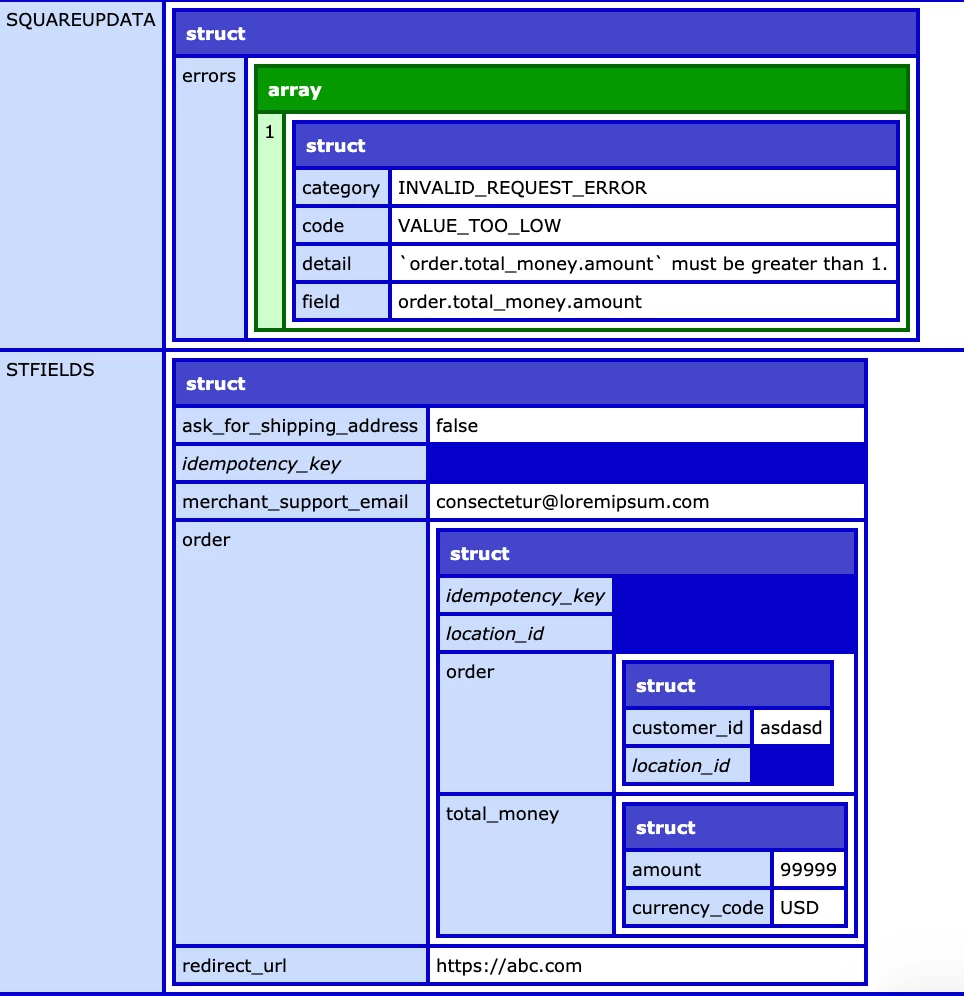
1) The field order.total_money_amount is actually a read-only field that Square calculates in the response. It is based on you sending order.amount and order.quantity. You don't send total_money in the request.
2) SquareUpData is the response data, not the data you send.
Here's an example of working code:
<cfset REQUEST.location_id = "YourLocationID">
<cfset REQUEST.Access_Token = "YourToken">
<cfset REQUEST.Square_Server = "connect.squareup.com">
<cfset REQUEST.Square_Version = "2020-12-16">
<cfif StructKeyExists(Session, "total") AND StructKeyExists(Session, "CustomerID")>
<cfset session.total = session.total * 100 />
<cfset REQUEST.Amount = #session.total#>
<cfif isDefined("URL.transactionId")>
<cfset rtFields = {
          "order_ids": [
              "#URL.orderID#"
          ]
}>
<cfhttp method="post" result="objGet" url="https://#REQUEST.Square_Server#/v2/locations/#REQUEST.location_id#/orders/batch-retrieve">

<cfhttpparam type="header" name="Accept" value="application/json">
<cfhttpparam type="header" name="Authorization" value="Bearer #REQUEST.Access_Token#">
<cfhttpparam type="header" name="Cache-Control" value="no-cache">
<cfhttpparam type="header" name="Content-Type" value="application/json">
<cfhttpparam type="body" value="#serializeJSON(rtFields)#">

</cfhttp>

<cfelse>

<cfset REQUEST.Base_Price_Money_Amount = #session.total#>
<cfset REQUEST.idempotency_key = #CreateUUID()#>
<cfset REQUEST.order_idempotency_key = #CreateUUID()#>


<cfset stFields = {
	"idempotency_key": "#REQUEST.idempotency_key#",
	"order": {
	  "idempotency_key": "REQUEST.order_idempotency_key",
	  "order": {
		"location_id": "#session.REQUEST_LocationID",
		"customer_id": "C-#session.CustomerID#",
		"line_items": [
		  {
			"quantity": '1',
			"name": "Item Name",
			"note": "Any Item Note",
			"uid": "uid",
			"base_price_money": {
			  "amount": int(#REQUEST.Base_Price_Money_Amount#),
			  "currency": "USD"
			}
		  }
		]
	  }
	},
	"ask_for_shipping_address": false,
	"merchant_support_email": "CustomerService@example.com",
	"redirect_url": "https://someURL.com/SquareOrderComplete.cfm"
  }>

<cfhttp method="post" result="objGet" url="https://#REQUEST.Square_Server#/v2/locations/#REQUEST.location_id#/checkouts">


<cfhttpparam type="header" name="Square-Version" value="#REQUEST.Square_Version#">
<cfhttpparam type="header" name="Authorization" value="Bearer #REQUEST.Access_Token#">
<cfhttpparam type="header" name="Content-Type" value="application/json">
<cfhttpparam type="body" value="#serializeJSON(stFields)#">

</cfhttp>

</cfif>

<cfscript>
squareupdata = deserializeJSON(#objGet.FileContent#);
</cfscript>
3) If using CF2016 you need to add the metadata above in BKBK's post. You don't need it in 2018 and 2021.
4) Square checkout (unlike Stripe) after the customer completes the checkout does not return JSON. The customer can't get to the order complete page until the card has been approved. You get ID's for reference in the order complete URL.
To reiterate, the error does not originate from the struct stFields. It originates from squareupdata, the output of a cfhttp post.
But we don't know the contents of squareupdata. So the original question is moot.
In any case, since CF2016 Update 2, you can specify the data type of a struct's key-value pair as follows:
<cfset metadata = {someKey: {type:"int"}}>
<cfset myStruct.setMetadata(metadata)>



 AdChoices