
Inspiring
December 27, 2020
Answered

Using isdefined when json variable contains a #

  • December 27, 2020
  • 3 replies
  • 909 views

Hello,

I need help understanding how to check if a variable is defined when the json variable contains a # in its name as shown in the image:
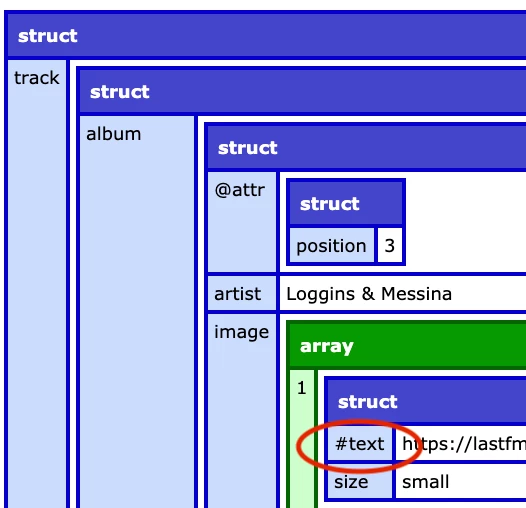
I tried using ## but it not correct:

<cfif Isdefined('results.track.album.image[2].##text') AND #results.track.album.image[2].##text# NEQ ''>

 Suggestions?


Thanks!
Gary

    This topic has been closed for replies.
    Correct answer BKBK
    <cfif structKeyExists(results.track.album.image[2], "##text") AND results.track.album.image[2]["##text"] NEQ ''>
    	
    </cfif>

    3 replies

    BKBK
    Community Expert
    BKBKCommunity ExpertCorrect answer
    Community Expert
    December 27, 2020
    <cfif structKeyExists(results.track.album.image[2], "##text") AND results.track.album.image[2]["##text"] NEQ ''>
    	
    </cfif>
    BKBK
    Community Expert
    Community Expert
    December 27, 2020
    <cfif not isNull(results.track.album.image[2]["##text"]) AND results.track.album.image[2]["##text"] NEQ ''>
    
    </cfif>
    
    ghanna1Author
    Inspiring
    December 27, 2020

    Might not be the best way to do it but this worked to simply remove the # for the JSON results:

    <cfset content = replace(#cfhttp.filecontent#, "##", "", "all") />
    <cfset results = deserializeJSON(content) /> 


    BKBK
    Community Expert
    Community Expert
    December 28, 2020

    ghanna1

    There is no need to apply replace() beforehand. You got an error because isDefined() cannot be used in this case.


    To use isDefined() the argument has to be a valid variable-name. However, results.track.album.image[2]['##text'] is not a valid variable-name. 


    To test for existence in this case, the appropriate methods to use are, for example, isNull() or structKeyExists().

    Community Expert
    December 27, 2020

    I think you'll have to treat it like an associative array. This is how you deal with any structure members whose names don't correspond to CF variable naming rules.


    results.track.album.image[2]['#text']


    Dave Watts, Eidolon LLC

    Dave Watts, Eidolon LLC
    ghanna1Author
    Inspiring
    December 27, 2020

    I tried your suggestion:

    <cfif Isdefined("results.track.album.image[2]['#text']")>
    do something
    </cfif>

    and still got:

    • An expression that began on line 26, column 48.
      The expression might be missing an ending #, for example, #expr instead of #expr#.
    • An expression beginning with /", on line 26, column 17.This message is usually caused by a problem in the expressions structure.
    • An expression beginning with Isdefined, on line 26, column 7.This message is usually caused by a problem in the expressions structure.
    • A cfif tag beginning on line 26, column 2.
    BKBK
    Community Expert
    Community Expert
    December 29, 2020

    Please confirm whether or not you're satisfied with the answers.