
rohamiran
Participant
April 10, 2017
Answered

adobe connect connection test error

  • April 10, 2017
  • 1 reply
  • 4912 views

Hi!

I have a problom with adobe connect connection test (step 2).

(My adobe connect version is 9.5 and my server OS is windows server 2008 R2 SP1)
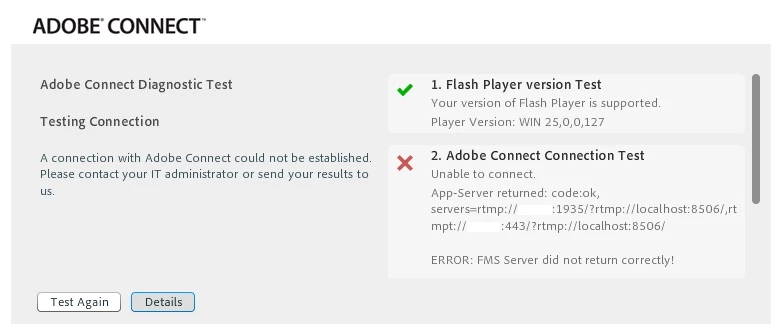
I've searched about it and I've found this two post but it didn't help:

Meeting Connection Test Page Fails at Step Two

Connect Meeting Test failed

Could you please help me solve that?

Thanks.
This topic has been closed for replies.
Correct answer Jorma_at_Knox

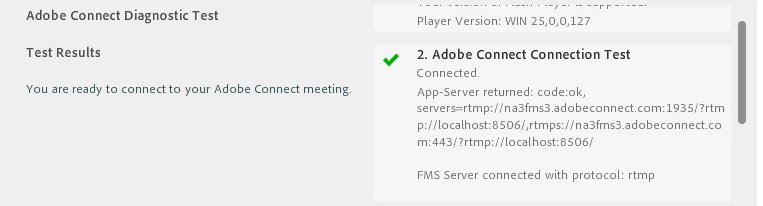
The URL that you obsured is very short. Are you sure that is the valid URL to your meeting server(s)? By comparison, Adobe's hosted servers look like this:

As to why it failed, it is likely one of two scenarios.

  1. Your AMS application is not running on your Connect server. This is probably less likely, but if this the issue, you can spend a lot of time chasing your tail trying to troubleshoot things.
  2. You have a firewall issue between you and the Connect server. This would be a policy that blocks RTMP traffic over port 1935 and RTMPS traffic over port 443.

1 reply

Jorma_at_Knox
Jorma_at_KnoxCorrect answer
Legend
April 10, 2017

The URL that you obsured is very short. Are you sure that is the valid URL to your meeting server(s)? By comparison, Adobe's hosted servers look like this:

As to why it failed, it is likely one of two scenarios.

  1. Your AMS application is not running on your Connect server. This is probably less likely, but if this the issue, you can spend a lot of time chasing your tail trying to troubleshoot things.
  2. You have a firewall issue between you and the Connect server. This would be a policy that blocks RTMP traffic over port 1935 and RTMPS traffic over port 443.
rohamiran
rohamiranAuthor
Participant
April 11, 2017

flyingj481  wrote

The URL that you obsured is very short. Are you sure that is the valid URL to your meeting server(s)? By comparison, Adobe's hosted servers look like this:

Thanks for the reply.

You were right. The url was very short, so I checked it and I found out that I haven't put "FQDN"  completely in (Adobe Connect Configuration--Application settings--server settings--Host Mappings--External Name).

Thank you again dear "@flyingj481". Your reply was a vey great help.

Jorma_at_Knox
Legend
April 28, 2017

Great! Glad it was an easy fix.