
Participant
December 6, 2021
Answered

Substance Painter Material color changes in new substance

  • December 6, 2021
  • 1 reply
  • 2263 views

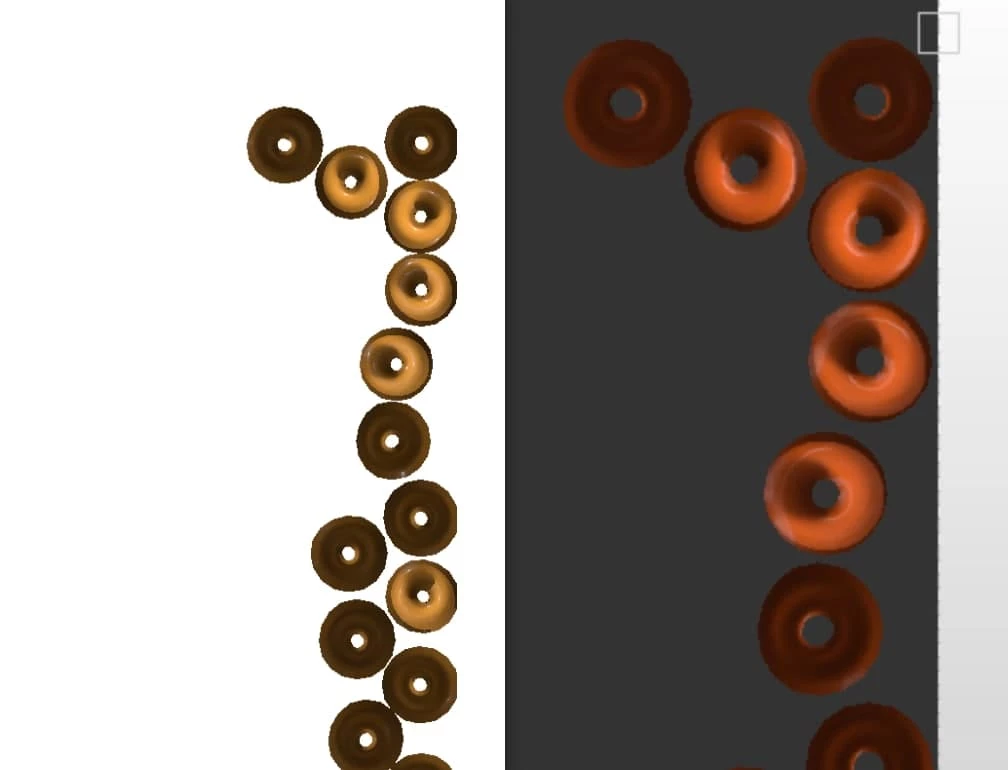
I couldn't find anyone else having this issue, but since I got the newest Substance Painter all materials that I've tested displays a vastly different color than previous Substance Painter versions. It appears to be the materials themselves doing this as a plain fill color shows correctly.

The main materials I've focused on testing is Resin Epoxy and Bull Leather medium grain.
(but it appears it's most if not all materials).
It displays best with the color #F8A73B, that previously showed up on these and other materials

close to the actual hex, but now turns from yellow to bright orange.

Thanks for any advice.

Example of same project and same color on old vs new substance.
This topic has been closed for replies.
Correct answer OliverPearl

Could it be that your issue is same than the one described in the thread below? According to Adobe, this is a bug introduced in Substance 3D Painter version 7.0.4: https://community.adobe.com/t5/substance-3d-painter-discussions/material-color-mismatch/m-p/12550400

I'm facing a very similar issue where the light yellow color #E0A016 appears orange on the 3D model.

1 reply

OliverPearl
OliverPearlCorrect answer
Participant
December 12, 2021

Could it be that your issue is same than the one described in the thread below? According to Adobe, this is a bug introduced in Substance 3D Painter version 7.0.4: https://community.adobe.com/t5/substance-3d-painter-discussions/material-color-mismatch/m-p/12550400

I'm facing a very similar issue where the light yellow color #E0A016 appears orange on the 3D model.

Participant
December 12, 2021

Yes, it seems to be! Thank you for directing me to that. Then I will hope they find a fix soon.