
Participant
Nov 21, 2023 3:37 AM UTC
Answered

Creative Cloud lets me sign out but won't actually sign me out?

So basically, I'm trying to login to my other email that I used to purchase my products, instead of my usual one (my school account). I click sign out on Creative Cloud, but it then tells me to sign in again. I click sign in once again, but it auto signs me into my school account, which is the account I do not want to log into. I want to type in the information for my other account...
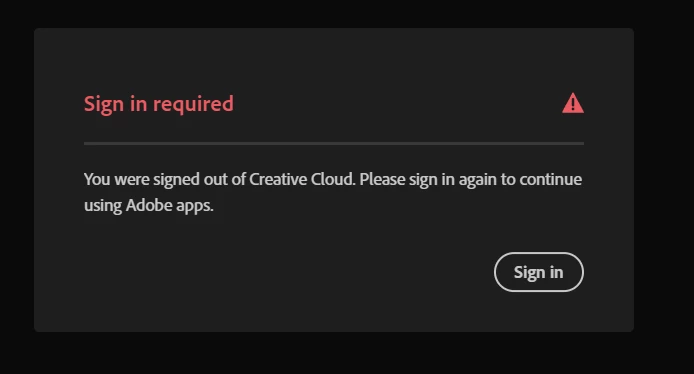
 

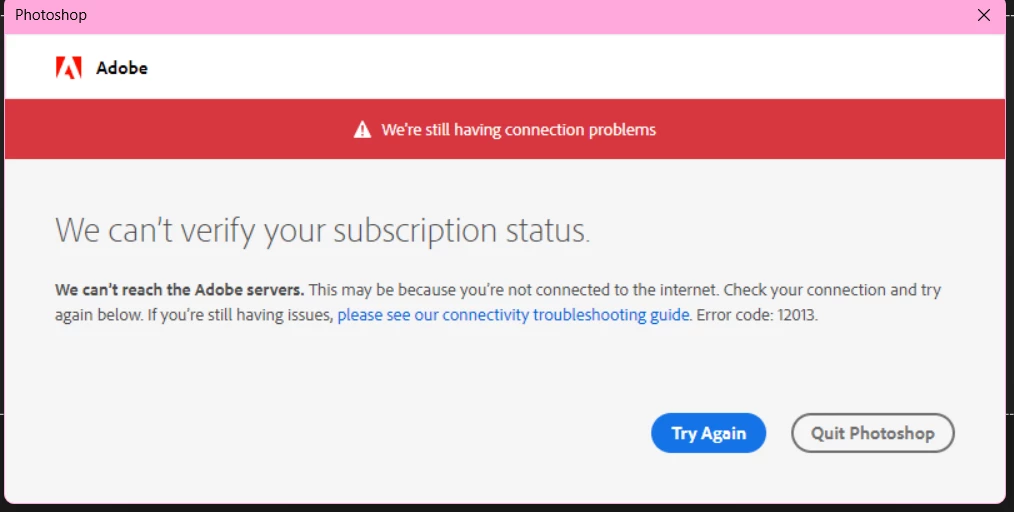
Not sure if this is related, but I tried out going into Photoshop directly to see if it would ask me to log into an account with a Photoshop purchase. It constantly says it can't verify my subscription status because it can't reach the Adobe servers. I've tried using my home wifi and my phone data network, but I don't think it is my internet issues as I can connect properly to anything else but Adobe apps.
 

I tried out uninstalling every Adobe file and product on my computer, but when I install Creative Cloud, it keeps on auto logging me into my school account. Can someone please help me out? Thanks.

    kglad
    kgladCorrect answer
    Community Expert
    Nov 21, 2023 3:24 PM UTC

    thanks for the info @Cheese00 


    for others:


    You can delete the cached login profile/files from the machine and check the behavior. I am assuming the user is using the Windows machine.
     
    The locations are:
     
    > Remove Adobe-related entries from Control Panel >> Credential Manager >> Windows Credentials.
     
    > Delete all the files and folders from C:\Users\username\AppData\Local\Adobe\OOBE
     
    *****************************************************
     
    Delete the entire contents of the OOBE folder:
     
    1) Quit the Creative Cloud desktop app from the gear icon in the upper-right corner.
     
    2) Browse to the following location based on your operating system.
     
        A) Mac OS: /Users/<user name>/Library/Application Support/Adobe/OOBE
    NOTE: \Users\<user name>\Library\ is hidden by default. To unhide see below*
     
        B) Windows: C:\Users\<user name>\AppData\Local\Adobe\OOBE
    NOTE: C:\Users\<user name>\AppData is hidden by default.  To unhide see below*
     

    5 replies

    Cheese00Author
    Participant
    Nov 21, 2023 3:21 PM UTC

    If anyone is having the same issue as me; this is what i did:


    (I am on Windows)

    I went into credential manager (then windows credentials) and deleted any instance that mentioned "adobe".

    I then faced my other issue, which was connecting to the Adobe servers. I had to go into my settings and turn off my firewall protection for public (I turned it back on after). 


    After doing this, I was able to type in my personal credentials as it fully signed me out of my school account. 🙂 


    p.s. im not sure if i had to go into credential manager to delete any adobe instances, but i am able to sign in now. yay!

    Translate
    kglad
    Community Expert
    kgladCommunity ExpertCorrect answer
    Community Expert
    Nov 21, 2023 3:24 PM UTC

    thanks for the info @Cheese00 


    for others:


    You can delete the cached login profile/files from the machine and check the behavior. I am assuming the user is using the Windows machine.
     
    The locations are:
     
    > Remove Adobe-related entries from Control Panel >> Credential Manager >> Windows Credentials.
     
    > Delete all the files and folders from C:\Users\username\AppData\Local\Adobe\OOBE
     
    *****************************************************
     
    Delete the entire contents of the OOBE folder:
     
    1) Quit the Creative Cloud desktop app from the gear icon in the upper-right corner.
     
    2) Browse to the following location based on your operating system.
     
        A) Mac OS: /Users/<user name>/Library/Application Support/Adobe/OOBE
    NOTE: \Users\<user name>\Library\ is hidden by default. To unhide see below*
     
        B) Windows: C:\Users\<user name>\AppData\Local\Adobe\OOBE
    NOTE: C:\Users\<user name>\AppData is hidden by default.  To unhide see below*
     
    Translate
    romantic_appreciator8951
    Participant
    Jun 8, 2025 2:58 PM UTC

    Hi, Ive been trying this multiple times but it seems whenever I reopen creative cloud, im still signed in onto my school account and a new OOBE folder appears in the same place of the one I deleted. 

    Translate
    kglad
    Community Expert
    Community Expert
    Nov 21, 2023 4:03 AM UTC

    you may need to delete your stored adobe credentials. ask adobe support to walk you through it or do it for you.


    there are 2 ways to contact adobe; chat and twitter (now x):

    chat:
    use a browser that allows popups and cookies
    and click here, https://helpx.adobe.com/contact.html?rghtup=autoOpen
    in the chat field (lower right), type AGENT
    be patient, it can take quite a while to reach a human.

    twitter/x:
    tweet @AdobeCare

    p.s. if you're contacted by anyone (via email or private message), it's much more likely to be a scammer than an adobe representative.

    Translate