
Participant
Nov 19, 2026 9:31 PM UTC
Answered

Creative Cloud Photography plan, got 2 now

So currently I’m using the Creative Cloud Photography plan which expires on july 7 2027. I bought last year a couple of codes during black friday and extended it.

Today I got another code so i can extend it one more year until 2028. 

Unfortunately after redeeming the code, with the same AdobeID, now I have 2 plans instead of the current one extended by 1 year.

Is there anything I can do, is it a bug or something? Because I followed the correct steps.
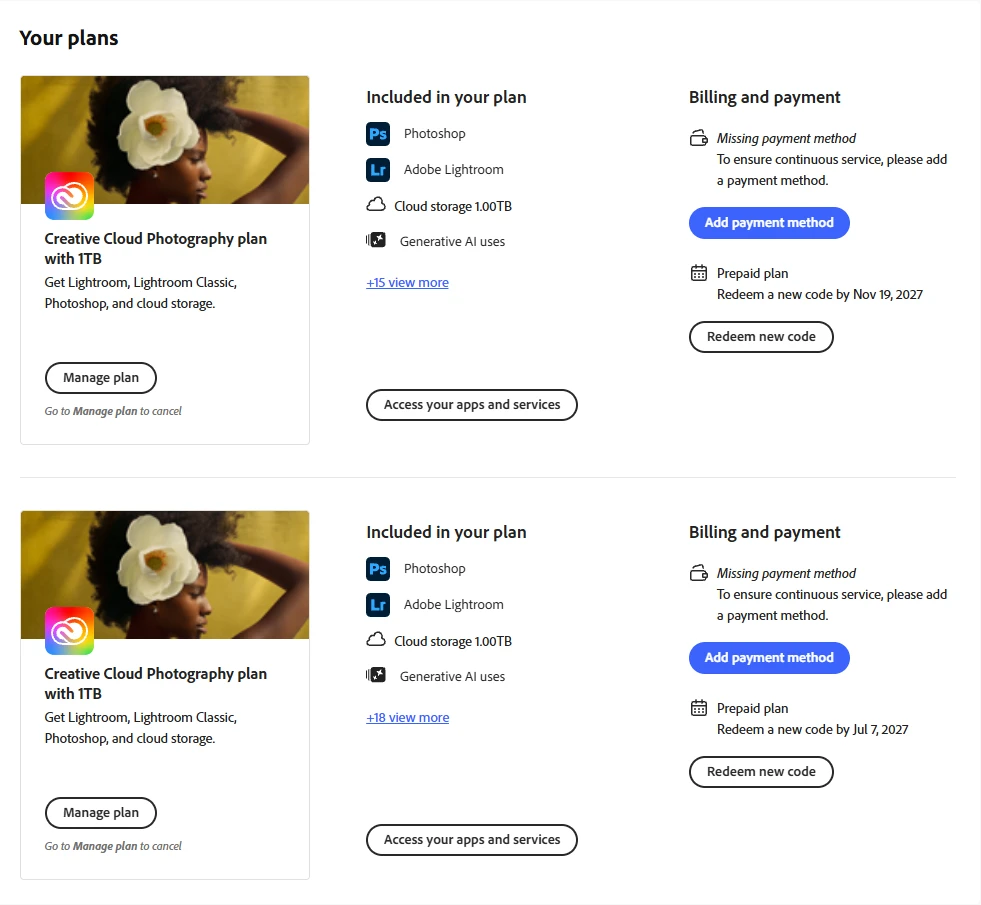
As you can see there’s 2 of them now. I had prior to the activation, only the bottom one which I was planning to extend.

    Jeff_A_Wright
    Jeff_A_WrightCorrect answer
    Community Manager
    Nov 19, 2026 9:46 PM UTC

    Thank you for posting, ​@stefanb40445977.


    I can see why this was confusing, especially since you expected the redemption code to extend your existing Photography plan.


    I can confirm that you currently have two Creative Cloud Photography plans, each with 1 TB of storage.


    You can review our guidance for redeeming a code when you already have an active subscription here:

    https://helpx.adobe.com/download-install/apps/licensing-activation/serial-number-redemption-code/redeem-code-adobe-account.html


    At this point, I recommend canceling the newly created subscription and contacting the reseller where you purchased the code to discuss a refund.


    If you need help identifying and canceling the correct subscription, please get in touch with us directly, as ​@John T Smith suggested:

    https://helpx.adobe.com/contact.html?rghtup=autoOpen


    Please let us know if you have any other questions, ​@stefanb40445977.

    9 replies

    Participant
    Nov 21, 2026 6:01 PM UTC

    Got in touch with Amazon since I purchased the code there and they told me there’s no way they can refund since it’s a digital product and that most likely there’s a “bug” on the Adobe side. The person I spoke with had a similar situation a while back and he spent a couple of weeks with the Adobe support and in the end they correctly extended his plan. 
    I managed to speak to someone from the support yesterday and he said he’ll forward the issue internally and let me know in the upcoming days the outcome. 
    hopefully they’ll fix it because as I said, I did the exact steps as the last time, the ID is the same and more important the product is the exact same. 

    Translate
    kglad
    Community Expert
    Community Expert
    Nov 22, 2026 1:34 PM UTC

    ​@stefanb40445977 


    thank you for your post.

    Translate
    Inspiring
    Nov 24, 2026 9:00 AM UTC

    Did anyone get back to you about this? As a matter of interest has anyone EVER seen any results from a support agent “escalating” their issue? My experience is that you receive automated e-mails for a while and then your ticket is closed and it disappears into the void.

    Example:

    Thank you for contacting Adobe Customer Care. Your case is still open, and we want to be sure your request has been addressed. Please let us know if you need more help or would like to provide additional information.


    Here are some details about the request you submitted:

    • Case Number:  xxxxxxx  
    • Issue:   xxxxxxx

    This case will remain open for the next 3 days to give you some time to respond.

    Translate
    Inspiring
    Nov 21, 2026 10:11 AM UTC

    Jeff - from the link you posted

    “Note You can also extend an existing subscription with a redemption code. Ensure the new subscription details match exactly to avoid creating a duplicate subscription.”

    There seems to be a disconnect between what Adobe are saying on their website and the actual practice.

    Translate
    kglad
    Community Expert
    Community Expert
    Nov 21, 2026 2:10 PM UTC

    ​@jezzahhh 


    i don’t know any details of what you purchased with your redemption code, but it may be that purchase applies to first time subscribers only.

    Translate
    Inspiring
    Nov 24, 2026 9:23 AM UTC

    I purchased two Amazon codes for 1TB photography plan. I used one of them to start a plan. I asked to use the second code to extend the plan. I was repeatedly told that this is not possible, even though Adobe’s own web page explicitly says that it is. After I sent an agent a screenshot of the relevant page (the one Jeff quotes above) he said he would escalate the matter. Since then I have heard precisely nothing, except for automated emails informing that the ticket will be closed in 3 days.

    Translate
    Jeff_A_Wright
    Community Manager
    Jeff_A_WrightCommunity ManagerCorrect answer
    Community Manager
    Nov 19, 2026 9:46 PM UTC

    Thank you for posting, ​@stefanb40445977.


    I can see why this was confusing, especially since you expected the redemption code to extend your existing Photography plan.


    I can confirm that you currently have two Creative Cloud Photography plans, each with 1 TB of storage.


    You can review our guidance for redeeming a code when you already have an active subscription here:

    https://helpx.adobe.com/download-install/apps/licensing-activation/serial-number-redemption-code/redeem-code-adobe-account.html


    At this point, I recommend canceling the newly created subscription and contacting the reseller where you purchased the code to discuss a refund.


    If you need help identifying and canceling the correct subscription, please get in touch with us directly, as ​@John T Smith suggested:

    https://helpx.adobe.com/contact.html?rghtup=autoOpen


    Please let us know if you have any other questions, ​@stefanb40445977.

    Translate
    John T Smith
    Community Expert
    Community Expert
    Nov 19, 2026 9:35 PM UTC

    This is a public forum, not Adobe support... other users can't see your account to help
    This is the correct way to contact support
    https://helpx.adobe.com/contact.html?rghtup=autoOpen

    -and enter AGENT in the box asking How can we help you?
    -or contact adobe support @adobecare at twitter/x

    Translate