


Participant
March 31, 2023
Answered

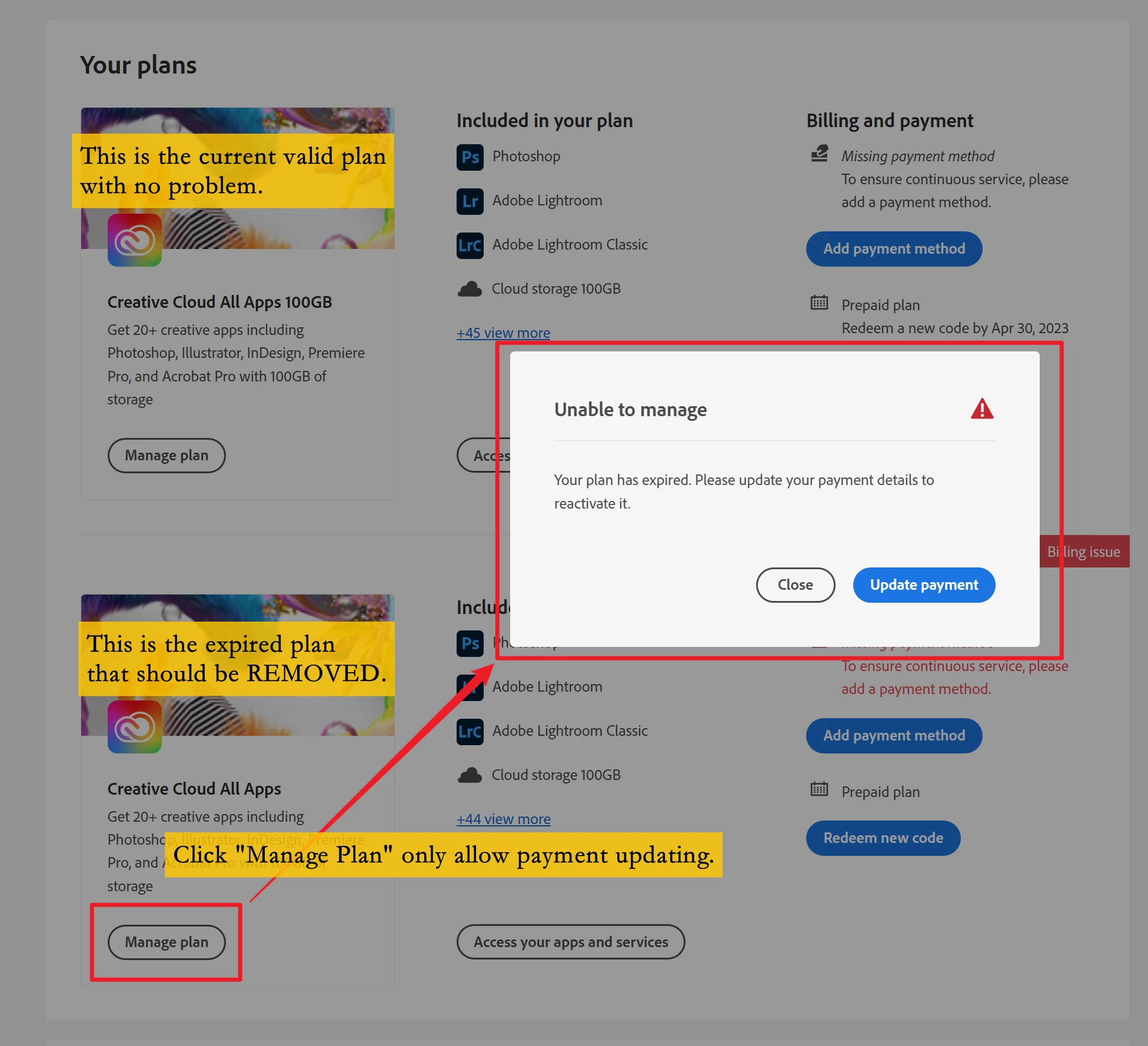
Expired redundant plan cannot be removed

  • March 31, 2023
  • 1 reply
  • 534 views

I redeemed a Creative Cloud plan last year AND this year. They are recognized as different plans. Whenever I log in, the warning says, "Billing Issue: There is an issue with your payment details. Please update your payment information." I wish to remove the expired plan.

 

This topic has been closed for replies.
Correct answer kglad

@Eric_the_Red_ 


contact adobe support. there are 3 ways to contact adobe; chat, phone and twitter:

chat:
use a browser that allows popups and cookies
and click here, https://helpx.adobe.com/contact.html?rghtup=autoOpen
in the chat field (lower right), type AGENT
be patient, it can take quite a while to reach a human.

phone:
https://helpx.adobe.com/contact/phone.html

twitter:
tweet @AdobeCare

p.s. if you're contacted by anyone (via email or private message), it's much more likely to be a scammer than an adobe representative. ie, double check for an employee badge if contacted in the forums and look for an adobe.com domain in the email address if you click reply to an email. then check again and be very suspicious. any other method of contacting (or offering to contact you) is almost certainly a scam, https://community.adobe.com/t5/using-the-community-discussions/staying-safe-in-the-adobe-support-community/td-p/12919684/redirect_from_archived_page/true

1 reply

kglad
Community Expert
kgladCommunity ExpertCorrect answer
Community Expert
March 31, 2023

@Eric_the_Red_ 


contact adobe support. there are 3 ways to contact adobe; chat, phone and twitter:

chat:
use a browser that allows popups and cookies
and click here, https://helpx.adobe.com/contact.html?rghtup=autoOpen
in the chat field (lower right), type AGENT
be patient, it can take quite a while to reach a human.

phone:
https://helpx.adobe.com/contact/phone.html

twitter:
tweet @AdobeCare

p.s. if you're contacted by anyone (via email or private message), it's much more likely to be a scammer than an adobe representative. ie, double check for an employee badge if contacted in the forums and look for an adobe.com domain in the email address if you click reply to an email. then check again and be very suspicious. any other method of contacting (or offering to contact you) is almost certainly a scam, https://community.adobe.com/t5/using-the-community-discussions/staying-safe-in-the-adobe-support-community/td-p/12919684/redirect_from_archived_page/true

Participant
March 31, 2023

The issue is resolved. Thank you very much. Still can't believe only an agent can fix such a small problem. The system can be designed better.

kglad
Community Expert
Community Expert
March 31, 2023

@Eric_the_Red_ 


you're welcome (and you'll get no argument from me about a better design).