


Participant
October 3, 2026
Question

False device activation limit issue

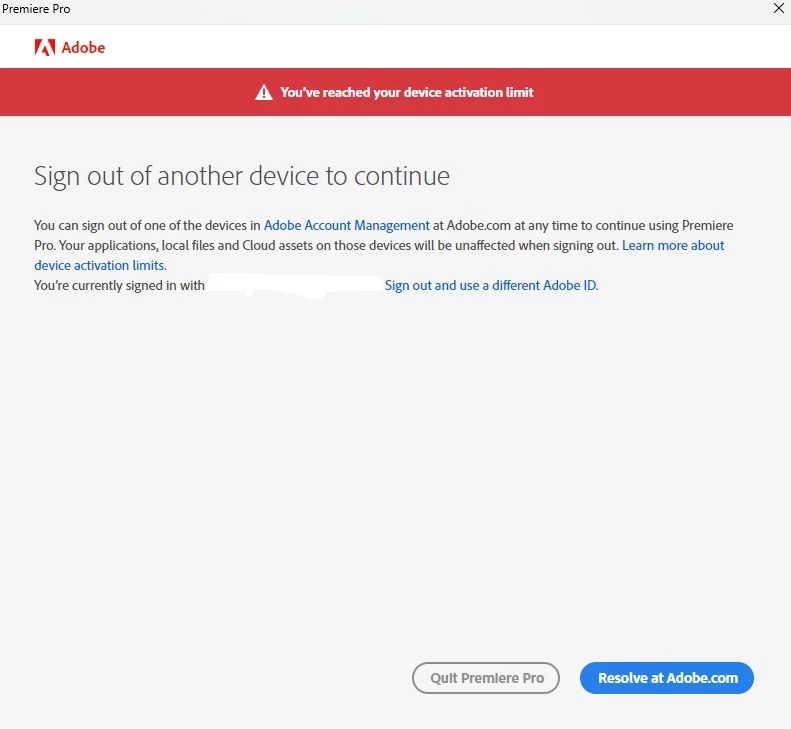
Hi, I have recently encountered an issue that when opening the Premiere app, I get an error message claiming that I have reached my device activation limit. I only have two devices activated on my account and I have double checked that many times. Also, the error window does not show which devices are activated. In the activation guide and other troubleshooting guides is visible the list of devices concerning the issue. I feel like I have tried everything I can and still the problem remains the same. Any suggestions on how to proceed? 
 

5 replies

Peru Bob
Community Expert
Community Expert
October 3, 2026

Try a different browser and make sure to allow popups.

Translate
Participant
October 3, 2026

Tried with Chrome, Edge and Firefox, similar result with each.

Translate
kglad
Community Expert
Community Expert
October 4, 2026

​@beautiful_personality1bd1 


check your account, https://account.adobe.com and verify everything is what you expect.


then, if your premiere subscriptions shows no problem, sign out of the cc desktop app


then exit the cc desktop app and reopen it.  sign in with the same adobe id/pass used to confirm your subscription.

Translate
Participant
October 3, 2026

To add, this issue only pops up with Premiere. I can use Lightroom with no issues but with Premiere this occurs every time. 

Translate
Ann Bens
Community Expert
Community Expert
October 3, 2026

Best is to contact support.

Translate