


Participant
August 29, 2025
Question

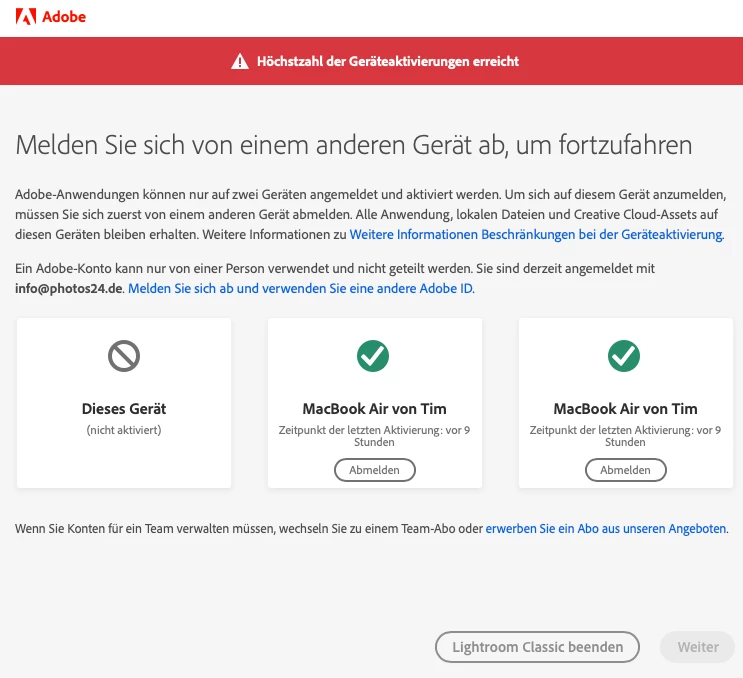
Fehlerhafte Meldung "Höchstzahl Geräteaktivierungen"
  • August 29, 2025
  • 2 replies
  • 125 views


Ich bekomme leider diese Fehlermeldung. Allerdings besitze ich nur zwei Rechner, einen Mac Mini und ein Macbook Air. Letzteres wird mir von Lightroom plötzlich doppelt als aktiviert angezeigt, was natürlich kompletter Schwachsinn ist. Daher weigert sich der Mac Mini aber leider, mich mit LR arbeiten zu lassen. Was kann ich tun?

2 replies

Sameer K
Community Manager
Community Manager
August 29, 2025

Hey, @tims78545147. You posted in the Lightroom Classic Community, but I moved your post to the Accounts community. I checked your account, and you have an active subscription. 


The first thing you can try to update the subscription & device info in Lightroom Classic is to sign out of the Creative Cloud app & sign in again.


If this does not work, try this:

  • Press CMD + OPT + T (macOS) to launch Creative Cloud Troubleshooter in the Creative Cloud app. Select 'Close Creative Cloud and related processes' > click on Go.
  • Go to Activity Monitor and force-stop any other Adobe-related processes. After all the other tasks are closed, the process called 'Adobe IPC Broker' must be closed.
  • Now use Spotlight Search & search for Keychain on macOS.
  • Clear out any certificates & signatures for Adobe. 
  • Restart the Mac. 
  • Sign in to the Creative Cloud desktop app again.

Let me know how it goes. Thanks!

Sameer K

(Type '@' and type my name to mention me when you reply)

kglad
Community Expert
Community Expert
August 29, 2025

at https://account.adobe.com sign out of all devices

enable 2fa, https://helpx.adobe.com/manage-account/using/secure-your-adobe-account.html


sign into your computer(s).