Participant
November 20, 2024
Answered

How do I cancel?

  • November 20, 2024
  • 3 replies
  • 293 views

Adobe списывает средства с моей карты, хотя я ею не пользуюсь, я хочу отменить подписку и списать средства с моей карты!

This topic has been closed for replies.
Correct answer John T Smith

Nobody here in a public forum can see your account information
Help Center https://helpx.adobe.com/support.html is a good place to start
What do you see for your account at https://account.adobe.com/
This space is provided by Adobe, but this is not Adobe support
This is a public forum, you need the link to Adobe support, not other users
Be sure to remain signed in with your Adobe ID before accessing the link below
Do be aware that wait times are sometimes long before an agent responds
.
You MUST make sure that your browser does NOT block ads, scripts, or pop-ups
You MUST also allow 'cookies' in your web browser for the link to work
This will NOT work if you are using a VPN
.
This link will go directly to the chat option
https://helpx.adobe.com/contact.html?rghtup=autoOpen
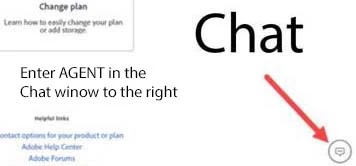
Type "Agent" in the chat box to bypass the chatbot and be connected to a person
-Meaning type in the word Agent in the lower right, without the quote " " marks
or
X (aka Twitter) tweet @AdobeCare
.
Adobe does NOT do support by email, so beware of answering anyone who sends you a private message
-click for more information about scammers https://tinyurl.com/10791730

 

3 replies

kglad
Community Expert
Community Expert
November 20, 2024

make sure you're aware of the cancellation terms by selecting your plan type (at the top of the page here), https://helpx.adobe.com/manage-account/using/creative-cloud-subscription-terms.html

for info on how to cancel your subscription, this page describes the few steps involved, https://helpx.adobe.com/manage-account/using/cancel-subscription.html

if you want to cancel but are unable to follow the steps described in the "how to cancel page", contact adobe support.

there are 2 ways to contact adobe; chat and twitter (now x):

chat:
use a browser that allows popups and cookies, and click here, https://helpx.adobe.com/contact.html?rghtup=autoOpen
in the chat field (lower right), type AGENT
be patient, it can take quite a while to reach a human.

twitter/x:
tweet @AdobeCare

p.s. if you're contacted by anyone (via email or private message), it's much more likely to be a scammer than an adobe representative.

John T Smith
Community Expert
John T SmithCommunity ExpertCorrect answer
Community Expert
November 20, 2024

Nobody here in a public forum can see your account information
Help Center https://helpx.adobe.com/support.html is a good place to start
What do you see for your account at https://account.adobe.com/
This space is provided by Adobe, but this is not Adobe support
This is a public forum, you need the link to Adobe support, not other users
Be sure to remain signed in with your Adobe ID before accessing the link below
Do be aware that wait times are sometimes long before an agent responds
.
You MUST make sure that your browser does NOT block ads, scripts, or pop-ups
You MUST also allow 'cookies' in your web browser for the link to work
This will NOT work if you are using a VPN
.
This link will go directly to the chat option
https://helpx.adobe.com/contact.html?rghtup=autoOpen
Type "Agent" in the chat box to bypass the chatbot and be connected to a person
-Meaning type in the word Agent in the lower right, without the quote " " marks
or
X (aka Twitter) tweet @AdobeCare
.
Adobe does NOT do support by email, so beware of answering anyone who sends you a private message
-click for more information about scammers https://tinyurl.com/10791730

 

Community Manager
November 20, 2024

Hi shakhboz_6792,

Welcome to the ESMB community. Upon review, I see you have an active individual subscription to Adobe Acrobat pro. 

I am moving your post to a more relevant community where experts can provide tailored assistance and help you resolve this issue effectively. Meanwhile, you can refer to this guide on canceling your Adobe plan. It offers a detailed, step-by-step process to help you cancel your subscription smoothly.


Regards,


^AN

