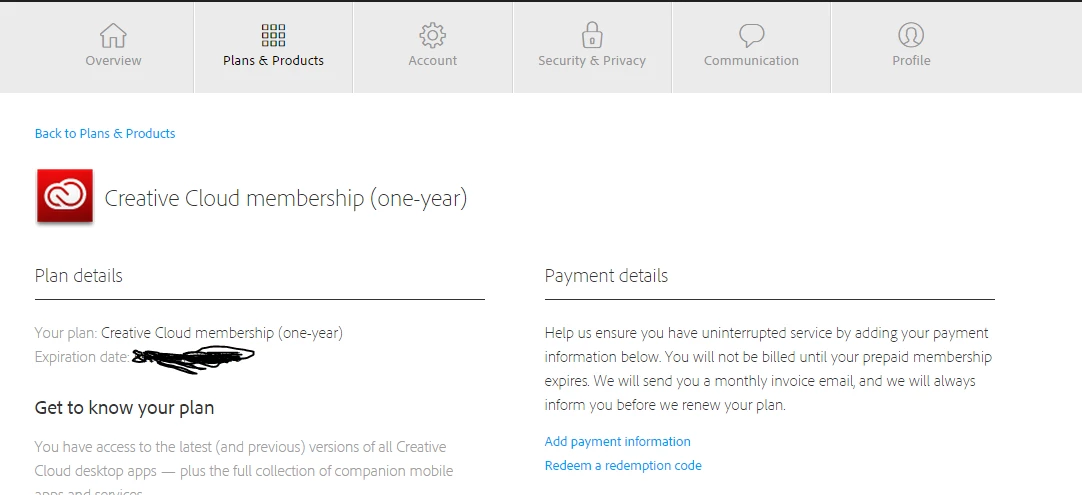
zzz22021388
Participant
October 15, 2015
Answered

how to see the expire date of Adobe creative cloud?

  • October 15, 2015
  • 9 replies
  • 145488 views

I wanna see the expire date of adobe creative cloud, Can anyone help me ?

Correct answer Anupriya Khare

Please follow the steps below.

  • Click here to access your Adobe ID account online, and sign in with your Adobe ID and password.

  • Click on manage plan. You will get the subscription expiry date.


    Hope this will resolve your issue.

    Regards,

    Anupriya Khare

9 replies

Participant
December 28, 2024

I've just tried to find out when my Adobe subscription plans expire. I couldn't find the information anywhere - it seems Adobe are purposefully hiding this information to make it harder to know when to cancel any subscriptions. I eventually found that I had to go through Adobe Support, which was painful (my question was initially answered by a chatbot, then finally got through to a human who could tell me when they were expiring). 

kglad
Community Expert
Community Expert
December 28, 2024

again, there are 2 ways to contact adobe support; chat and twitter (now x):

chat:
if you have or want to purchase a subscription, use a browser that allows popups and cookies
and click here, https://helpx.adobe.com/contact.html?rghtup=autoOpen
in the chat field (lower right), type AGENT
be patient, it can take quite a while to reach a human.

twitter/x:
tweet @AdobeCare

p.s. if you're contacted by anyone (via email or private message), it's much more likely to be a scammer than an adobe representative.

johna76645166
Participant
September 28, 2023

Old thread I know, but if you're searching this then I contacted an agent via the help button on the desktop creative cloud app.

Asked when my plan expired. they know what you're up to! They'll come to you with an offer of the improved price. I had two months left (I worked this out from the redemption fee they would have charged)

Adobe should make this easier to find, however, chatting with an agent I got a better price, 90 days free and a refund for the remaining two months difference.

TLDR - ask the agent if you have a couple of months left they'll likely make you an offer you can't refuse! 

Known Participant
August 30, 2024

Agreed - there is no "expiry date" on my page, either. It DOES say "Subscriber since..." which perhaps implies the date, but the expiry date is not shown.  These are the exact kinds of practices that are leading me to cut the cord.  (Reminder that the FTC and the DOJ sued Adobe and two execs for "Hiding fees, preventing consumers from easily cancelling software subscriptions.)
https://www.ftc.gov/news-events/news/press-releases/2024/06/ftc-takes-action-against-adobe-executives-hiding-fees-preventing-consumers-easily-cancelling

kglad
Community Expert
Community Expert
August 30, 2024

the expiration date is the same as the subscriber since date (except the year is different).

Participant
November 20, 2022

It seems like many people has same problem and adobe doesn't do anything about it, i couldn't find expirity date also, tried it on several different searching apps but it just doesn't show


kglad
Community Expert
Community Expert
November 20, 2022

@Linas27227335x7m3 ,


individual or enterprise/team subscription?

Participant
November 20, 2022
i got everything resolved by adobe customer support, there works one
wonderful human being that did everything i needed to. Ill delete my
comment.
Participant
November 24, 2021

I have the same problem. My school give me this plan for Graphic Design. Can anyone help me?

Nancy OShea
Community Expert
Community Expert
November 24, 2021

It looks like you have a Team plan from Calgary Board of Education.  Reach out to your IT dept's Team plan Administrator to find out what you have. It originates at their end.


Nancy O'Shea— Product User & Community Expert
Participant
March 11, 2018

Or by opening the Creative Cloud App, on the Apps tab, the expiration date will also show

Participant
November 9, 2017

Hi,

I am having the same issue and I did what you have mentioned there but getting the same screen like the zzz22021388 got .

Can you please let me know to find the way. The expire date on adobe licens. 

I am getting emails which telling me my license will be expired on **** this date. So I want to check it exactly. Please help.

John Waller
Community Expert
Community Expert
November 9, 2017

You have a different plan: Creative Cloud for Teams.

Ask your Team administrator for your expiry date.

Manage your teams membership

zzz22021388
Participant
October 16, 2015

hi,I did what you said, but I still couldn't see the expire date....

Anupriya Khare
Community Manager
Community Manager
October 19, 2015

Please check your personal message.

jacko85063136
Participant
June 8, 2017

I have  the same issue.  I have the Student and Teacher Edition with no expiration date displayed.  Seriously Adobe, now you are trying to scare us into putting in our phone number and credit card information for Education accounts.  Shame on you!

Rajashree Bhattacharya
Community Manager
Community Manager
October 15, 2015

Are you on Adobe CC trial ? Or is it any other product, please let us know.

Regards

Rajashree

Anupriya Khare
Community Manager
Anupriya KhareCommunity ManagerCorrect answer
Community Manager
October 15, 2015

Please follow the steps below.

  • Click here to access your Adobe ID account online, and sign in with your Adobe ID and password.

  • Click on manage plan. You will get the subscription expiry date.


    Hope this will resolve your issue.

    Regards,

    Anupriya Khare

Participant
December 2, 2021

Not true. No expiration date listed. I have an ANNUAL plan paid monthly and it only says I signed up a month ago, which is obviously false. I don't need to be told which DAY I need to be told which MONTH the plan actually expires on, ie when my entire year is up.


matthewk60211540
Participant
January 4, 2022

It's a bit of a trap and you don't know you are trapped for another year until it's to late as there is no check box to opt out at the end of your year. Then you pay dearly to get out of a plan for the next year you didn't what so you stay in and then the cycle continues. Trying to find the plan end date and giving up is part of that and the emails informing you are slipped in at the last moment... miss it and your hooked. I could say more but I choose to be kind and respectful.