

Participant
September 5, 2025
Answered

How to switch to a monthly plan?
  • September 5, 2025
  • 2 replies
  • 207 views

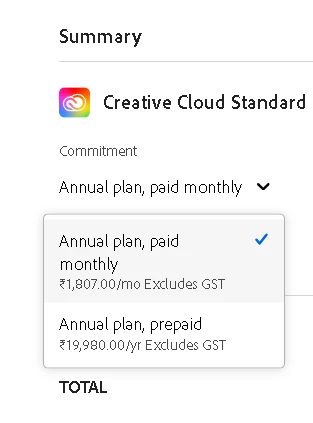
Currently on a monthly creative cloud pro plan and wanted to switch to a creative cloud standard monthly plan but it isn't allowing a monthly option?

 

Correct answer Manan Joshi

I suppose you will have to cancel the current plan and then subscribe to the new plan. The following article may help

https://helpx.adobe.com/manage-account/using/change-plan.html

-Manan

2 replies

kglad
Community Expert
Community Expert
September 5, 2025

in the future, to find the best place to post your message, use the list here, https://community.adobe.com/

p.s. i don't think the adobe website, and forums in particular, are easy to navigate, so don't spend a lot of time searching that forum list. do your best and we'll move the post (like this one has already been moved) if it helps you get responses.


<"moved from cc desktop">
Shivangi_Gupta
Community Manager
Community Manager
September 5, 2025

Hi @N38511380q4av,

Thanks for reaching out!

Upon reviewing your account details, I noticed that you currently have two active Creative Cloud Pro plans, and one of them has pending dues. To proceed with changing your plan, please cancel one of the subscriptions first.

You can refer to the following help articles for guidance:

How to cancel Adobe plan: https://adobe.ly/4mPDyIh

How to change/switch Adobe plan: https://adobe.ly/4m23eA6


Feel free to reach out if you have any further questions or need assistance.

Best regards,
Shivangi

Manan JoshiCommunity ExpertCorrect answer
Community Expert
September 5, 2025

I suppose you will have to cancel the current plan and then subscribe to the new plan. The following article may help

https://helpx.adobe.com/manage-account/using/change-plan.html

-Manan

-Manan
kglad
Community Expert
Community Expert
September 5, 2025

other than cancelling first (don't), the first post is correct.  follow the steps to manage your current plan.