
Participant
Nov 13, 2026 3:14 AM UTC
Answered

I can't install the older version of Photoshop on my desktop.

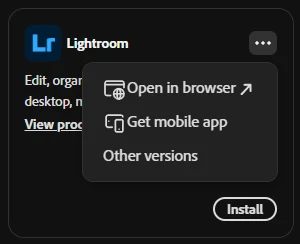
Hi everyone, I recently reinstalled my old computer, but unfortunately I can't find the option to install other versions of Photoshop in Creative Cloud. You can see the screenshot above.
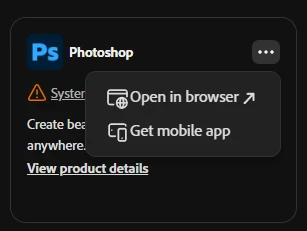
(However, Lightroom has an Install "other versions" option.)
 

Please help me, thank you.

kglad
kgladCorrect answer
Community Expert
Nov 13, 2026 1:29 PM UTC

​@寶茲17_2 


you can use the cc desktop app to install the current and one previous version of each app.  you can try the previous version of ps or check, https://helpx.adobe.com/creative-cloud/system-requirements.html

4 replies

Community Expert
Nov 13, 2026 3:18 AM UTC

This is probably due to your computer not meeting the system requirements. I see some sort of warning behind the popup. What does it say?

Translate
-Manan
Participant
Nov 13, 2026 7:11 AM UTC

Thank you for your reply. This is the "System incompatible" message I received, telling me that my computer's CPU needs to support AVX2, but my CPU is an Intel Core i5-3470, which, according to Intel's official website, only supports AVX1.

Therefore, I'm hoping there are other versions of Photoshop that can be installed on my old computer.

Translate
kglad
Community Expert
kgladCommunity ExpertCorrect answer
Community Expert
Nov 13, 2026 1:29 PM UTC

​@寶茲17_2 


you can use the cc desktop app to install the current and one previous version of each app.  you can try the previous version of ps or check, https://helpx.adobe.com/creative-cloud/system-requirements.html

Translate