
Victor van den Brink
Participating Frequently
October 25, 2022
Question

"Incorrect billing info"

  • October 25, 2022
  • 2 replies
  • 486 views

I'm trying to purchase the Substance 3D collection (annual plan), but I keep getting the same notice that I've provided the incorrect billing information. 
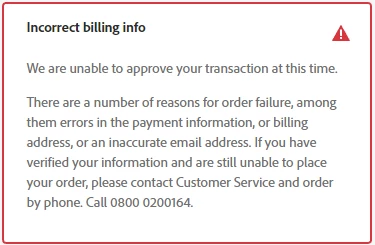


I've double, triple and quadruple checked everything multiple times, and the information adds up. I can even see on my credit card account that Adobe has tried to withdraw credit, but the transaction won't go through. 

I've also contacted my bank, and payed from a book online, so I know its not my credit card. 

This is unacceptable for a company as Adobe. Proffesionals are supposed to rely on you and you can't even manage simple payment options. I even tried making a paypal account which I've never used, and I get the exact same error. 

This topic has been closed for replies.

2 replies

John T Smith
Community Expert
Community Expert
October 25, 2022

I suggest that you contact support for a review of your information


Be sure to remain signed in with your Adobe ID before accessing the link below
Do be aware that Adobe's staffing is impacted by the virus, so wait times are long
-you MUST make sure that your browser does NOT block ads, scripts, or pop-ups
-you MUST also allow 'cookies' in your web browser for the link to work
This link will go directly to the chat option
Type "Agent" in the chat box to bypass the chatbot and be connected to a person
-Meaning type in the word Agent without the quote " " marks
https://helpx.adobe.com/contact.html?rghtup=autoOpen
- or by telephone https://helpx.adobe.com/contact/phone.html
.
Adobe does NOT do support by email, so beware of answering anyone who sends you a private message
-click for more information about scammers https://tinyurl.com/10791730

Victor van den Brink
Participating Frequently
October 25, 2022

There's no popup with a chat. Yes I've enabeled cookies and popup's before you ask.

kglad
Community Expert
Community Expert
October 25, 2022

use phone or twitter 


phone -https://helpx.adobe.com/contact/phone.html

twitter - tweet @AdobeCare

p.p.p.s. if you're contacted by anyone (via email or private message), it's much more likely to be a scammer than an adobe representative. ie, double check for an employee badge if contacted in the forums and look for an adobe.com domain in the email address if you click reply to an email. then check again and be very suspicious. any other method of contacting (or offering to contact you) is almost certainly a scam, https://community.adobe.com/t5/using-the-community-discussions/staying-safe-in-the-adobe-support-community/td-p/12919684/redirect_from_archived_page/true

Peru Bob
Community Expert
Community Expert
October 25, 2022

Are you using PayPal?

Victor van den Brink
Participating Frequently
October 25, 2022
I tried paying with my credit card first, which worked in the past. But
when I kept getting the notice I made a Paypal account and tried that. But
it didn't work either.

--

GAME ARTIST