


Participant
February 18, 2024
Answered

Issue in changing the location

  • February 18, 2024
  • 2 replies
  • 180 views

Dear Team,
I would like to bring to your attention that our company is registered in Malta, but due to my current location in Austria, our address was incorrectly registered as being in Austria. Given that our company and its bank account are both located in Malta, we require your assistance in updating our region from Austria to Malta.

I need to change our VAT number and it does not allow for changing the location.
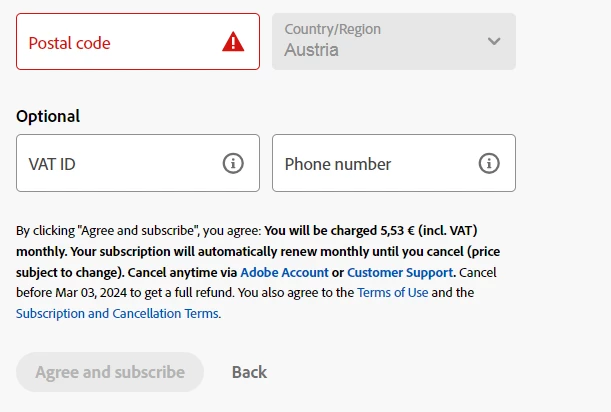
Thank you

This topic has been closed for replies.
Correct answer droopydog500

This is a community forum for discussing the products, features, bug requests and new feature requests. For issues involving your account, please go to Adobe Customer Service (make sure to sign in to your Adobe account first and allow popups and cookies on your browser. You may not be able to see the chat window if using a VPN.):
https://helpx.adobe.com/contact.html?rghtup=autoOpen will automatically open the chat window.
Type "Agent" in the chat box to bypass the chatbot and be connected to a person.

You may also be able to contact Adobe by phone:
https://helpx.adobe.com/contact/phone.html

or Twitter:
https://twitter.com/AdobeCare

2 replies

kglad
Community Expert
Community Expert
February 20, 2024

The country associated with your adobe id must match the store you purchase from and must match the payment address. otherwise, change what's necessary:


change country associated with adobe id - https://helpx.adobe.com/x-productkb/policy-pricing/change-country-associated-with-adobe-id.html


change credit card and/or billing address, https://helpx.adobe.com/manage-account/using/update-billing-information.html


change currency - https://forums.adobe.com/thread/1999694


change store - http://www.adobe.com/store_selector/storeselector.html


change adobe.com website language - https://forums.adobe.com/thread/1999693

droopydog500
Community Manager
droopydog500Community ManagerCorrect answer
Community Manager
February 18, 2024

This is a community forum for discussing the products, features, bug requests and new feature requests. For issues involving your account, please go to Adobe Customer Service (make sure to sign in to your Adobe account first and allow popups and cookies on your browser. You may not be able to see the chat window if using a VPN.):
https://helpx.adobe.com/contact.html?rghtup=autoOpen will automatically open the chat window.
Type "Agent" in the chat box to bypass the chatbot and be connected to a person.

You may also be able to contact Adobe by phone:
https://helpx.adobe.com/contact/phone.html

or Twitter:
https://twitter.com/AdobeCare

Adobe Community Expert (not an Adobe employee)