iD2comm
Known Participant
April 13, 2021
Answered

setting up 2-factor authentication

  • April 13, 2021
  • 2 replies
  • 1614 views

I want to change my 2-factor authentication to using ADOBE's authenticator app ... I downloaded the app ... the only option I'm presented with after launching the app is to "scan code" ... which code? where do I get a QR code?


Thank you, Stephan
This topic has been closed for replies.
Correct answer thatsmauri

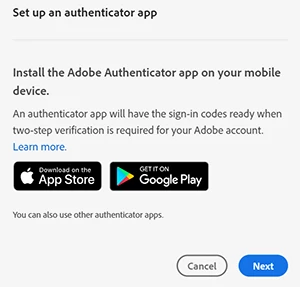
By pop-up, you mean this one, right?


Have you clicked on Next after downloading the app?

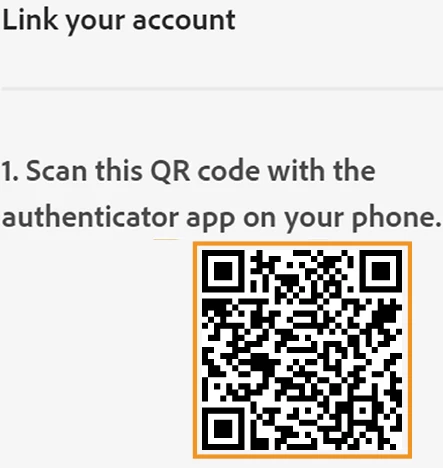
If you have signed in to your Adobe account from a computer, you will get this window with a QR code:


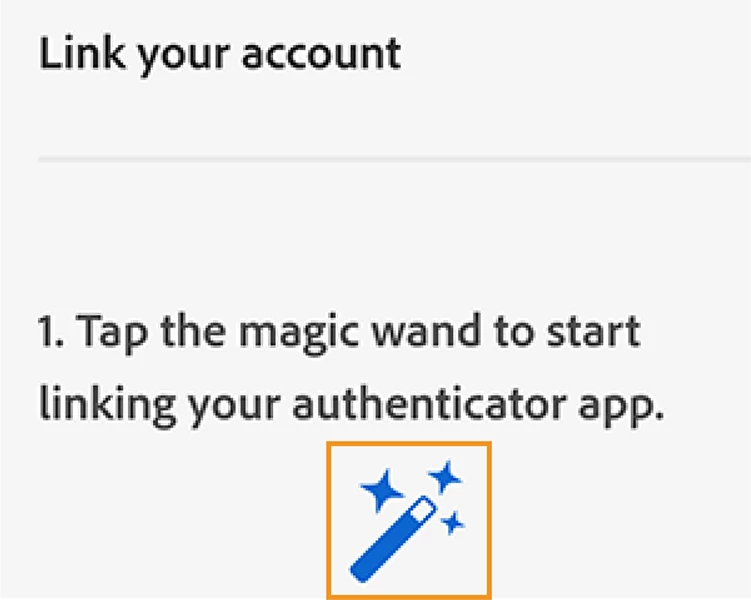
If you have signed in to your Adobe account from your mobile phone, you will get this instead:


(This may be a shot in the dark, but... if you use any script-blocking plug-ins in your browser, try deactivating it or set an exclude exeption for adobe.com)


Kind Regards, Maurice

2 replies

Participant
June 21, 2022

Please disable2-factor authentication

thatsmauri
Community Expert
Community Expert
April 13, 2021

Please check the following Help entry below - it will explain everything:

iD2comm
iD2commAuthor
Known Participant
April 13, 2021
That’s what I did - I read the article you refer to before posting. I click "set-up” which brings up a pop-up to download the “adobe Account Access app” sometimes all referred to as the “Adobe Authenticator” launching the app on my phone gives me one lonely option “scan code” which brings me back to my post: Which code? Where do I get the code?

Thank you, Stephan