Participating Frequently
Jun 20, 2021 7:25 PM UTC
Question

''Something went wrong'' when trying to update payment information

I'm getting a Payment error when trying to pay for my creative cloud subscription

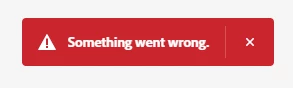
When clicking ''Update payment'' all im getting is a something went wrong popup at the right lower corner of my screen

3 replies

John T Smith
Community Expert
Community Expert
Jun 20, 2021 9:08 PM UTC

This is a public forum, you need the link to Adobe support, not other users
Be sure to remain signed in with your Adobe ID before accessing the link
Do be aware that Adobe's staffing is impacted by the virus, so wait times are long
-make sure that your browser does NOT block ads, scripts, or pop-ups
-you must also allow 'cookies' in your web browser for the link to work
This link will go directly to the chat option
Type "Agent" in the chat box to bypass the chatbot and be connected to a person
-Meaning type in the word Agent without the quote " " marks
https://helpx.adobe.com/contact.html?rghtup=autoOpen
- or https://helpx.adobe.com/contact/phone.html
.
Also: beware of answering anyone who sends you a private message
-click for more information about scammers https://tinyurl.com/10791730

Translate
Participating Frequently
Jun 20, 2021 11:45 PM UTC

Hello! thanks for your reply


It fixed itself, I dont know how!


Thanks

Translate
Participating Frequently
Jun 20, 2021 7:34 PM UTC

I managed to get the update billing info, im getting this message


Translate