


Participating Frequently
July 22, 2026
Question

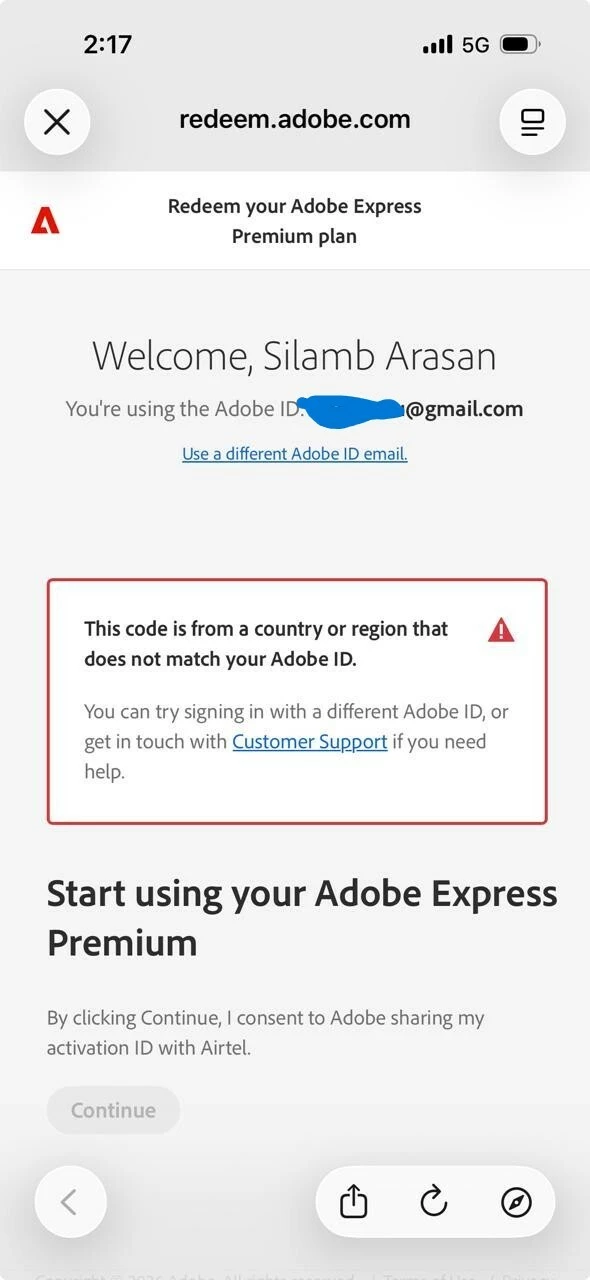
This code is from a country or region that does not match your Adobe ID

  • July 22, 2026
  • 18 replies
  • 84 views

I am trying to redeem the 12-month free Adobe subscription through the Airtel offer.

My Adobe ID was originally created while I was on a short trip to London, so it appears that my account region was set to the UK. I have since returned to India, and I am an Indian resident.

When I try to claim the Airtel offer using this Adobe ID, I receive the following error:

"This code is from a country or region that does not match your Adobe ID."

Has anyone faced this issue before? Is there a way to change my Adobe ID's country/region or otherwise resolve this so I can redeem the Airtel offer? Any guidance would be greatly appreciated.

 

18 replies

ShivangiGupta
Community Manager
Community Manager
July 24, 2026

Hi@Silambarasan+Mohan,

Could you confirm where did you purchase the redemption code from? Did you speak with the support team?


Let us know.


^Shivangi

^Shivangi
Participating Frequently
July 25, 2026

I got this offer from Airtel as a partner. Airtel is telecom company, they asked me to deal this with adobe as this is my profile hold with adobe where they should change the country.

Adobe only can change region in their end. But adobe asking me payment to do this country change. I got one year free offer from Airtel which i could not claim due to this issue.

kglad
Community Expert
Community Expert
July 22, 2026

The country associated with your adobe id must match the store you purchase from and must match the payment address. otherwise, change what's necessary:


change your country on adobe.com, https://www.adobe.com/international/selector/


change country associated with adobe id - https://helpx.adobe.com/x-productkb/policy-pricing/change-country-associated-with-adobe-id.html


change credit card and/or billing address, https://helpx.adobe.com/manage-account/using/update-billing-information.html


change currency - https://forums.adobe.com/thread/1999694


change store - http://www.adobe.com/store_selector/storeselector.html


change adobe.com website language - https://forums.adobe.com/thread/1999693


change age - https://helpx.adobe.com/nz/creative-cloud/kb/you-eligible-cc.html

Participating Frequently
July 23, 2026

Thanks for reply.

I tried the given option to change the region. Even after changing region, i am facing same problem.

I have tried updated the region using this link - https://www.adobe.com/international/selector/

It is quite disappointing to use adobe due to this.


kglad
Community Expert
Community Expert
July 23, 2026

try using a mobile phone's updated non-opera browser with wifi disabled.