
Participant
October 21, 2022
Answered

Unable to update address

  • October 21, 2022
  • 1 reply
  • 242 views

Hi,

I need to update our adress on our account. I have followed the guide but under Edit payment method, where the billing adress should be, but in my form I cant see Billing adress, just First and Last name, Postal code and Country.
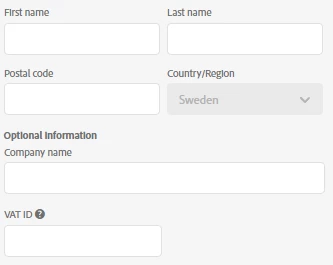
 

Payment day is the 16th so that shouldn't be the problem?

I hope some one can help me 🙂

/Anne


This topic has been closed for replies.
Correct answer Manan Joshi

Hi @familjehemsbanken,

In such a case only Adobe support would be able to guide you. To contact support follow the instructions given below
1. Go to https://helpx.adobe.com/contact.html?rghtup=autoOpen
2. Wait a bit on the page that opens up, it should automatically open a chat popup. If that does not happen then look for a call out/chat icon at the bottom right, click over it and the chat popup should open
3. In order to talk to a human type "AGENT" in the chat box
4. If you are not able to get to the chat window, then disable your adblockers, firewall, enable cookies/scripts on your browser. If it still fails then change your browser/machine/network.

P.S. Be mindful of answering anyone who sends you a private message. See the following for more information about scammers
https://tinyurl.com/y7cfrr7y
-Manan

1 reply

Manan JoshiCommunity ExpertCorrect answer
Community Expert
October 21, 2022

Hi @familjehemsbanken,

In such a case only Adobe support would be able to guide you. To contact support follow the instructions given below
1. Go to https://helpx.adobe.com/contact.html?rghtup=autoOpen
2. Wait a bit on the page that opens up, it should automatically open a chat popup. If that does not happen then look for a call out/chat icon at the bottom right, click over it and the chat popup should open
3. In order to talk to a human type "AGENT" in the chat box
4. If you are not able to get to the chat window, then disable your adblockers, firewall, enable cookies/scripts on your browser. If it still fails then change your browser/machine/network.

P.S. Be mindful of answering anyone who sends you a private message. See the following for more information about scammers
https://tinyurl.com/y7cfrr7y
-Manan

-Manan
Participant
October 21, 2022

Thank you for your answer!

I have now got the help i needed 🙂

/ Anne