


When I open the application it says I need to renew, but my membership is active.
About a month ago, I suddenly was unable to use Lightroom on my Desktop computer. When I opened the application, it said my subscription had ended and I needed to renew. However, when I would click that error message and confirm my renewal, it gave me an error message saying I already have an active 1TB Lightroom membership. I immediately reached out to Adobe support, where they confirmed that I had 2 active Adobe subscriptions? They said they would cancel them, renew me, and that would fix the issue. It did not. I got a charge on my account about a week later, which prompted me to reach out to support again, because I was still getting a renewal error message and still unable to use lightroom. They transferred me to 3 different people before the last person said he was going to have a representative call me.
I got that phone call on Saturday and was told that he would have a 'higher up" respond to me to fix the issue, but I never got a return phone call, and Wednesday night I got an email saying my customer care case was closed.
When I look at my adobe account it says I have an active free trial, that began in April of 2025, which yes, I had a 1-week-trial, but I have been paying for it right along and that free trial is no longer active, but it's still saying it's active on my account. When I try and cancel this free trial, it loads for a long time and gives me an error message. My account also says I am only allowed 100G of cloud storage instead of the 1TB I am paying for. Please, someone help!! 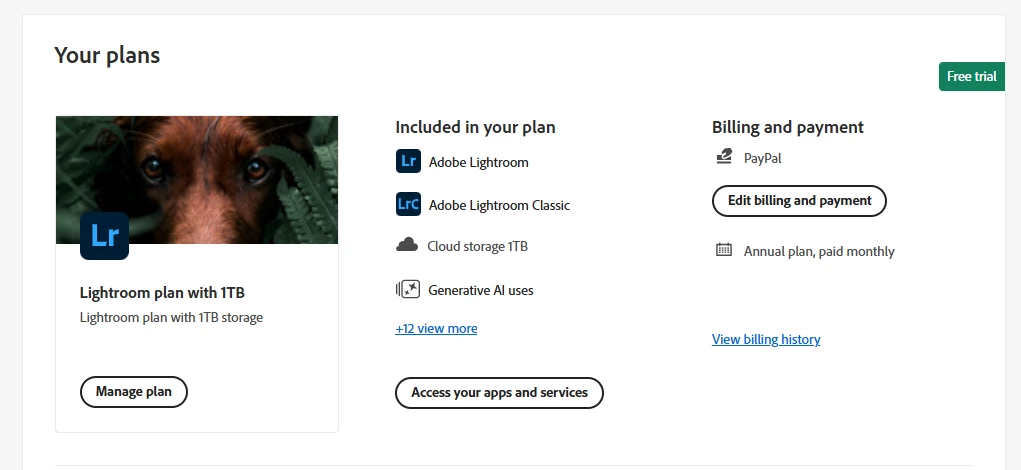
 AdChoices