Sara Rahman
Participant
March 18, 2026
Answered

Why am I being charged by Adobe?

  • March 18, 2026
  • 3 replies
  • 220 views

Hi , I have the same problem as Karin. And I see i have been charged. I am confused and I could not find a customer help to ask .,

Can you please help me as well

Thanks

    This topic has been closed for replies.
    Correct answer Dave Creamer of IDEAS

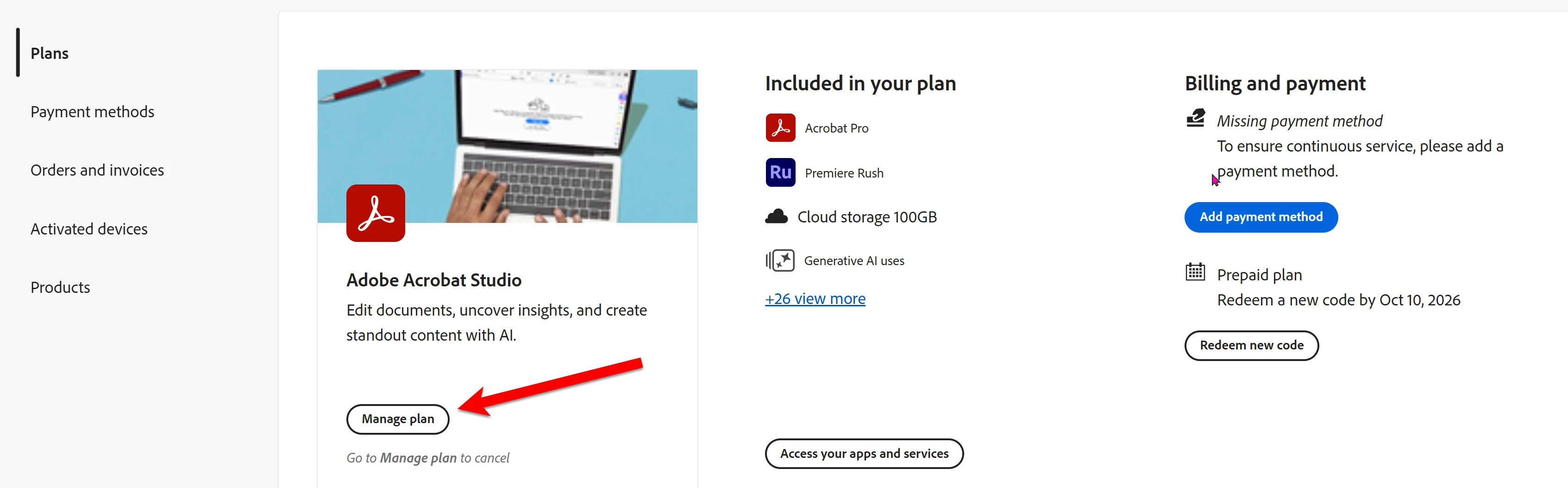
    When you went to your account, you would see any plans you are currently subscribed to. Look for the Manage Plan button:

    From there, you will see a cancel option. Keep in mind that if you did a trial, you agreed to subscribe after the trial has ended when you signed up. 

    You generally don’t get a refund for the time left, so if your subscription renews April 15, then your subscription would end then. . 

    3 replies

    AishaNaeem
    Participant
    March 18, 2026

    Hi 

    I cancelled my subcription and was refunded. there were no subcriptions. suddenly i got charged again in march. i had cancelled in february and ecen got email. i think i was even refunded for feb and charged again for march now. HELP ME THERE IS NO EMAIL AND THE PROCESS IS SO COMPLEX. ITS MY HARD EARNED MONEY

    Peru Bob
    Community Expert
    Community Expert
    March 18, 2026

    Does it show an active account, or does it show that it was canceled?

    Sara Rahman
    Participant
    March 18, 2026

    I had the same as Karin , as when I cansceled the email was like AI assisstant cancelatiin i did not realised. Now I canceled the hole plan again. Cause I did not want to be charged as I just needed that for a short time.

    Peru Bob
    Community Expert
    Community Expert
    March 18, 2026

    @Sara Rahman 

    Check your account:

    https://account.adobe.com/

    Sara Rahman
    Participant
    March 18, 2026

    Hi , I did checked it, i don't know what you mean . I don't see anything about i would get a refund or not. As i have the invoice of  about 29.90 £

    Dave Creamer of IDEAS
    Community Expert
    Dave Creamer of IDEASCommunity ExpertCorrect answer
    Community Expert
    March 18, 2026

    When you went to your account, you would see any plans you are currently subscribed to. Look for the Manage Plan button:

    From there, you will see a cancel option. Keep in mind that if you did a trial, you agreed to subscribe after the trial has ended when you signed up. 

    You generally don’t get a refund for the time left, so if your subscription renews April 15, then your subscription would end then. . 

    David Creamer: Community Expert (ACI and ACE 1995-2023)