


Sep 14, 2026 9:38 AM UTC
Answered

Why am I being charged by Adobe Saggart in Dublin

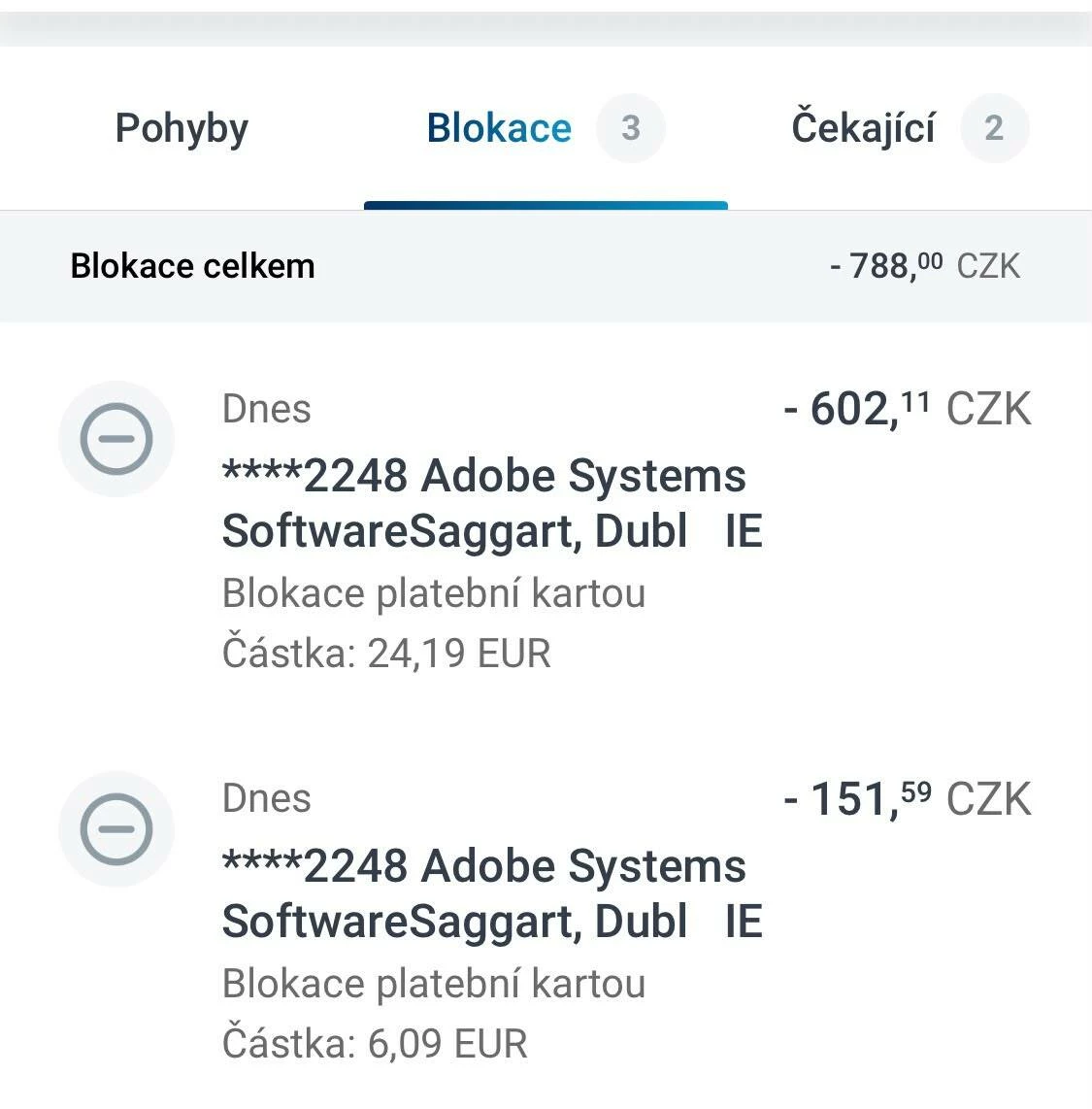
I have just experienced the same issue today. Two unauthorized payment attempts appeared on my bank card from “Adobe Systems SoftwareSaggart, Dublin, IE” – EUR 24.19 and EUR 6.09.

I did not make or authorize either of these payments, and I have no knowledge of any Adobe subscription corresponding to these charges. The transactions are currently only blocked/pending by my bank and have not yet been posted. I have already blocked my payment card because I suspect fraudulent use.

This is extremely concerning, especially considering that multiple other users are reporting very similar unauthorized charges in this thread.

Adobe, please investigate this urgently and confirm whether these payment attempts originated from Adobe and what account or subscription they are supposedly associated with. I also ask Adobe to ensure that no further payment attempts are made against my card.

I have not provided any personal or card details in this public forum, but I can provide the necessary information privately to Adobe Support.

If other users are experiencing the same issue, please report it here as well. There appear to be multiple cases of unexplained Adobe payment attempts.

 

    Jeff_A_Wright
    Jeff_A_WrightCorrect answer
    Community Manager
    Sep 14, 2026 11:13 AM UTC

    Thank you for posting, ​@Zamig.


    I understand how concerning it can be to see unexpected payment attempts on your card when you do not recognize the charges.


    I reviewed the account associated with your community profile and don't see any active Adobe subscriptions.


    The description "Adobe Systems Software Saggart, Dublin, IE" is associated with Adobe billing transactions, but if you do not recognize the charges, please review the following document, which covers the most common causes of unexpected Adobe charges and the steps you can take to identify them:

    https://helpx.adobe.com/manage-account/kb/unknown-charge-on-billing-statement.html


    Please update this public discussion if you have any questions, ​@Zamig.

    4 replies

    Participant
    Oct 22, 2026 12:02 AM UTC

    Hi - I needed Adobe briefly, so subscribed. When my project finished, I cancelled. However, as mentioned by others, continued to be billed for an AI creative option that I did not need / want or authorise (from Adobe Saggart, Dubl Ie). Not impressed as monies are currently tight.

    Translate
    Community Expert
    Oct 22, 2026 2:55 AM UTC

    Check your account to what you are subscribed to and cancel whatever you don’t need. Unless you cancel it you will keep on getting charged https://account.adobe.com/plans

    Also, if you cancel within 14 days of initial purchase you will get a full refund.

    https://helpx.adobe.com/account/individual/terms-policies-and-regulations/adobe-subscription-terms.html

    Translate
    -Manan
    Jeff_A_Wright
    Community Manager
    Jeff_A_WrightCommunity ManagerCorrect answer
    Community Manager
    Sep 14, 2026 11:13 AM UTC

    Thank you for posting, ​@Zamig.


    I understand how concerning it can be to see unexpected payment attempts on your card when you do not recognize the charges.


    I reviewed the account associated with your community profile and don't see any active Adobe subscriptions.


    The description "Adobe Systems Software Saggart, Dublin, IE" is associated with Adobe billing transactions, but if you do not recognize the charges, please review the following document, which covers the most common causes of unexpected Adobe charges and the steps you can take to identify them:

    https://helpx.adobe.com/manage-account/kb/unknown-charge-on-billing-statement.html


    Please update this public discussion if you have any questions, ​@Zamig.

    Translate
    Community Expert
    Sep 14, 2026 11:11 AM UTC

    Check your account to see the subscriptions you have https://account.adobe.com/plans

    To know details about a charge look at https://helpx.adobe.com/account/individual/billing-and-payments/payment-and-billing-issues/unknown-charge-on-bill.html

    If this is indeed a fraudulent transaction then the first thing I would advice is to block the card by contacting the bank

    Translate
    -Manan