

Participant
October 14, 2024
Question

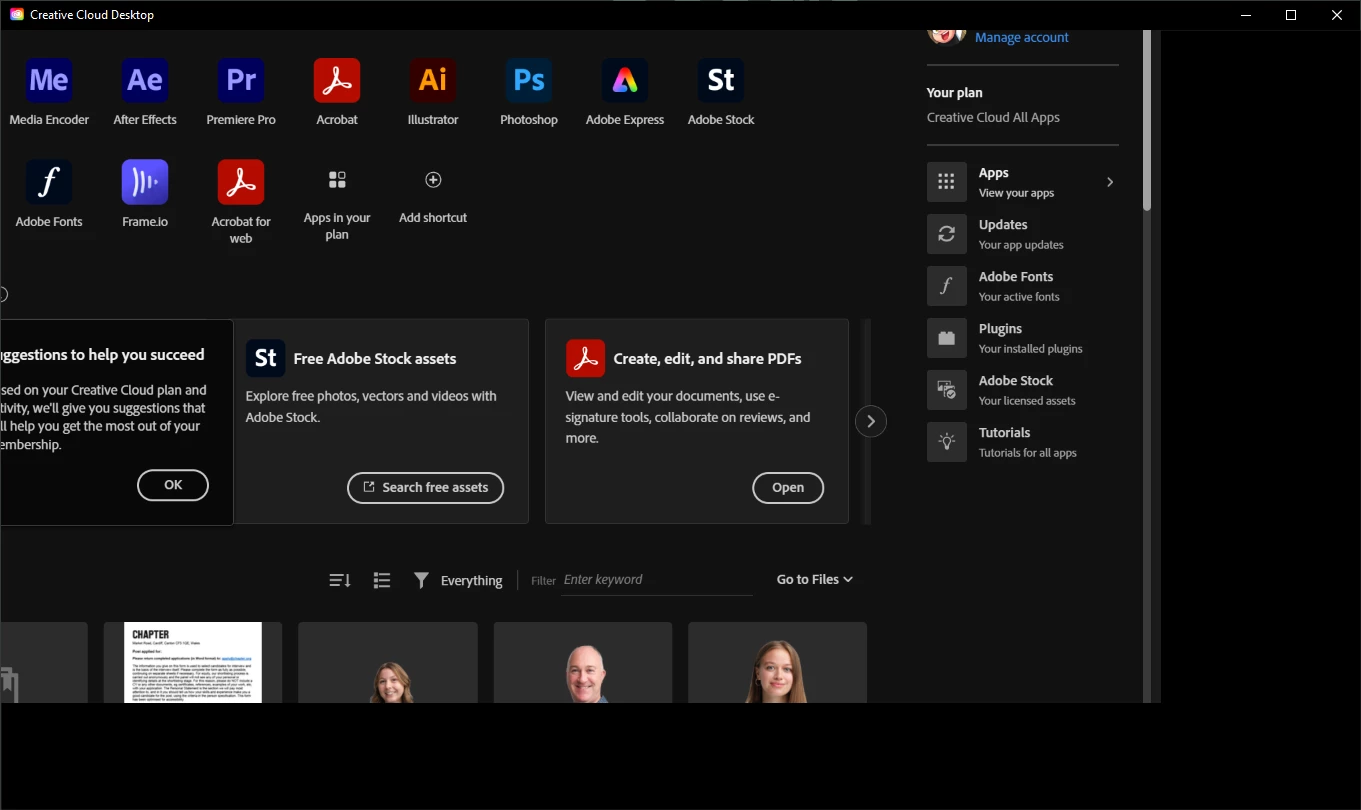
CC App is wonky
  • October 14, 2024
  • 3 replies
  • 296 views


My CC App looks like the above, it also means that the mouse is out of calibration.

 

This topic has been closed for replies.

3 replies

Ruchika Wadhawan
Adobe Employee
Adobe Employee
November 20, 2024

@annieroyal Kindly help us with the log files so we can investigate this at the earliest.


Regards,

Ruchika Wadhawan

Ruchika Wadhawan
Adobe Employee
Adobe Employee
November 12, 2024

Hi @annieroyal , Could you please collect and share the Creative cloud logs using log collector tool. Additionally, kindly also share a screenshot of the display settings of your machine.


Regards,

Ruchika Wadhawan

kglad
Community Expert
Community Expert
October 14, 2024

reset the cc desktop app by making sure it's in the foreground, then press:

Win: Ctrl + Alt + R
Mac: Cmd + Opt + R


Participant
October 18, 2024

Thanks, it didn't do anything though 🙂

kglad
Community Expert
Community Expert
October 18, 2024

are your display settings at 100%?

have your updated your graphics card drivers?