
Creative Cloud Desktop has black borders and won't respond to mouse clicks.
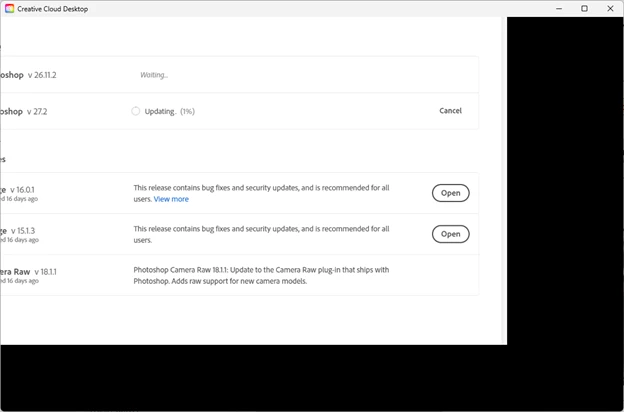
When I start Creative Cloud Desktop, the right side and bottom side have an area of black -- it's blank.
The rest of the content for this application is shifted to the left and up. An example is below.
In the image below, it looks like I cropped out a portion of the window on the left. But I assure you, it's not there.
I can't left-mouse click on items in Creative Cloud Desktop. I can use keyboard shortcuts like ( Tab, left/right cursor key, Enter ) to navigate the interface. I can have it update an application, for example.
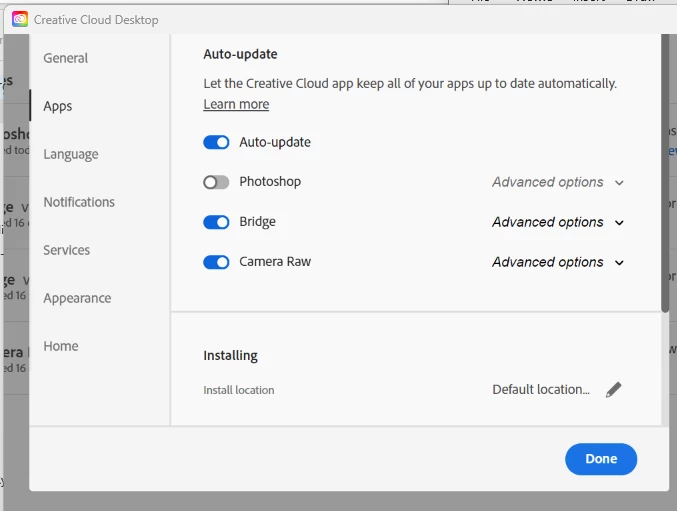
Auto-update is turned on, so I don't think I am out of date:
I am on Windows 11 Pro, Version 24H2 (OS Build 26.100.3775).
I have 208GB free on my C: drive. Photoshop runs fine for me.
I would like this application to work better for me. I'm not sure why this offset looks wrong.
This has problem has been occurring for weeks (not sure when it started).


 AdChoices