


violentchalupa
Participating Frequently
January 23, 2019
Question

Creative Cloud Draining Battery like Crazy

  • January 23, 2019
  • 1 reply
  • 17708 views

I just discovered today that my creative cloud is significantly draining my battery life.  Can someone please help me with tips to combat this problem?  I have a MacBook Pro 2014 13 inch.  Apple told me that the best they thought I could do was 'pause file syncing' unless I completely uninstall the application.  Can I download Photoshop, Lightroom, Premiere, and InDesign without the cloud?
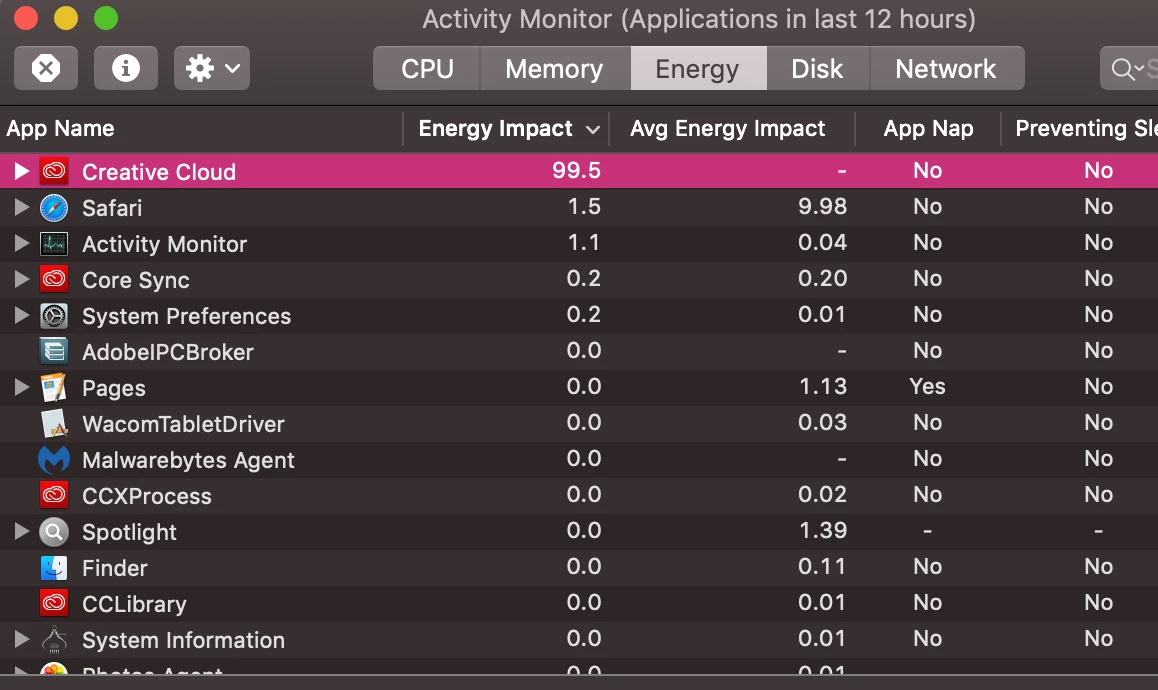
This topic has been closed for replies.

1 reply

kglad
Community Expert
Community Expert
January 23, 2019

disable file and font sync'g and retest.

Participant
January 4, 2020

I have the same problem. How do I disable file and font sync'g? Thanks.

silk-m
Community Expert
Community Expert
January 4, 2020

Hi,

In my case it is a Mac, so the location of the file may be slightly different.


1. Pause Syncing.

2. On the Activity Monitor, Quit Core Sync.


3. Delete the CoreSync folder.
/ Users / User Name / Library / Application Support / Adobe / CoreSync


4. Delete the cache_config.xml.

/ Users / User Name / Library / Preferences / Adobe / CoreSync / cache_config.xml


5. Restart PC and Resume Syncing.
This solved the problem.

--Susumu Iwasaki