


Participant
February 21, 2025
Answered

Creative Cloud Error Symbol

  • February 21, 2025
  • 2 replies
  • 399 views

 My Adobe Creative Cloud App is showing with this red triangle symbol. I assume there is an error that needs resolving. When I open the app, ther is also an arrow symbol on the cloud icon (see below).
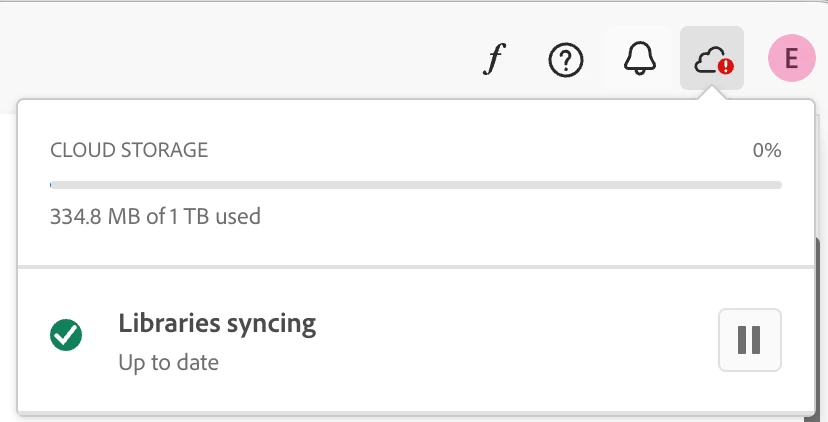
 

But there doesnt appear to have any explanation of what the error is and how to fix it!


Can anyone help?

Correct answer kglad

reset the cc desktop app by making sure it's in the foreground, then press:

Win: Ctrl + Alt + R
Mac: Cmd + Opt + R


2 replies

kglad
Community Expert
Community Expert
February 21, 2025

reset your cc app

Participant
February 21, 2025

Would you be able to share more on how to reset? Ive closed the app and reopened and thats not done anything!

kglad
Community Expert
kgladCommunity ExpertCorrect answer
Community Expert
February 21, 2025

reset the cc desktop app by making sure it's in the foreground, then press:

Win: Ctrl + Alt + R
Mac: Cmd + Opt + R


kglad
Community Expert
Community Expert
February 21, 2025

in the future, to find the best place to post your message, use the list here, https://community.adobe.com/

p.s. i don't think the adobe website, and forums in particular, are easy to navigate, so don't spend a lot of time searching that forum list. do your best and we'll move the post (like this one has already been moved) if it helps you get responses.


<"moved from using the community bugs">