


Participant
December 13, 2023
Question

Creative Cloud Files appear as Cloud Storage in Finder

  • December 13, 2023
  • 2 replies
  • 448 views

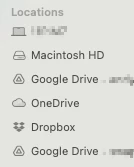
How can Creative Cloud Files appear to be the Cloud Storage in macOS Finder?
Other cloud services seem to show as Cloud Storage but not Creative Cloud Files folder. 

For the record, I have also set the CC folder to sit in Users/me/Library/CloudStorage


This topic has been closed for replies.

2 replies

Kalvyn Rasquinha
Community Manager
Community Manager
December 13, 2023

Hi @andychin , we will be discontinuing Creative Cloud synced files next year. You can get more details here: https://helpx.adobe.com/creative-cloud/kb/eol-creative-cloud-synced-files.html

kglad
Community Expert
Community Expert
December 13, 2023

only adobe's cc sync folder is local and therefore should appear in finder.

andychinAuthor
Participant
December 13, 2023

No, you don't get it. 

CC Sync Folder, yes, it definitely appears in Finder. But not as Cloud Storage. 


kglad
Community Expert
Community Expert
December 13, 2023

are you asking other users why adobe cc works the way it does, or you asking something else?
