

didiermazier
Community Expert
Community Expert
February 5, 2026
Question

Creative cloud strange behavior on mac

  • February 5, 2026
  • 2 replies
  • 44 views

Hi y’all,

I noticed that my cloud app is constantly sending and receiving data even with no Adobe app running.

Does it means there is some data sending/receiving?

Also the Adobe apps are very slow and it even affect third parties app.

I did all uninstalling, cleaning and reinstalling with no better situation.

Also I cut of auto notifications and updates with no results.

here is my config
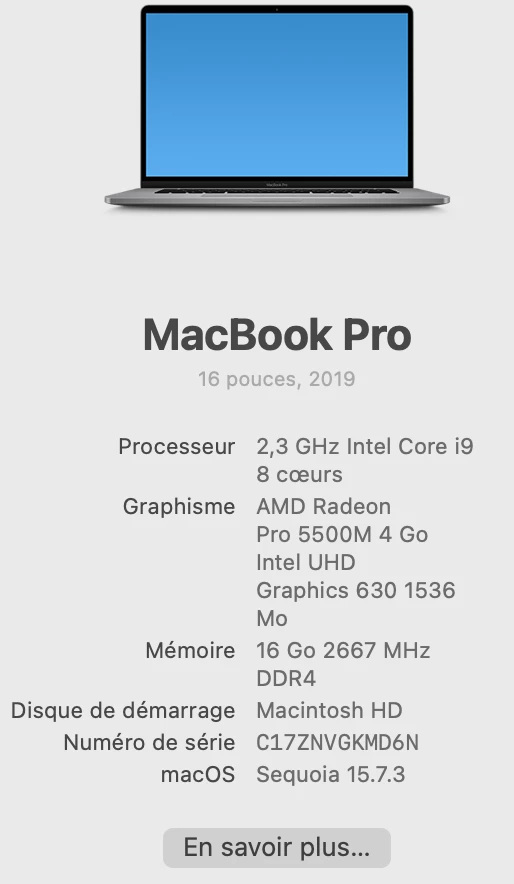
Old but still working…

Will I be required to install Tahoe??

Thanks for advices

Best

Didier


2 replies

leo.r
Community Expert
Community Expert
February 7, 2026

Also the Adobe apps are very slow and it even affect third parties app.


From my experience, 16 GB is simply not enough to use Adobe products efficiently (as well as other software), especially on an Intel Mac. I realized it years ago. With 16 GB, everything will continue to be slow, unfortunately.


I remember what difference it made when I updated my iMac 2017 from 16 GB to 24, and then to 40. It was a different world.

didiermazier
Community Expert
Community Expert
February 9, 2026

You are right. All apps now need more memory… I will probably get a Mac mini. With 48 ram and 2 To disk, the total is around 3K… Downgrading to 32 Go save 1K with M4 not pro…

They always find a new way to make tou break the bank…

;-)

kglad
Community Expert
Community Expert
February 5, 2026

that occurs with file syncing.

didiermazier
Community Expert
Community Expert
February 6, 2026

Yes you are right, but it never stops though I have all my files on the computer and not on the CC…

kglad
Community Expert
Community Expert
February 6, 2026

make sure there’s nothing adobe could be trying to sync.use a web browser to navigate to the following locations. at each location there are several folders to check.:


https://assets.adobe.com

https://lightroom.adobe.com

https://documentcloud.adobe.com

https://spark.adobe.com


if you delete anything from any of these locations, check for a deleted folder where your file(s) was (were) moved. if you want to clear space you must delete files in the deleted folder.


if there are no files in any of those locations, then something other than syncing is causing the problem.